System Design Phase 1 — Part 10: Security Basics
📚 Table of Contents
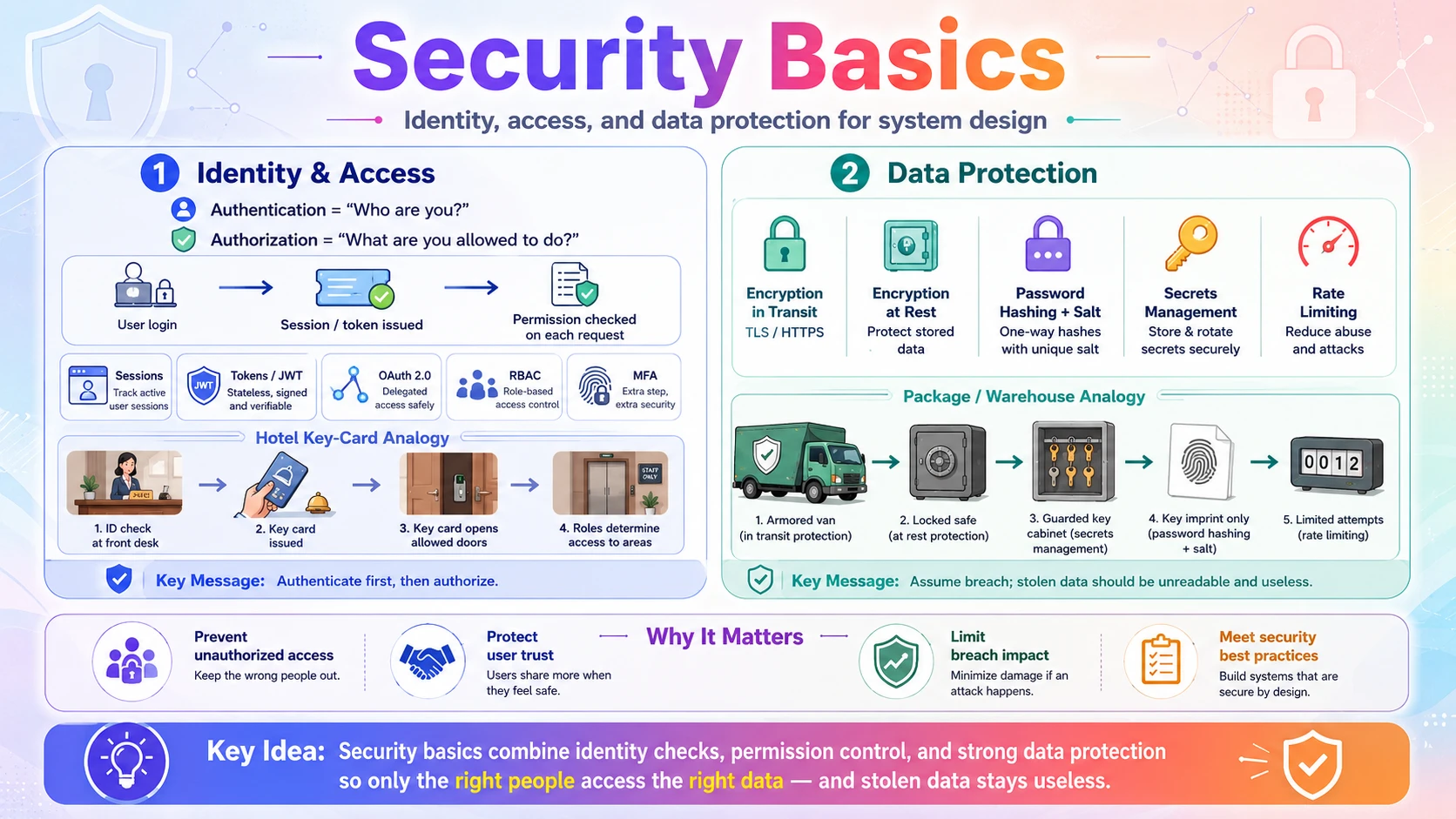
A system can be fast, scalable, and always up — and still be a disaster if it lets the wrong person in or leaks its users' data. Security is the discipline of making sure only the right people can do the right things, and that data stays private and intact even if attackers get their hands on it. This post covers two foundations. You will start with Identity & Access — proving who a user is (authentication) and controlling what they're allowed to do (authorization), including sessions vs tokens, JWT, OAuth 2.0, role-based access, and multi-factor authentication. Then you will learn about Data Protection — keeping data safe with encryption in transit and at rest, proper password hashing, secrets management, and rate limiting to blunt abuse. Each topic is explained with real-world analogies, step-by-step examples, and clear diagrams — starting from zero.
🔑 1. Identity & Access
Every secure system answers two questions on every request: who are you? and what are you allowed to do? The first is authentication, the second is authorization. In this section you will learn the difference between them, how a server remembers a logged-in user with sessions or tokens (and what a JWT actually is), how OAuth 2.0 lets you "Sign in with Google" without sharing your password, how role-based access control decides permissions, and why multi-factor authentication and least privilege are non-negotiable.
1.1 🎯 Introduction
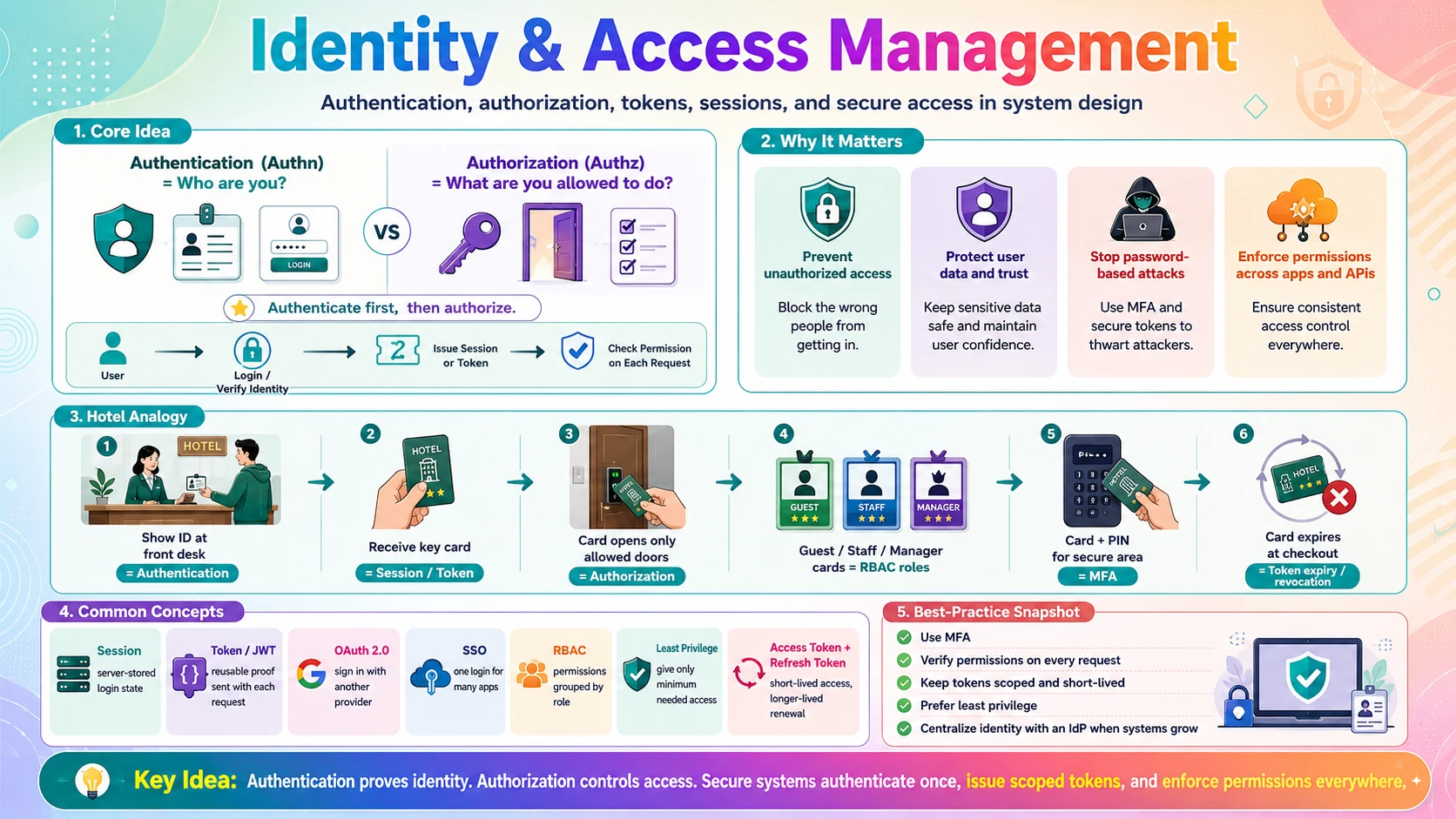
Every time a shopper logs into our online store ShopEasy, two separate questions have to be answered. First: are you really who you say you are? When Alice types her email and password, the system must confirm it's actually Alice. Second: what are you allowed to do? Alice can view her own orders, but she must not see Bob's, and she certainly can't access the admin dashboard. Those two questions are the whole foundation of identity and access.
- Authentication (authn) — verifying identity: proving you are who you claim to be. Logging in with a password, a code, or "Sign in with Google" is authentication.
- Authorization (authz) — verifying permissions: deciding what an authenticated user is allowed to do. Checking that Alice can open the admin page (she can't) is authorization.
They always happen in that order — you authenticate first, then authorize — and confusing them is a classic source of security holes. Once a user is authenticated, the system needs to remember that across many requests without asking for the password every time; that's where sessions and tokens (like JWTs) come in. And when you want to log in using another provider's account, OAuth 2.0 handles it without ever sharing your password. This section walks through all of it.
💡 Authn vs Authz in one line: authentication is "who are you?"; authorization is "what are you allowed to do?". A boarding pass proves who you are (authn); the gate agent checking that your ticket allows you into the first-class lounge is authz.
1.2 💡 Why It Matters
Broken identity and access control is consistently the number one category of web security failure — it tops the OWASP Top 10 as "Broken Access Control." The consequences are enormous: breaches routinely expose hundreds of millions of accounts, and a single missing authorization check can let any user read every other user's data. Attackers know this, which is why login and permission logic is the most probed part of any system.
- One weak check = total breach — if authorization is missing on even one endpoint, an attacker can often access everyone's data by simply changing an ID in the URL.
- Passwords are the front line — most attacks start with stolen or guessed credentials; MFA and good token handling are what stop them turning into a breach.
- Trust and compliance — leaking user data destroys trust and triggers legal penalties (GDPR and similar); getting access control right is a legal requirement, not just good practice.
- It scales with the system — every new service and API needs the same identity checks, so a consistent, centralised approach (tokens, an identity provider) is essential as systems grow.
Why system design cares: nearly every design must answer "how do users log in, and how do services verify them?" The strong answer names authentication (tokens/OAuth), stateless verification (JWT) so any server can check identity, and authorization (roles/least privilege) enforced on every request — not just at the front door.
1.3 🏠 Real-world Analogy
Think of checking into a hotel. At the front desk you show your ID and booking to prove who you are — that's authentication. In return you get a key card. That card doesn't re-prove your identity every time; it just grants access to the specific doors you're allowed through — your room, the gym, maybe the executive lounge if you paid for it. The card is your token, and what it opens is authorization.
The details map perfectly. The key card expires at checkout (token expiry). It works at any door reader without phoning the front desk (a self-contained token like a JWT — the reader checks it locally). Losing the card doesn't reveal your password, and the desk can deactivate it instantly (revocation). High-security areas need the card plus a PIN (multi-factor authentication). And staff cards open only what their job requires — housekeeping can't enter the safe room (role-based access and least privilege).
| Hotel | Security World | Meaning |
|---|---|---|
| 🪪 Showing ID + booking at check-in | 🔐 Authentication | Proving who you are |
| 🎟️ The key card you receive | 🎫 Token / session | Proof of login, reused per request |
| 🚪 Which doors the card opens | ✅ Authorization | What you're allowed to access |
| 🏷️ Housekeeping vs guest vs manager cards | 👥 Roles (RBAC) | Permissions grouped by role |
| 🔢 Card + PIN for secure areas | 🔓 Multi-factor auth (MFA) | Two proofs are stronger than one |
| ⏰ Card stops working at checkout | ⌛ Token expiry / revocation | Access is time-limited and revocable |
The hotel never hands out master keys and never re-checks your passport at every door — it authenticates once, issues a scoped, expiring card, and checks that card at each door. That is exactly how modern systems handle identity and access.
1.4 📖 Key Terms
| Term | Simple Definition | Quick Example |
|---|---|---|
| Authentication (authn) | Proving who you are | Logging in with a password |
| Authorization (authz) | Deciding what you may do | Only admins reach /admin |
| Credential | Something that proves identity | Password, passkey, API key |
| Session | Server-stored record of a logged-in user | Session ID in a cookie |
| Token | A self-contained proof of login sent per request | A JWT in a header |
| JWT | JSON Web Token — a signed, self-describing token | Authorization: Bearer eyJ… |
| OAuth 2.0 | A standard for delegated access without sharing passwords | "Sign in with Google" |
| SSO | Single Sign-On — one login across many apps | One company account for all tools |
| RBAC | Role-Based Access Control — permissions by role | admin / editor / viewer |
| MFA | Multi-Factor Authentication — 2+ proofs | Password + phone code |
| Least privilege | Grant only the minimum access needed | Read-only where write isn't needed |
| Access / Refresh token | Short-lived access + long-lived renewal token | 15-min access, 30-day refresh |
1.5 🔢 How It Works
Let us go step by step: how authentication proves identity, how the system remembers a login with sessions or tokens, how OAuth lets you log in with another provider, and how authorization decides what each user can do.
A. Authentication — Proving Identity
Authentication verifies a claim of identity by checking one or more factors:
- Something you know — a password or PIN.
- Something you have — a phone receiving a code, an authenticator app, a hardware key.
- Something you are — a fingerprint or face scan (biometrics).
A password alone is one factor, and passwords get stolen, phished, and reused. Multi-factor authentication (MFA) requires two or more factors, so a stolen password isn't enough on its own — this single measure blocks the overwhelming majority of account-takeover attacks. Critically, the server never stores raw passwords; it stores a salted hash and compares hashes (covered in the Data Protection sub-topic). Modern systems increasingly move to passkeys (passwordless login backed by device keys), which remove the password as an attack surface entirely.
MFA — how it works, step by step (using an authenticator-app code, the most common second factor):
| Step | What Happens |
|---|---|
| ① | User enters username + password (factor 1: something you know) |
| ② | Server verifies the password hash — correct, but login is not complete yet |
| ③ | Server asks for the second factor and waits |
| ④ | User opens their authenticator app, which shows a 6-digit code that changes every 30 seconds (a TOTP — time-based one-time password) |
| ⑤ | User submits the code (factor 2: something you have — the phone) |
| ⑥ | Server computes the expected code from the shared secret + current time; if it matches, login succeeds |
Real-world example: logging into Gmail — you type your password, then Google prompts for a code from Google Authenticator (or a tap on your phone). A thief with only your password is stopped at step ③, because they don't have your phone.
B. Remembering a Login — Sessions vs Tokens
After you log in once, the system must remember you across many requests without re-asking for your password. There are two approaches:
- Sessions (stateful) — the server creates a session record and hands the browser a session ID in a cookie. Every request sends the cookie; the server looks the ID up in its session store. Simple and easy to revoke, but the server must store and share session state — which complicates horizontal scaling (recall the stateless-services post).
- Tokens (stateless) — on login the server issues a signed token (typically a JWT) that the client sends on each request. The server verifies the signature and trusts the contents without any lookup, so any server can validate it — perfect for stateless, scalable systems.
A JWT (JSON Web Token) has three dot-separated parts — a header, a payload of "claims," and a signature: header.payload.signature. The payload carries identity and metadata; the signature (created with a secret only the server knows) proves it hasn't been tampered with.
The client sends it in an HTTP header on every request:
Because anyone holding a token can use it, tokens are kept short-lived. The common pattern pairs a short-lived access token (say 15 minutes) with a long-lived refresh token that quietly gets a new access token — limiting the damage if an access token leaks. Their one weakness versus sessions: a self-contained token is hard to revoke before it expires, which is why expiry is kept short.
Session — how it works, step by step (the stateful approach):
| Step | What Happens |
|---|---|
| ① | User submits correct credentials |
| ② | Server creates a session record (user id, expiry) in a session store — memory, Redis, or a database — and generates a random session ID |
| ③ | Server returns the session ID in a cookie (Set-Cookie) |
| ④ | Browser automatically sends the cookie on every later request |
| ⑤ | Server looks the session ID up in the store to know who the user is |
| ⑥ | On logout or timeout, the server deletes the record — the cookie is now useless |
Real-world example: a traditional bank web portal. After login you hold a session cookie; leave the tab idle for 10 minutes and the server expires the session, forcing you to log in again. Because the server holds the state, the bank can instantly invalidate your session the moment you click "Log out."
Token (JWT) — how it works, step by step (the stateless approach):
| Step | What Happens |
|---|---|
| ① | On login, the server builds the payload (sub, role, exp) and signs header + payload with a secret key → this produces the JWT |
| ② | Server sends the JWT to the client |
| ③ | Client stores it and sends it in the Authorization: Bearer … header on every request |
| ④ | Server recomputes the signature over header + payload with its secret; if it matches the token's signature, the token is authentic and untampered |
| ⑤ | Server checks exp (not expired) and reads the claims (like role) — no database lookup |
Real-world example: a mobile app calling a REST API. The app holds a JWT and attaches Authorization: Bearer … to every call; each API server verifies it locally with the shared secret. That's why you can run 50 stateless API servers behind a load balancer with no shared session store — any of them can validate the token.
Access & refresh tokens — how it works, step by step (why there are two):
| Step | What Happens |
|---|---|
| ① | On login, the server issues a short-lived access token (~15 min) and a long-lived refresh token (~30 days) |
| ② | The client uses the access token on every request |
| ③ | After ~15 min the access token expires → the API returns 401 Unauthorized |
| ④ | The client quietly sends the refresh token to the auth server's /refresh endpoint |
| ⑤ | The auth server validates it and issues a new access token — no password, no re-login |
| ⑥ | If the refresh token is expired or revoked, the user must log in again |
Real-world example: staying logged into Netflix or Spotify for weeks without re-entering your password. The app silently swaps the expired access token for a new one using the refresh token in the background. Short access tokens limit the damage if one leaks; the refresh token keeps you signed in — and revoking it (e.g. "log out all devices") ends every session.
C. OAuth 2.0 & Single Sign-On
OAuth 2.0 is the standard behind "Sign in with Google/GitHub/Facebook." Its key idea is delegated access: you let ShopEasy verify your identity through Google without ever giving ShopEasy your Google password. Instead of sharing credentials, the apps exchange a scoped, temporary token.
The simplified flow when Alice clicks "Sign in with Google":
| Step | What Happens |
|---|---|
| ① | ShopEasy redirects Alice to Google's login page |
| ② | Alice logs in with Google (ShopEasy never sees the password) and consents to share basic profile info |
| ③ | Google redirects back to ShopEasy with a one-time authorization code |
| ④ | ShopEasy exchanges that code (plus its secret) with Google for an access token |
| ⑤ | ShopEasy uses the token to fetch Alice's profile and logs her in |
OAuth 2.0 handles authorization (delegated access); layered on top of it, OpenID Connect (OIDC) adds a standard identity layer for authentication ("who is this user"). Together they power Single Sign-On (SSO) — one login that works across many apps, which is why your company's one account opens email, chat, and dozens of internal tools. Scopes keep it safe: an app can request only "read your email," not full account access.
OAuth — real-world example: clicking "Sign in with Google" on ShopEasy. ShopEasy never sees your Google password. Google authenticates you, hands ShopEasy a one-time authorization code, and ShopEasy exchanges that code (plus its own client secret) for an access token — which it uses to read only the name and email you approved (the scope). Revoke ShopEasy in your Google account settings and its access stops, with your password never involved.
SSO — how it works, step by step (one login across many apps):
| Step | What Happens |
|---|---|
| ① | You log into your central identity provider (IdP) once — e.g. Google Workspace or Okta |
| ② | You open App A (say Slack); it redirects you to the IdP |
| ③ | The IdP sees you already have an active session → no login prompt |
| ④ | The IdP sends App A a signed token/assertion proving who you are |
| ⑤ | App A logs you in automatically |
| ⑥ | Open App B (say Jira) → same flow → instant login. One login, many apps |
Real-world example: at work you sign in to Google once in the morning, and Gmail, Drive, Calendar, and dozens of connected third-party tools all open without asking again. The flip side is powerful too: logging out of (or disabling) the IdP account can revoke access everywhere at once.
D. Authorization — RBAC & Least Privilege
Once a user is authenticated, authorization decides what they can do — and it must be checked on every protected request, on the server, never just hidden in the UI. The most common model is Role-Based Access Control (RBAC): assign each user a role, and attach permissions to roles rather than to individuals.
| Role | Can do |
|---|---|
| Customer | View own orders, place orders |
| Support | View any customer's orders, issue refunds |
| Admin | Everything, including managing users |
RBAC is guided by the principle of least privilege: give every user (and every service) the minimum access needed to do its job, and nothing more. A reporting service that only reads data should have read-only access, so a bug or breach can't delete anything. For finer control, ABAC (Attribute-Based Access Control) decides based on attributes ("only the order's owner can view it") — which catches the classic bug where any logged-in user can read another user's data just by changing the ID in the URL.
📌 Authenticate once, authorize every time. It's tempting to check permissions only at login or only in the front-end. Real security checks authorization on the server for every request — because an attacker can always call your API directly, skipping your UI entirely.
RBAC — how a request is authorized, step by step (this runs on every protected request, after authentication):
| Step | What Happens |
|---|---|
| ① | Request arrives with a verified token (authentication already passed) |
| ② | Server reads the user's role from the token claims (e.g. role: support) |
| ③ | Server looks up the permissions attached to that role |
| ④ | Server checks the permission this action needs (e.g. "issue refund") |
| ⑤ | Role has it → allow; role lacks it → 403 Forbidden |
| ⑥ | For resource-level rules (ABAC), also check ownership — e.g. "is this order's user_id the requester?" |
Real-world example: a support agent on ShopEasy can open any customer's order and issue a refund (their support role grants those permissions), but clicking through to user management returns 403 — that's admin-only. Same app, same UI, different capabilities, all decided by the role attached to their token and checked on the server for each action.
1.6 🔀 Types & Variations
Systems choose among several authentication methods, often combining them. Here are the common ones and where each fits.
Password-based
The classic email + password. Simple and universal, but weakest alone — vulnerable to phishing, reuse, and guessing. Always hash + salt.
Multi-Factor (MFA)
Password plus a second factor (app code, SMS, hardware key). Blocks most account takeovers; standard for anything sensitive.
OAuth / Social & SSO
"Sign in with Google," or one corporate login across many apps. No new password to manage; delegates trust to an identity provider.
Passwordless / Passkeys
Log in with a device key, biometric, or magic link — no password to steal. The modern direction (WebAuthn/passkeys).
API Keys / mTLS
For machine-to-machine access: a service presents an API key or a client certificate instead of a human login.
They combine. A real app might offer password + MFA and "Sign in with Google" for humans, use API keys for third-party integrations, and mTLS between internal services — each method matched to who (or what) is logging in.
1.7 🎨 Illustrated Diagram
The diagram shows token-based auth end to end: the user logs in once and gets a signed token, then every later request carries that token, which any app server verifies (authentication) before checking the user's role (authorization).
Reading the diagram: login happens once (steps 1–2). After that, every request (step 3) carries the token, and the App Server does two checks locally with no database lookup — verifying the JWT signature (authentication) and checking the user's role (authorization), both shown inside the App Server box. Only when both pass does it query the data (steps 4–5) and respond (step 6). Skip the authorization check and you have the most common security hole there is.
1.8 ✅ When to Use
The main choices are how to keep a login (session vs token) and how to authenticate (own passwords vs an identity provider). Match them to the system.
| Use tokens (JWT) when… | Use server sessions when… |
|---|---|
| You have many services / a stateless, scaled backend | It's a single traditional web app |
| Mobile or third-party API clients need to authenticate | You need instant, reliable logout/revocation |
| Any server must verify identity without a shared store | Simplicity matters more than statelessness |
And how to handle authentication itself:
| Situation | Reach for… |
|---|---|
| Any account worth protecting | MFA on top of the password |
| You don't want to store passwords at all | OAuth / social login or passkeys |
| Many internal apps, one workforce | SSO via an identity provider |
| Service-to-service calls | API keys or mTLS, not human logins |
| Deciding what users can do | RBAC + least privilege, checked server-side |
Rule of thumb: don't build authentication from scratch — use a proven library or a managed identity provider (Auth0, Cognito, Firebase Auth, Okta). Add MFA, prefer short-lived tokens for scaled backends, apply least privilege everywhere, and enforce authorization on the server for every request.
1.9 🏗️ Real-world Example — Alice Logs Into ShopEasy
Follow one login and the checks that guard every request afterward — and watch a would-be attacker get stopped:
| Step | Actor | What Happens |
|---|---|---|
| ① | 👤 Alice | Enters email + password, then a code from her authenticator app (MFA) |
| ② | 🔐 Auth service | Compares the password's hash to the stored hash, checks the MFA code — authentication passes |
| ③ | 🎫 Auth service | Issues a signed JWT with role: customer and a 15-minute expiry |
| ④ | ⚙️ App server | Alice opens her orders; the server verifies the token's signature and returns only her orders (authorization) |
| ⑤ | 🕵️ Attacker | Changes the URL to request order #5000 (not theirs); the server's ownership check (authz) returns 403 Forbidden |
| ⑥ | 🚫 Attacker | Tries the /admin dashboard; their customer role fails the RBAC check — denied |
| ⑦ | ⌛ App server | After 15 min the access token expires; Alice's client silently uses its refresh token for a new one — no re-login |
The payoff: authentication (steps ①–③) happened once; authorization (steps ④–⑥) is enforced on every request server-side. The attacker is blocked not because the UI hid the button, but because the server re-checks ownership and role each time. MFA stopped the stolen-password path, and short-lived tokens limit the blast radius if one leaks.
1.10 ⚖️ Trade-offs
The main design tension here is tokens vs sessions — stateless scalability versus easy control. Here's how they compare:
| ✅ Tokens (JWT) — advantages | ❌ Tokens — drawbacks |
|---|---|
| Stateless — any server verifies with no shared store | Hard to revoke before expiry — a leaked token works until it expires |
| Scales cleanly — fits stateless, multi-service backends | Can't easily force logout — needs short expiry or a denylist |
| Works everywhere — web, mobile, service-to-service | Bigger per request — token travels on every call |
| Self-describing — carries role/claims for fast authz | Storage risk — a stolen token = access; must store it safely |
More security almost always trades against convenience, too:
- MFA greatly improves safety but adds a step to every login — worth it for anything sensitive.
- Short token expiry limits damage from leaks but forces more frequent refreshes.
- Strict least privilege is safest but needs more careful role design and can slow onboarding.
📌 The core tension: security vs convenience, and stateless vs revocable. There's no free lunch — the goal is to pick defaults that are secure enough for the data at stake (MFA, short-lived tokens, least privilege) while keeping the everyday experience smooth (refresh tokens, SSO).
1.11 🚫 Common Mistakes
| # | ❌ Common Mistake | ✅ The Reality |
|---|---|---|
| 1 | Checking permissions only in the UI | Hiding a button doesn't stop anyone — attackers call the API directly. Enforce authorization on the server, every request. |
| 2 | Confusing authentication with authorization | A logged-in user is not an allowed user. Always check "is this user permitted to do this?" separately from "who are you?" |
| 3 | Trusting a JWT without verifying it | A token's claims mean nothing unless the signature is verified with your secret/key. Never accept alg: none or skip verification. |
| 4 | Long-lived or never-expiring tokens | A leaked token that lasts forever is a permanent breach. Keep access tokens short-lived and use refresh tokens. |
| 5 | Rolling your own auth / crypto | Home-grown login and token code is riddled with subtle holes. Use vetted libraries or a managed identity provider. |
| 6 | Over-permissive roles (no least privilege) | Giving everyone admin "to keep things simple" turns any compromised account into a full breach. Grant the minimum each role needs. |
1.12 📝 Summary
- Authentication ≠ authorization — authn proves who you are; authz decides what you may do. Do authn first, authz on every request.
- Sessions vs tokens — sessions are server-stored and easy to revoke; JWT tokens are stateless and scale across services (kept short-lived).
- OAuth 2.0 / OIDC power "sign in with…" and SSO — delegated login without sharing passwords, scoped by permissions.
- RBAC + least privilege — grant permissions by role, and only the minimum each role needs; enforce server-side.
- MFA and vetted tools — add multi-factor auth and use proven libraries / identity providers; never roll your own.
1.13 🏋️ Design Challenge
🏥 Challenge: Design access for a healthcare app
A telehealth app has patients, doctors, and admins, plus a mobile app and third-party lab integrations. Think through the following:
- How should patients log in, and what extra factor would you require given the sensitive data?
- Would you use sessions or tokens, considering the mobile app and multiple backend services?
- How do you ensure a doctor sees only their patients, and a patient sees only their own records?
- How should the third-party lab system authenticate — the same way as human users?
👁️ Show Answer
Patient login + factor: email/password (hashed) — or better, passkeys — plus MFA (an authenticator-app code). Health data is highly sensitive, so MFA is non-negotiable; SMS is acceptable but app-based/hardware factors are stronger.
Sessions or tokens: tokens (JWT). With a mobile app and several backend services, short-lived access tokens + refresh tokens let any service verify identity statelessly. Keep expiry short and store tokens securely on the device.
Fine-grained access: combine RBAC (roles: patient, doctor, admin) with attribute checks (ABAC) — a doctor's role permits viewing patient records, but an ownership/assignment check ensures they see only patients assigned to them, and a patient sees only their own. Enforce every check server-side, on every request.
Lab integration: not a human login — use OAuth 2.0 client credentials or API keys / mTLS for machine-to-machine access, scoped with least privilege (e.g. permission to submit results for specific patients only, nothing more).
1.14 ☁️ Cloud Service Mapping
You almost never build authentication yourself — clouds offer managed identity for your app's users, workforce SSO, and fine-grained IAM for resources:
| Need | AWS (Primary) | GCP | Azure |
|---|---|---|---|
| Managed user auth — login, MFA, social/OAuth for your app | Amazon Cognito | Firebase Auth / Identity Platform | Entra External ID (Azure AD B2C) |
| Workforce SSO — one login across internal apps | IAM Identity Center | Cloud Identity | Microsoft Entra ID |
| Resource IAM — RBAC / least privilege on cloud resources | AWS IAM | Google Cloud IAM | Azure RBAC |
Simplest AWS picture: let Amazon Cognito handle sign-up, login, MFA, and "sign in with Google," issuing standard JWTs your services verify. Use AWS IAM with least-privilege roles for what each service and person can touch. Popular non-cloud identity providers — Auth0, Okta, Firebase Auth — do the same job. Don't build login from scratch.
🔒 2. Data Protection
Controlling who gets in is only half of security. The other half is protecting the data itself — so that even if an attacker intercepts traffic, steals a database, or breaks in, what they get is useless. In this section you will learn encryption in transit (TLS/HTTPS, so no one can read data as it travels), encryption at rest (so a stolen disk or database dump is unreadable), why passwords must be hashed and never encrypted or stored in plain text, how secrets management keeps keys and credentials out of your code, and how rate limiting blunts brute-force and abuse.
2.1 🎯 Introduction
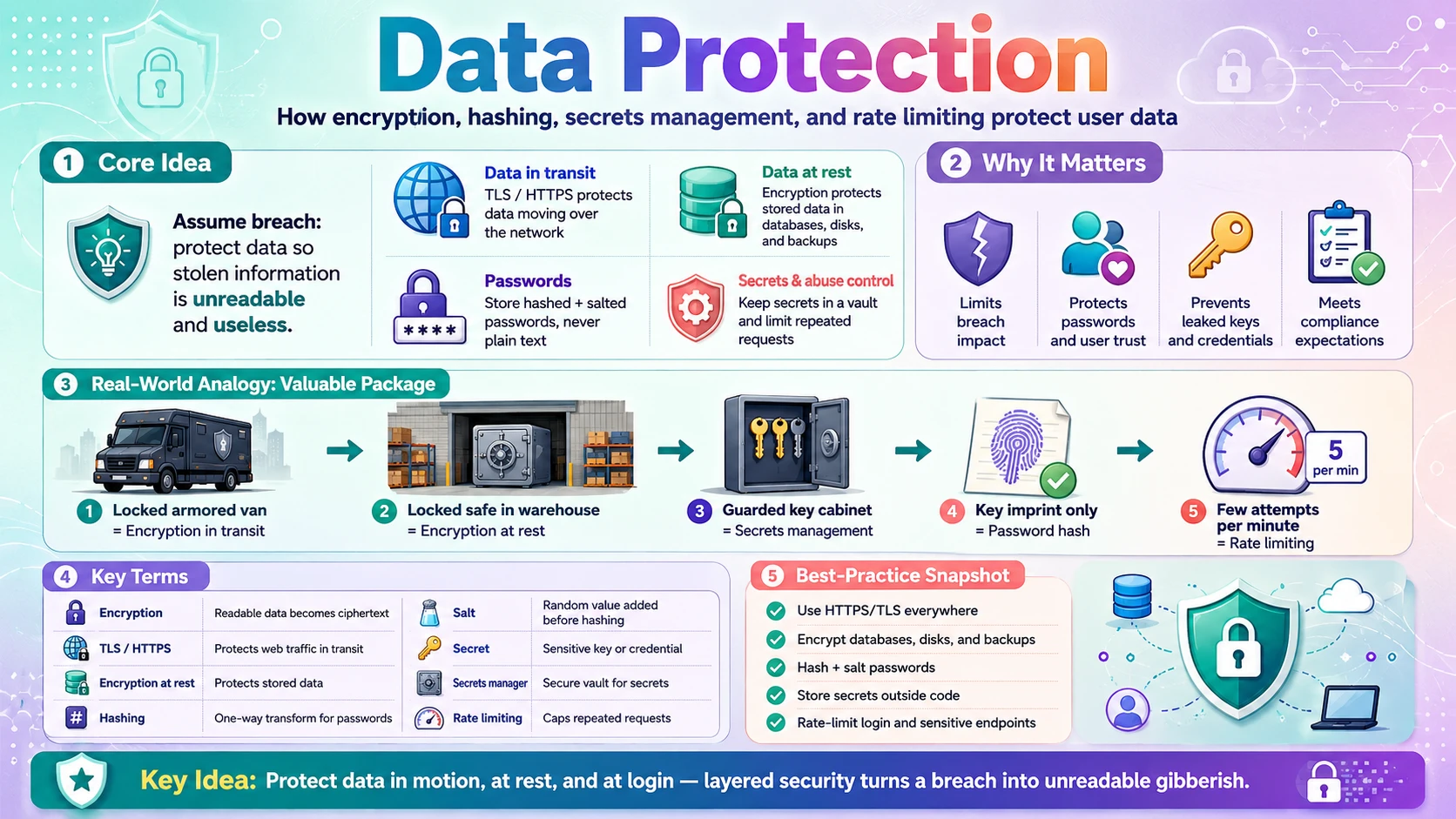
Identity and access decide who gets in. Data protection assumes they'll sometimes get in anyway — and makes sure the data is useless when they do. Picture ShopEasy's database being stolen, or a shopper's checkout intercepted on café Wi-Fi. If the data is protected properly, the attacker ends up with unreadable gibberish instead of passwords, card numbers, and addresses. That is the whole goal: defence in depth, so no single breach hands over the crown jewels.
Protection applies to data in two states, plus a few supporting practices:
- Data in transit — data moving over the network (browser ↔ server, service ↔ service). Protected with encryption in transit (TLS/HTTPS) so eavesdroppers see only scrambled bytes.
- Data at rest — data sitting in a database, disk, or backup. Protected with encryption at rest so a stolen disk or database dump can't be read.
- Passwords — a special case: never encrypted or stored raw, but hashed (a one-way transformation), so even a full database leak doesn't reveal them.
- Secrets & abuse control — keeping keys/credentials out of code (secrets management) and limiting how often anyone can hit your endpoints (rate limiting).
💡 Assume breach. Good data protection doesn't rely on keeping attackers out forever — it assumes they'll eventually get something, and ensures that something is encrypted, hashed, and useless. Encryption in transit + at rest + hashed passwords is the baseline every serious system meets.
2.2 💡 Why It Matters
Data breaches are constant and expensive. Studies put the average cost of a breach in the millions of dollars, and history is full of avoidable disasters: companies that stored passwords in plain text saw hundreds of millions of accounts exposed overnight, and unencrypted backups left in the open have leaked entire customer databases. "Cryptographic failures" (weak or missing encryption) sit near the very top of the OWASP Top 10 for exactly this reason.
- Encryption limits the blast radius — a stolen encrypted disk or intercepted TLS stream is worthless without the key, turning a catastrophe into a non-event.
- Hashing protects users beyond your walls — people reuse passwords, so a plain-text leak from you compromises their bank and email too. Proper hashing prevents that.
- Leaked secrets are a top breach cause — an API key or database password committed to a public repo is one of the fastest ways to get owned; secrets management exists to stop it.
- Compliance requires it — GDPR, PCI-DSS (payment cards), and HIPAA (health) all mandate encryption and safe data handling, with heavy fines for failing.
Why system design cares: any design touching user data must answer "how is it protected in transit and at rest, and how are secrets managed?" The strong baseline — TLS everywhere, encryption at rest, hashed passwords, secrets in a vault, and rate limiting on sensitive endpoints — is expected, not optional.
2.3 🏠 Real-world Analogy
Think of sending a valuable package. While it travels, you put it in a locked armored van so nobody can open it on the road — that's encryption in transit. When it arrives, you store it in a locked safe, so even a burglar who breaks into the warehouse can't open it — that's encryption at rest. The keys to the van and safe aren't taped to the door; they're kept in a separate, guarded key cabinet — that's secrets management.
Passwords get special treatment. Instead of storing the actual key, the guard keeps only a tamper-proof imprint of it: when you present your key, they compare imprints, never holding the real key themselves. That one-way imprint is a hash — even if the imprint book is stolen, no one can reconstruct the keys. And to stop someone trying thousands of keys at the door, the guard only allows a few attempts per minute — that's rate limiting.
| Package World | Security World | Meaning |
|---|---|---|
| 🚚 Locked armored van on the road | 🔐 Encryption in transit (TLS) | Data unreadable while moving |
| 🧰 Locked safe in the warehouse | 🗄️ Encryption at rest | Stored data unreadable if stolen |
| 🔑 Keys kept in a guarded cabinet | 🗝️ Secrets management | Keys/credentials stored separately, safely |
| 🖐️ Tamper-proof imprint of the key | #️⃣ Password hash | One-way; the real secret is never stored |
| ⏱️ Only a few key attempts per minute | 🚦 Rate limiting | Blocks brute-force and abuse |
The warehouse never assumes the walls are enough. It locks the van, locks the safe, hides the keys, keeps only imprints of what it doesn't need to hold, and limits attempts at the door. Layer those together and a single break-in yields nothing useful — which is exactly the goal of data protection.
2.4 📖 Key Terms
| Term | Simple Definition | Quick Example |
|---|---|---|
| Encryption | Scrambling data so only a key can unscramble it | Ciphertext instead of plain text |
| Encryption in transit | Protecting data while it moves over a network | HTTPS / TLS |
| Encryption at rest | Protecting stored data on disk/DB | Encrypted database volume |
| TLS / HTTPS | The protocol that encrypts web traffic | The padlock in the address bar |
| Symmetric encryption | Same key encrypts and decrypts | AES |
| Asymmetric encryption | Public key encrypts, private key decrypts | RSA, used in the TLS handshake |
| Hashing | One-way transform; cannot be reversed | bcrypt of a password |
| Salt | Random data added before hashing | Makes identical passwords hash differently |
| Encryption vs Hashing | Encryption is reversible (with a key); hashing is not | Encrypt card numbers, hash passwords |
| Secret | A sensitive value like a key or credential | API key, DB password |
| Secrets manager | A secure vault for storing secrets | AWS Secrets Manager, Vault |
| Rate limiting | Capping requests per client per time window | 5 login attempts per minute |
2.5 🔢 How It Works
Data protection is five layers: encrypt data as it moves, encrypt it where it's stored, hash passwords one-way, keep secrets in a vault, and rate-limit abuse. We'll take them in turn.
A. Encryption in Transit (TLS / HTTPS)
When data travels over a network, anyone in between — a rogue Wi-Fi hotspot, an ISP, an attacker — can read it unless it's encrypted. TLS (the "S" in HTTPS) fixes this. Recall from the Networking post that a TLS handshake uses asymmetric encryption (a public/private key pair) just long enough to agree on a shared symmetric key, then encrypts the actual traffic with that fast symmetric key.
| Step | What Happens |
|---|---|
| ① | Client connects and the server presents its TLS certificate (its public key, signed by a trusted authority) |
| ② | Client verifies the certificate is genuine and not expired |
| ③ | They use the public/private keys to securely agree on a shared session key |
| ④ | All further traffic is encrypted with that fast symmetric key — unreadable to anyone in between |
The rule today is simple: TLS everywhere — not just the login page but every request, and increasingly between internal services too (mTLS). Free certificates (Let's Encrypt) and default HTTPS make plain HTTP inexcusable for anything handling user data.
B. Encryption at Rest
Encryption at rest protects data where it's stored — database files, disk volumes, backups, object storage. If someone steals a hard drive, grabs a backup file, or dumps the database, encrypted data is just noise without the key. It typically uses fast symmetric encryption (AES-256), applied at one or more levels:
- Disk / volume level — the whole storage volume is encrypted; transparent to the app. The common default (one checkbox on cloud databases and disks).
- Database level — the database engine encrypts its files (Transparent Data Encryption).
- Field level — the app encrypts specific sensitive columns (card numbers, national IDs) before storing, so they're protected even from someone with database access.
The security now rests entirely on protecting the encryption key — which is why keys live in a dedicated key management service (KMS), never next to the data they protect. Encryption at rest is worthless if the key is stored on the same stolen disk.
C. Password Hashing
Passwords are never encrypted (encryption is reversible — anyone with the key gets every password back). They're hashed: run through a one-way function that can't be reversed. You store only the hash; at login you hash the submitted password and compare hashes. Two more rules make it safe:
- Salt — add a unique random value to each password before hashing, so two users with the same password get different hashes, and precomputed "rainbow table" attacks fail.
- Slow, purpose-built hashes — use bcrypt, scrypt, or Argon2, which are deliberately slow, so an attacker can only try a few guesses per second. Never use fast hashes like MD5 or SHA-256 for passwords — they let attackers test billions of guesses per second.
The payoff: even if the entire user table leaks, attackers get salted bcrypt hashes, not passwords — and cracking them is so slow that strong passwords stay safe. This is why a good site can never "email you your password" — it genuinely doesn't have it.
D. Secrets Management
Your app needs secrets to run — database passwords, API keys, encryption keys, TLS private keys. The mistake is putting them where they can leak: hardcoded in source code or committed to a Git repo (attackers scan public repos for keys within minutes). Secrets management keeps them out of code and under control:
- Never in code or Git — no keys in source; add secret files to
.gitignore. - Environment variables — a basic step: inject secrets at runtime rather than baking them in (as used throughout this blog's projects).
- A dedicated secrets manager — the real answer at scale: a vault (AWS Secrets Manager, HashiCorp Vault, Azure Key Vault) that stores secrets encrypted, controls who can read them, audits access, and rotates them automatically.
- Least privilege for secrets — each service reads only the secrets it needs, so one compromised service doesn't expose everything.
⚠️ A leaked secret is a breach. A single database password or cloud key pushed to a public repo can hand an attacker your whole system. Treat secrets like the keys to the building — stored in a guarded vault, rotated regularly, never left lying in the code.
E. Rate Limiting
Rate limiting caps how many requests a client can make in a time window — a simple control that defends against several abuses at once. It's what stops an attacker from trying millions of passwords (brute force), scraping all your data, or overwhelming an endpoint with traffic.
A common mechanism is the token bucket: each client has a bucket that refills at a fixed rate (say 5 tokens/minute); each request spends a token, and when the bucket is empty, further requests are rejected with 429 Too Many Requests. Limits are applied per identifier — per IP, per user, or per API key:
| Endpoint | Typical limit | Why |
|---|---|---|
| Login | ~5 attempts / minute / account | Stops password brute-forcing |
| Password reset / OTP | A few / hour | Prevents abuse and spam |
| General API | e.g. 1,000 / minute / key | Fair use; blunts scraping & overload |
📌 Layered defence: encryption in transit + at rest protect the data, hashing protects passwords, secrets management protects the keys, and rate limiting protects the doors. No single layer is enough — together they mean a breach of one control doesn't hand over everything.
2.6 🔀 Types & Variations
Protecting data uses a few distinct cryptographic tools, and mixing them up is the most common beginner mistake. Here's what each is for.
Symmetric Encryption
One shared key encrypts and decrypts. Fast — used for bulk data.
- Example: AES-256
- Use for: data at rest, TLS session traffic
Asymmetric Encryption
A public key encrypts; only the private key decrypts. Slower.
- Example: RSA, ECC
- Use for: TLS handshake, digital signatures
Hashing
One-way — cannot be reversed. Not encryption.
- Example: bcrypt, Argon2 (passwords); SHA-256 (integrity)
- Use for: passwords, verifying data hasn't changed
Tokenization
Replace sensitive data with a meaningless stand-in "token"; the real value lives in a secure vault.
- Use for: card numbers (PCI), so systems never touch the real value
Encryption vs hashing — the key distinction: encryption is reversible with a key (use it when you need the data back — card numbers, messages); hashing is one-way (use it when you only need to verify, never retrieve — passwords). "Encrypt the credit card, hash the password" is the rule of thumb.
2.7 🎨 Illustrated Diagram
The diagram follows data through the system and shows where each protection applies: TLS encrypts it in transit, the database encrypts it at rest, passwords are stored only as hashes, and the encryption keys live in a separate vault.
Reading the diagram: every network hop is wrapped in TLS, so an eavesdropper sees only ciphertext. The database is encrypted at rest and stores passwords only as salted hashes, so a stolen dump is useless. And the keys that unlock all of it live in a separate vault — never on the same disk as the data — so stealing the data alone gets an attacker nowhere.
2.8 ✅ When to Use
Most of these aren't optional — TLS, hashed passwords, and secrets management are baseline for any real system. The judgement calls are which encryption to apply where, and how aggressively to rate-limit.
| To protect… | Use… |
|---|---|
| Data moving over any network | TLS/HTTPS everywhere — always |
| Data you must read back later (card numbers, messages) | Encryption (symmetric at rest; consider field-level or tokenization for the most sensitive) |
| Passwords | Salted, slow hashing (bcrypt/Argon2) — never encryption |
| Keys, DB passwords, API keys | Secrets manager — never in code or Git |
| Login & sensitive endpoints | Rate limiting (tight on login/OTP, looser on general APIs) |
| Go further (field-level encryption, tokenization, tight limits) when… | Baseline is enough when… |
|---|---|
| Handling payments, health, or government data (PCI/HIPAA/GDPR) | Data is low-sensitivity and non-regulated |
| A breach would be catastrophic or legally serious | An internal tool with limited, trusted users |
| Endpoints are attractive brute-force / scraping targets | Traffic is low and abuse is unlikely |
Rule of thumb: turn on TLS everywhere, enable encryption at rest (usually one cloud checkbox), hash passwords with bcrypt/Argon2, move every secret into a vault, and rate-limit auth endpoints — that baseline covers most systems. Add field-level encryption or tokenization for the truly sensitive fields, and lean on managed crypto rather than rolling your own.
2.9 🏗️ Real-world Example — Protecting Data on ShopEasy
Follow Alice's data from signup through an attempted breach, and watch each protection do its job:
| Step | Event | Protection at work |
|---|---|---|
| ① | Alice signs up on café Wi-Fi | 🔐 TLS encrypts her password and details in transit — the café network sees only ciphertext |
| ② | ShopEasy stores her password | #️⃣ Stored as a salted bcrypt hash, never the raw password |
| ③ | She saves a card for later | 🎭 The card is tokenized / field-encrypted; ShopEasy holds a token, not the real number |
| ④ | Her order + address are written to the DB | 🗄️ Encryption at rest — the database volume is encrypted with a key from the vault |
| ⑤ | An attacker steals a database backup | 🛡️ It's encrypted; without the vault key it's unreadable noise, and passwords are only hashes |
| ⑥ | The attacker brute-forces Alice's login | 🚦 Rate limiting blocks after 5 tries/minute; the slow bcrypt hash makes guessing hopeless anyway |
| ⑦ | An old API key was pushed to GitHub | 🗝️ It lived in a secrets manager, not the code — nothing sensitive was in the repo to leak |
The payoff: the attacker got a database backup (step ⑤) and still ended up with nothing usable — encrypted data, hashed passwords, tokenized cards, and keys stored elsewhere. That's defence in depth: every layer assumes the others might fail, so one breach never exposes the crown jewels.
2.10 ⚖️ Trade-offs
Strong data protection is close to mandatory, but it isn't free — it adds compute, key-management burden, and some friction. The trade-offs:
| ✅ Advantages | ❌ Costs |
|---|---|
| Breach containment — stolen data is useless without keys | Compute overhead — encryption/decryption costs CPU (usually small) |
| User protection — hashed passwords stay safe even after a leak | Key management — lose the key and the data is gone; keys must be guarded and rotated |
| Compliance — satisfies GDPR, PCI-DSS, HIPAA requirements | Operational complexity — vaults, rotation, certificate renewal to run |
| Trust — protects reputation and avoids fines | Harder to query — encrypted/hashed fields can't be searched or sorted normally |
| Abuse resistance — rate limiting stops brute force & scraping | Some friction — aggressive limits can block legitimate bursts; tune carefully |
📌 The core tension: data protection trades a little performance and operational effort for a massive reduction in breach impact. The compute cost of encryption is tiny next to the cost of a leak — so the trade is almost always worth making. The one genuine risk to manage is key loss: encrypted data with a lost key is unrecoverable.
2.11 🚫 Common Mistakes
| # | ❌ Common Mistake | ✅ The Reality |
|---|---|---|
| 1 | Storing passwords in plain text or encrypted | A leak then exposes every password. Always store a salted, slow hash (bcrypt/Argon2) — one-way, never reversible. |
| 2 | Using fast hashes (MD5/SHA-256) for passwords | Attackers test billions/second against fast hashes. Use purpose-built slow hashes designed to resist brute force. |
| 3 | Hardcoding secrets / committing keys to Git | Bots scan public repos for keys within minutes. Keep secrets in a vault or env vars; add secret files to .gitignore. |
| 4 | TLS only on the login page | Any unencrypted request can leak session tokens or data. Use HTTPS for every request, site-wide. |
| 5 | Rolling your own crypto | Custom encryption is almost always broken. Use vetted libraries and standard algorithms (AES, RSA, bcrypt); never invent your own. |
| 6 | Storing the key next to the data | Encryption at rest is pointless if the key is on the same disk. Keep keys in a separate KMS/vault with their own access controls. |
2.12 📝 Summary
- Assume breach — protect data so that even if it's stolen or intercepted, it's unreadable and useless.
- Encrypt in transit and at rest — TLS everywhere for moving data; AES on stored data, with keys kept in a separate vault.
- Hash passwords, don't encrypt them — salted, slow hashes (bcrypt/Argon2); encryption is reversible, hashing is one-way.
- Manage secrets properly — keys and credentials live in a secrets manager, never in code or Git, and are rotated.
- Rate-limit and layer defences — cap requests to stop brute force/abuse; no single control is enough, so combine them (defence in depth).
2.13 🏋️ Design Challenge
💳 Challenge: Protect data for a payments app
A payments app stores user passwords, saved credit cards, and transaction history, and exposes a login and a public API. Think through the following:
- How do you store passwords vs credit card numbers — and why differently?
- How do you protect data as it travels and where it's stored?
- Where do the encryption keys and the database password live?
- How do you stop attackers brute-forcing logins or hammering the API?
👁️ Show Answer
Passwords vs cards: hash passwords with a salted, slow algorithm (bcrypt/Argon2) — you never need to read them back, only verify. Credit cards you do need to charge, so encrypt them (reversible) or better, tokenize them via the payment processor so you never store the real number at all (PCI-DSS strongly favours this). Encrypt what you must retrieve; hash what you only verify.
In transit & at rest: TLS on every request (browser↔server and service↔service), and encryption at rest (AES) on the database and backups — with field-level encryption on the most sensitive columns.
Keys & DB password: in a secrets manager / KMS (e.g. AWS KMS + Secrets Manager), never in code or on the same disk as the data, with least-privilege access and automatic rotation.
Brute force & abuse: rate-limit the login (a few attempts per minute per account) and the public API (per key), add MFA, and rely on slow password hashing so even leaked hashes resist cracking. Layer them — defence in depth.
2.14 ☁️ Cloud Service Mapping
Clouds provide managed building blocks for every layer of data protection, so you configure them rather than build crypto yourself:
| Need | AWS (Primary) | GCP | Azure |
|---|---|---|---|
| Encryption keys (KMS) — manage & rotate keys | AWS KMS | Cloud KMS | Azure Key Vault |
| Secrets management — store credentials/API keys | AWS Secrets Manager | Secret Manager | Azure Key Vault |
| TLS certificates — HTTPS in transit | AWS Certificate Manager (ACM) | Certificate Manager | App Service / Front Door certs |
| Rate limiting / WAF — block abuse | AWS WAF + API Gateway throttling | Cloud Armor + API Gateway | API Management + Front Door |
Simplest AWS picture: serve everything over HTTPS with a free ACM certificate, enable encryption at rest on RDS/S3 with keys in AWS KMS, keep your DB password and API keys in Secrets Manager, hash passwords with bcrypt in your app, and put WAF + API Gateway throttling in front to rate-limit abuse. All managed — you configure the protection, the platform runs the crypto.
📚 References
- OWASP Top 10 — The authoritative list of the most critical web security risks, led by Broken Access Control and Cryptographic Failures.
- OWASP Cheat Sheet Series — Practical, beginner-friendly guides for password storage, authentication, JWT, and transport security.
- System Design Interview (Vol. 1) — Alex Xu — Covers authentication, rate limiting, and secure API design as recurring building blocks.
- Auth0 & Okta Developer Docs — Clear explanations of OAuth 2.0, OpenID Connect, JWT, sessions, and SSO.
- Cloud security docs — AWS KMS / Secrets Manager, Google Cloud KMS, and Azure Key Vault for encryption keys and secrets management.