System Design Phase 1 — Part 6: Caching & CDN
📚 Table of Contents
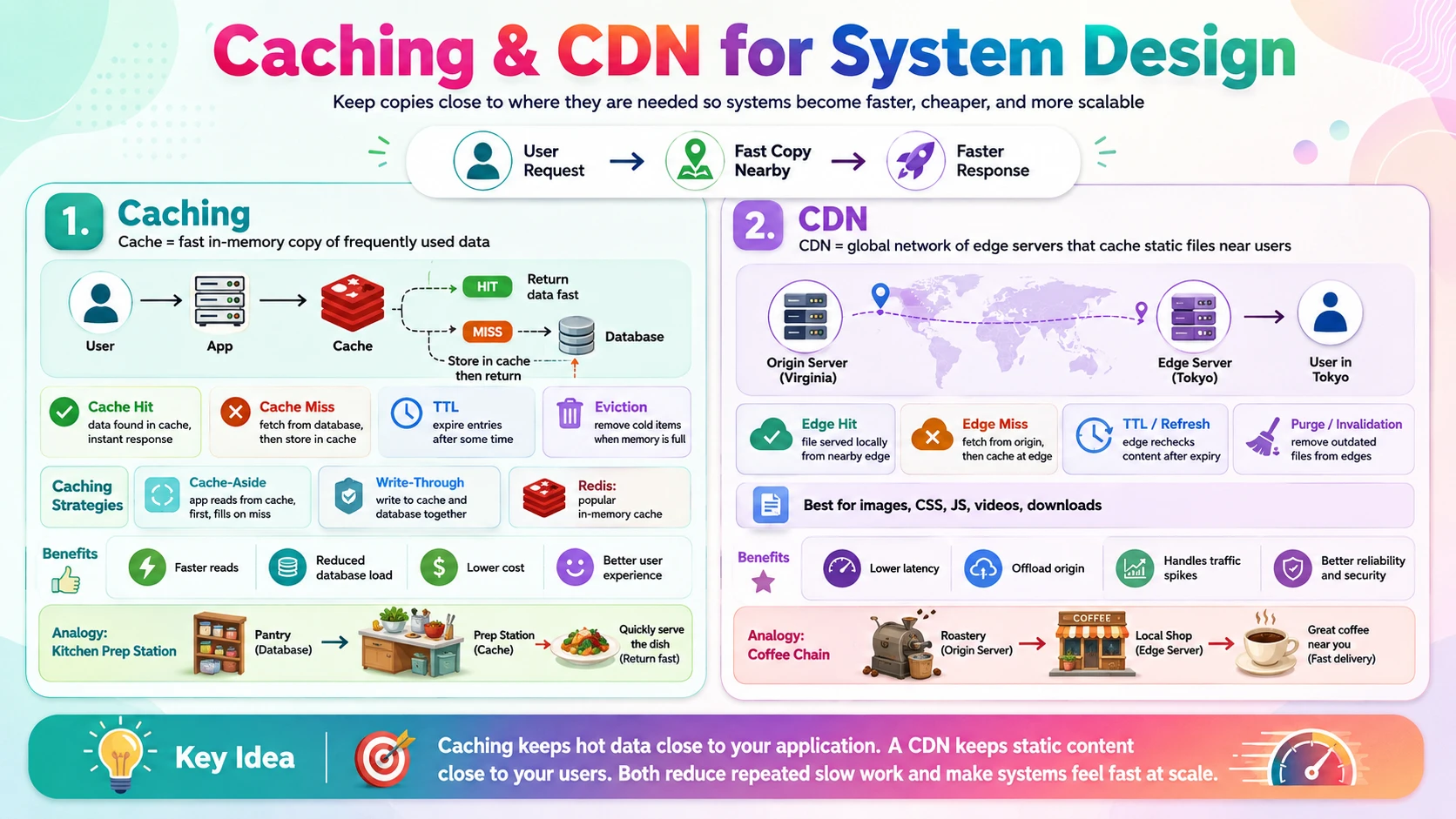
The fastest work a system can do is the work it never has to repeat. Every topic in this post is built on that single idea: keep a copy of a result close to where it's needed, so you don't recompute or refetch it every time. You will start with Caching — storing frequently-used data in fast memory so repeat requests skip the slow database entirely, including how cache hits and misses work, how TTL and eviction keep a cache fresh and bounded, and the write-through and cache-aside strategies. Then you will learn about the CDN — a network of edge servers spread around the world that deliver static content from a location physically close to each user, so a shopper in Tokyo isn't waiting on a server in Virginia. Finally you will take a deep dive into Redis — the in-memory data store behind most caches — covering what it is, how it works, why it's astonishingly fast, and when to reach for it. Each topic is explained with real-world analogies, step-by-step examples, and clear diagrams — starting from zero.
⚡ 1. Caching
A cache is a small, fast store that holds copies of data you've fetched or computed before, so the next request for the same data is answered instantly instead of hitting a slow database or recomputing a result. In this section you will learn what a cache is and where it lives, how a cache hit and cache miss play out, how TTL and eviction policies keep it fresh and within memory limits, the main read and write strategies (cache-aside, write-through, write-back), and the hardest problem in caching — invalidation, keeping cached copies from going stale.
1.1 🎯 Introduction
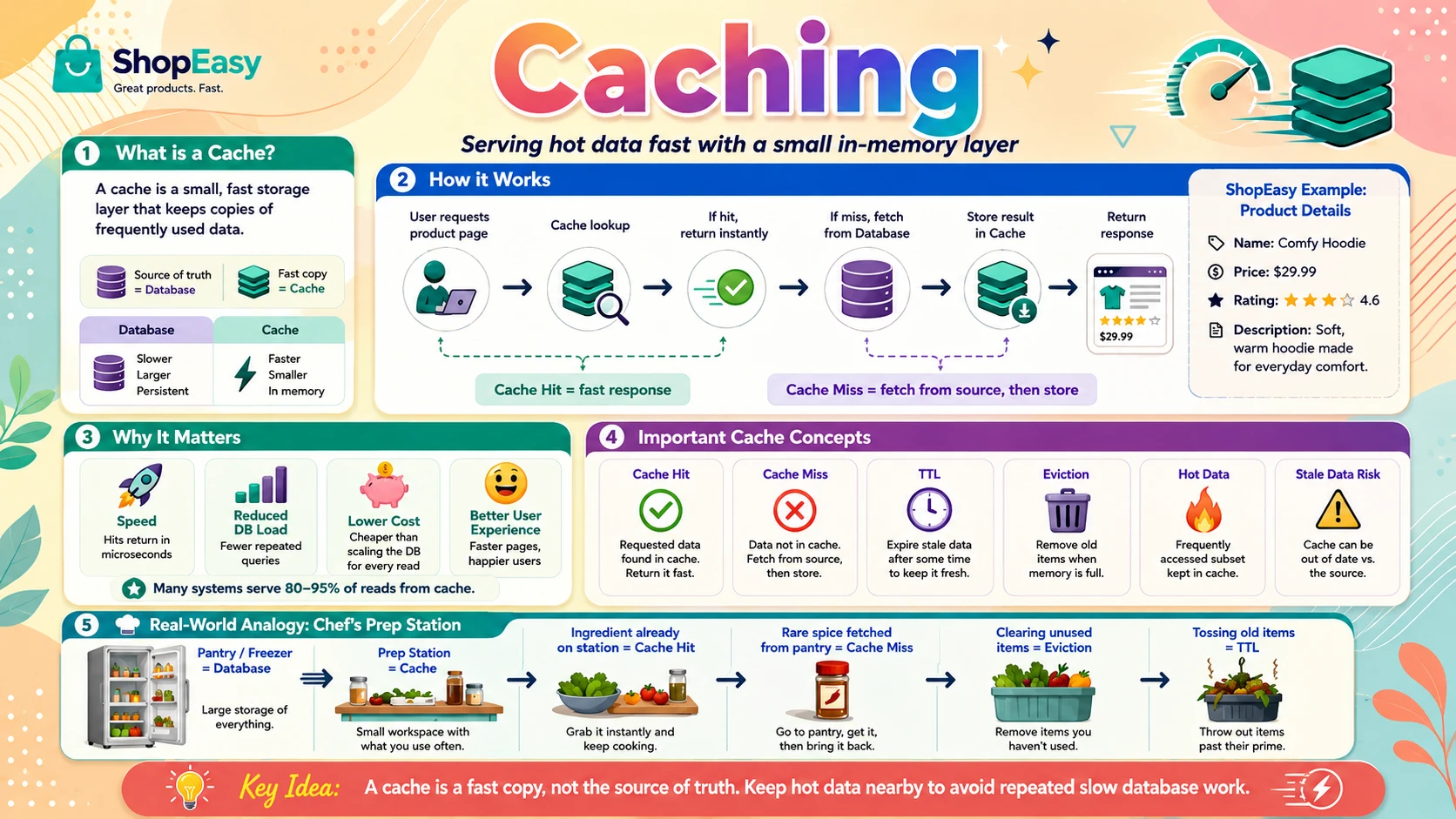
Every time a shopper opens a product page on our online store ShopEasy, the app fetches the same details — name, price, description, rating. For a popular laptop viewed 100,000 times a day, that's 100,000 identical database queries returning the exact same answer. The database does a lot of work to tell everyone the same thing. A cache fixes this: fetch the product once, keep a copy in fast memory, and serve the next 99,999 requests from that copy in a fraction of a millisecond — never touching the database.
A cache is a small, fast storage layer that sits in front of a slower source of truth (a database, an API, a computation) and holds copies of recently or frequently used data. When the data you want is already in the cache, that's a cache hit and you get it instantly. When it isn't, that's a cache miss, and you fall back to the slow source — then usually store the result in the cache so next time is a hit.
Caches are fast for two reasons: they live in memory (RAM) instead of on disk, and they store data by a simple key so lookups are direct — no scanning, no joins. The trade is that memory is small and expensive, so a cache holds only a hot subset of the data, and that copy can drift out of date — which is what makes caching both powerful and tricky.
💡 Cache = a fast copy, not the source of truth. The database still owns the real data. A cache just keeps a nearby copy of the parts you use most, so you avoid asking the slow source over and over. Everything about caching flows from that one idea.
1.2 💡 Why It Matters
Caching is one of the highest-leverage tricks in system design — a small cache can absorb the vast majority of traffic and make a system both faster and cheaper at once. The speed gap is enormous: reading from RAM takes around 100 nanoseconds, while reading from a database over the network can take 1–10 milliseconds — roughly 10,000× to 100,000× slower. Real systems lean on this hard: Facebook runs one of the world's largest memcached deployments to serve billions of requests, and a well-tuned cache commonly serves 80–95% of reads without ever touching the database.
- Speed — cache hits return in microseconds, turning a sluggish page into an instant one.
- Reduced load — every hit is a query the database never sees, which is often the difference between a database that copes and one that falls over (recall the database bottleneck from the scalability post).
- Lower cost — serving from a cheap cache node is far less expensive than scaling the database to handle every read.
- Better experience — faster responses directly improve engagement and conversions; slow pages lose users.
Why system design cares: "add a cache" is one of the first moves in almost every design, because it attacks the most common bottleneck (the database) cheaply. But it comes with a famous catch — keeping cached data from going stale — which is why interviewers and engineers care as much about invalidation as about the speed win.
1.3 🏠 Real-world Analogy
Think of a chef working a busy dinner service. The pantry and the walk-in freezer are the database — everything is there, but fetching an ingredient means a trip across the kitchen. So the chef keeps a small prep station right at the counter, stocked with the ingredients used most that night: chopped onions, grated cheese, the sauce of the day. That prep station is the cache.
When an order needs cheese and it's already on the station, that's a cache hit — grabbed in a second. When it needs a rare spice that isn't there, that's a cache miss — a trip to the pantry, and the chef brings back a little extra to keep on the station for next time. The station only has so much room (memory limit), so items that haven't been touched in a while get cleared to make space (eviction), and anything perishable is tossed after a set time (TTL).
| Kitchen World | Caching World | Meaning |
|---|---|---|
| 🥫 The pantry / walk-in freezer | 🗄️ Database (source of truth) | Everything, but slower to reach |
| 🔪 The prep station at the counter | ⚡ Cache (fast, in memory) | A small hot subset, instant to grab |
| 🧀 Needed item already on the station | ✅ Cache hit | Served instantly, no pantry trip |
| 🌶️ Rare item not on the station | ❌ Cache miss | Fetch from the source, then stock it |
| 🧹 Clearing unused items for space | 🗑️ Eviction | Drop cold data when memory is full |
| ⏲️ Tossing perishables after a while | ⏳ TTL (time to live) | Expire entries so they don't go stale |
The chef's whole trick is prediction: keep the things you'll reach for again within arm's reach, and don't waste counter space on what you won't. A cache does exactly this for data — and just like a station holding yesterday's sauce, its danger is serving something that's no longer fresh.
1.4 📖 Key Terms
| Term | Simple Definition | Quick Example |
|---|---|---|
| Cache | A fast, in-memory store of copied data | Redis holding product details |
| Cache Hit | Requested data is found in the cache | Product served from Redis |
| Cache Miss | Data isn't in the cache; fall back to the source | First view fetches from the DB |
| Hit Ratio | Share of requests served from cache | 92% hits, 8% misses |
| TTL (Time To Live) | How long an entry stays before expiring | Cache a price for 60 seconds |
| Eviction | Removing entries when memory is full | Drop the least-recently-used key |
| LRU | Evict the Least Recently Used entry | Common default eviction policy |
| Invalidation | Removing/updating a cached copy that changed | Delete the key when price updates |
| Cache-Aside | App checks cache, loads from DB on a miss | The most common read pattern |
| Write-Through | Write to cache and DB together | Cache always matches the DB |
| Stale Data | A cached copy that no longer matches the source | Old price shown after a change |
1.5 🔢 How It Works
Let us break caching into five pieces: the hit/miss read path, how TTL and eviction keep the cache bounded and fresh, how reads are wired up (cache-aside), how writes are handled (write-through and write-back), and the hardest part — invalidation.
A. Cache Hit & Cache Miss
Every cached read follows the same branch. The app asks the cache for a key. On a hit, the value comes straight back. On a miss, the app fetches from the database, returns it to the user, and populates the cache so the next request is a hit.
The hit ratio — the share of requests served from cache — is the number that matters. A 95% hit ratio means the database sees only 1 in 20 reads. Cold caches start at 0% hits and "warm up" as popular data gets loaded; the goal is to keep the hot working set resident.
B. TTL & Eviction
Memory is limited, so a cache can't keep everything forever. Two mechanisms keep it bounded and reasonably fresh. TTL (time to live) stamps each entry with an expiry — after, say, 60 seconds the entry is discarded and the next read is a miss that reloads fresh data. TTL is the simplest defence against staleness: even if you forget to invalidate, data self-corrects within the TTL window.
Eviction handles the "cache is full" case: when there's no room for a new entry, the cache drops an existing one according to a policy:
| Policy | Evicts… | Best for |
|---|---|---|
| LRU (Least Recently Used) | The entry unused for the longest time | General purpose — the common default |
| LFU (Least Frequently Used) | The entry accessed the fewest times | Stable, skewed popularity |
| FIFO (First In First Out) | The oldest entry, regardless of use | Simple, order-based needs |
| TTL-only | Nothing early — entries just expire | Small caches that fit in memory |
C. Read Strategy — Cache-Aside
The most common pattern is cache-aside (also called lazy loading), which is exactly the read path above: the application manages the cache. It looks in the cache first, and only on a miss does it load from the database and backfill the cache. The cache stays "on the side" — it never talks to the database itself.
The upside is that only requested data is ever cached (no wasted memory) and a cache failure isn't fatal — the app just reads from the database. The downsides: the first request for any key is always a miss (a slower cold read), and it's the app's job to invalidate entries when data changes.
D. Write Strategies
Reads are only half the story — when data changes, the cache and database can disagree. Three strategies handle writes differently:
- Write-through — write to the cache and the database at the same time, synchronously. The cache is always in sync, so reads are never stale, but every write pays the cost of updating both.
- Write-back (write-behind) — write to the cache immediately and flush to the database later, in the background. Very fast writes, but if the cache dies before flushing, you lose data — risky for anything that matters.
- Write-around — write straight to the database and skip the cache; the data only enters the cache later, on a read miss. Good when freshly-written data isn't read right away.
In practice, cache-aside reads + write-through (or explicit invalidation) on writes is the workhorse combination for most web systems.
E. Invalidation — The Hard Part
There's a famous quip: "there are only two hard things in computer science — cache invalidation and naming things." Invalidation is making sure a cached copy doesn't outlive the truth. When a product's price changes in the database, any cached copy is now stale and must be updated or deleted, or customers see the old price.
There are several invalidation strategies, and real systems usually combine two or three. They trade off freshness, write cost, and implementation effort differently:
| Strategy | How it keeps the cache correct | Trade-off |
|---|---|---|
| TTL expiration | Each entry auto-expires after a set time; the next read reloads fresh data | Simplest; data can be stale for up to the TTL window |
| Write-through | Every write updates cache and DB together, so the cache is never behind | Always fresh; every write pays to update both |
| Write-around + invalidate | On a write, delete (or update) the affected key so the next read reloads it | Precise and cheap; you must catch every write path — easy to miss one |
| Event-based | A data change publishes an event; subscribers evict the affected keys everywhere | Scales to many caches; adds a messaging system to build and run |
| Versioned keys | Change the key when data changes (product:42:v3) so old copies are simply never read | No purge needed; requires a version bump on every change |
The most common production recipe is TTL + explicit invalidation: delete the key the instant data changes (precise and immediate), and lean on a bounded TTL as a safety net in case an invalidation is ever missed. Beyond staleness, two failure modes bite at scale:
- Cache stampede — a hot key expires and thousands of simultaneous misses all hammer the database at once. Mitigated by staggered TTLs or letting only one request rebuild the entry.
- Thundering herd on a cold cache — after a cache restart, everything is a miss and the database is briefly overwhelmed. Mitigated by warming the cache with popular keys ahead of time.
📌 The freshness dial: a longer TTL means more hits but staler data; a shorter TTL means fresher data but more misses. Choosing the TTL is really choosing how much staleness your feature can tolerate — seconds for a price, minutes for a product description, hours for a rarely-changing config.
1.6 🔀 Types & Variations
Caching isn't one thing in one place — data can be cached at every layer between the user and the database. A request may be served by a cache long before it ever reaches your servers.
Browser Cache
The user's own device stores static assets (images, CSS, JS) so repeat visits load instantly, with zero network request.
CDN Cache
Edge servers around the world cache static content close to users. The subject of the CDN sub-topic later in this post.
Application Cache
A shared in-memory store (Redis, Memcached) holding query results and objects. The classic "the cache" in system design.
Database Cache
The database's own buffer pool keeps hot rows and query plans in memory, so common queries avoid disk reads.
They stack. A single page load might hit the browser cache for the logo, a CDN for product images, an application cache (Redis) for the price, and the database's own buffer for anything left. Each layer catches what the layer above missed — and the closer to the user a cache sits, the bigger the win.
1.7 🎨 Illustrated Diagram
The diagram shows the cache-aside read path. The app always asks the cache first. On a hit, it returns immediately. On a miss, it falls through to the database, then writes the result back into the cache so the next request is a hit.
Reading the diagram: the happy path is steps 1–2a — a hit that never touches the database. Steps 2b–5 are the miss path, paid only once per key per TTL window; every subsequent read for that key is a fast hit until it expires or is evicted.
1.8 ✅ When to Use
Caching shines for data that's read far more than it's written and can tolerate being a little out of date. It's a poor fit for data that must always be exact or changes constantly.
| Cache it when… | Don't cache when… |
|---|---|
| Data is read often and changes rarely (product info, config) | Data must always be perfectly current (account balance) |
| The same result is requested repeatedly | Every request is unique (no repeat reads to save) |
| The source is slow or expensive (heavy query, external API) | The source is already trivially fast |
| Brief staleness is acceptable (seconds to minutes) | Even momentary staleness is dangerous or illegal |
| Read load is overwhelming the database | Writes dominate and reads are rare |
A quick guide to picking a write strategy once you've decided to cache:
| Strategy | Choose it when… |
|---|---|
| Cache-aside + TTL | The default — read-heavy data where bounded staleness is fine |
| Write-through | Reads must never be stale and you'll accept slightly slower writes |
| Write-back | Write speed is critical and rare data loss is tolerable (metrics, counters) |
| Explicit invalidation | Data changes at known moments you can hook into (price update → delete key) |
Rule of thumb: start with cache-aside and a TTL sized to how much staleness the feature can bear. Add explicit invalidation for the data whose changes users notice immediately. Don't cache highly dynamic or must-be-exact data — a wrong cached value is worse than a slightly slower correct one.
1.9 🏗️ Real-world Example — Caching a ShopEasy Product Page
A viral laptop deal sends 100,000 shoppers to the same product page in an hour. Follow how a Redis cache turns that flood into almost no database load:
| Step | Actor | What Happens |
|---|---|---|
| ① | 👤 First shopper | Requests product:42; cache is empty → a miss |
| ② | 🗄️ Database | Serves the product row once; the app stores it in Redis with a 60s TTL |
| ③ | 👥 Next 99,999 shoppers | All get a hit from Redis in microseconds — the database sees none of them |
| ④ | 💰 Merchant | Changes the price; the app invalidates the key (deletes product:42) |
| ⑤ | 👤 Next shopper | Miss again → reloads the new price from the DB and re-caches it |
| ⑥ | ⏳ Cache (TTL) | Even without step ④, the entry would expire after 60s and refresh on its own |
The payoff: of 100,000 requests, the database handled roughly one. That's a 99.999% hit ratio for this key — the database is free to do real work while the cache absorbs the storm. Invalidation on price change (step ④) plus the TTL safety net (step ⑥) keep shoppers from ever seeing a stale price for long.
1.10 ⚖️ Trade-offs
A cache is one of the best speed-for-effort deals in system design, but it adds a second copy of your data — and two copies can disagree. The trade-offs:
| ✅ Advantages | ❌ Disadvantages |
|---|---|
| Huge speed gain — microsecond reads instead of milliseconds | Stale data risk — the copy can drift from the source |
| Offloads the database — most reads never reach it | Invalidation complexity — keeping the cache correct is genuinely hard |
| Lower cost — a cache node is cheaper than scaling the DB | Extra moving part — one more system to run and monitor |
| Absorbs spikes — hot data is served from memory under load | Cold-start & stampede — mass misses can overwhelm the source |
| Improves user experience — faster pages, higher engagement | More memory — caches consume RAM, a limited resource |
📌 The core tension: caching trades correctness guarantees for speed. The cached value is only probably current. Your whole caching design is really an answer to one question: how much staleness can this data tolerate, and how do I bound it?
1.11 🚫 Common Mistakes
| # | ❌ Common Mistake | ✅ The Reality |
|---|---|---|
| 1 | Forgetting to invalidate | Caching a value with no TTL and no invalidation serves stale data forever. Always set a TTL and invalidate on change. |
| 2 | Caching data that must be exact | Account balances or stock counts shown from a stale cache cause real errors. Read must-be-exact data from the source. |
| 3 | No expiry at all | Entries that never expire fill memory and drift stale. A TTL is a safety net even when you also invalidate explicitly. |
| 4 | Ignoring cache stampede | When a hot key expires, thousands of misses hit the DB at once. Stagger TTLs or let one request rebuild the entry. |
| 5 | Treating the cache as durable storage | A cache can evict or lose data anytime. It's a fast copy, never the source of truth — the DB must still hold the real data. |
| 6 | Caching everything | Caching rarely-read or unique data wastes memory and lowers the hit ratio. Cache the hot, repeated, read-heavy data only. |
1.12 📝 Summary
- A cache is a fast copy — an in-memory store in front of a slower source; a hit is instant, a miss falls back to the source and backfills.
- Hit ratio is the metric — a high hit ratio means the database barely sees your reads.
- TTL and eviction keep it bounded — entries expire on a timer and cold data is dropped (LRU) when memory fills.
- Cache-aside + write-through/invalidation — the workhorse patterns for reading and keeping the cache correct.
- Invalidation is the hard part — the whole design is a choice of how much staleness the data can tolerate, bounded by TTL.
1.13 🏋️ Design Challenge
📰 Challenge: Add caching to a news website
A news site shows article pages, a homepage list of headlines, and a per-user "recommended for you" feed. Traffic is huge during breaking news. Think through the following:
- Which of the three — article, headline list, recommendations — should you cache, and which is riskiest to cache?
- A breaking story is being edited every few minutes. What TTL or invalidation approach keeps it reasonably fresh?
- When a huge story breaks, its cache entry expires and a million readers hit it at once. What problem is this, and how do you prevent it?
- Would you cache the personalised feed the same way as the shared homepage? Why or why not?
👁️ Show Answer
What to cache: the article and the headline list are shared, read-heavy, and change infrequently — ideal to cache. The per-user recommendations are the riskiest: they're unique per user (low hit ratio) and change often, so a shared cache helps little.
Freshness for a live story: use a short TTL (say 30–60 seconds) so edits appear quickly, and explicitly invalidate the article key each time an editor saves. TTL bounds the worst case; invalidation makes the common case instant.
The million-reader spike: that's a cache stampede — one expired hot key causing a flood of simultaneous misses. Prevent it by letting only one request rebuild the entry while others briefly serve the old value (or wait), and by staggering TTLs so keys don't all expire together.
Personalised feed: not the same way. Cache it per user with a short TTL (or cache the expensive building blocks, like the candidate article set, rather than the final feed). A shared cache key can't serve different users, so the shared-page strategy doesn't apply.
1.14 ☁️ Cloud Service Mapping
You rarely run a cache server yourself — every cloud offers managed in-memory caches, letting you spin up Redis or Memcached and connect in minutes:
| Need | AWS (Primary) | GCP | Azure |
|---|---|---|---|
| Managed Redis cache — the common default | ElastiCache for Redis | Memorystore for Redis | Azure Cache for Redis |
| Managed Memcached cache — simple key-value caching | ElastiCache for Memcached | Memorystore for Memcached | Azure Cache for Redis (Redis-based) |
Simplest AWS picture: put ElastiCache for Redis between your app servers and the database, read with cache-aside, set a TTL that matches your staleness tolerance, and invalidate keys when data changes. Most reads now hit Redis in microseconds and never reach the database. (Delivering static files close to users is the CDN's job, covered later in this post.)
🔴 2. Redis Deep Dive
You've seen that a cache is a fast in-memory copy of data — and that the tool almost everyone reaches for to build one is Redis. It's worth understanding on its own, because Redis shows up far beyond caching: as a session store, a rate limiter, a leaderboard, a message broker, and a distributed lock. In this section you will learn what Redis is, how it stores and serves data, exactly why it's so blazingly fast (in-memory storage, a single-threaded event loop, and O(1) hash-table lookups), how much faster it actually is, the other in-memory stores in its family, and when Redis is — and isn't — the right choice.
2.1 🎯 Introduction
When ShopEasy needs to remember a shopper's cart, count live views on a flash sale, or serve a cached product in under a millisecond, it doesn't reach for its PostgreSQL database — it reaches for Redis. Redis is so fast and so flexible that it has become the default answer to "we need this right now, not in 10 milliseconds."
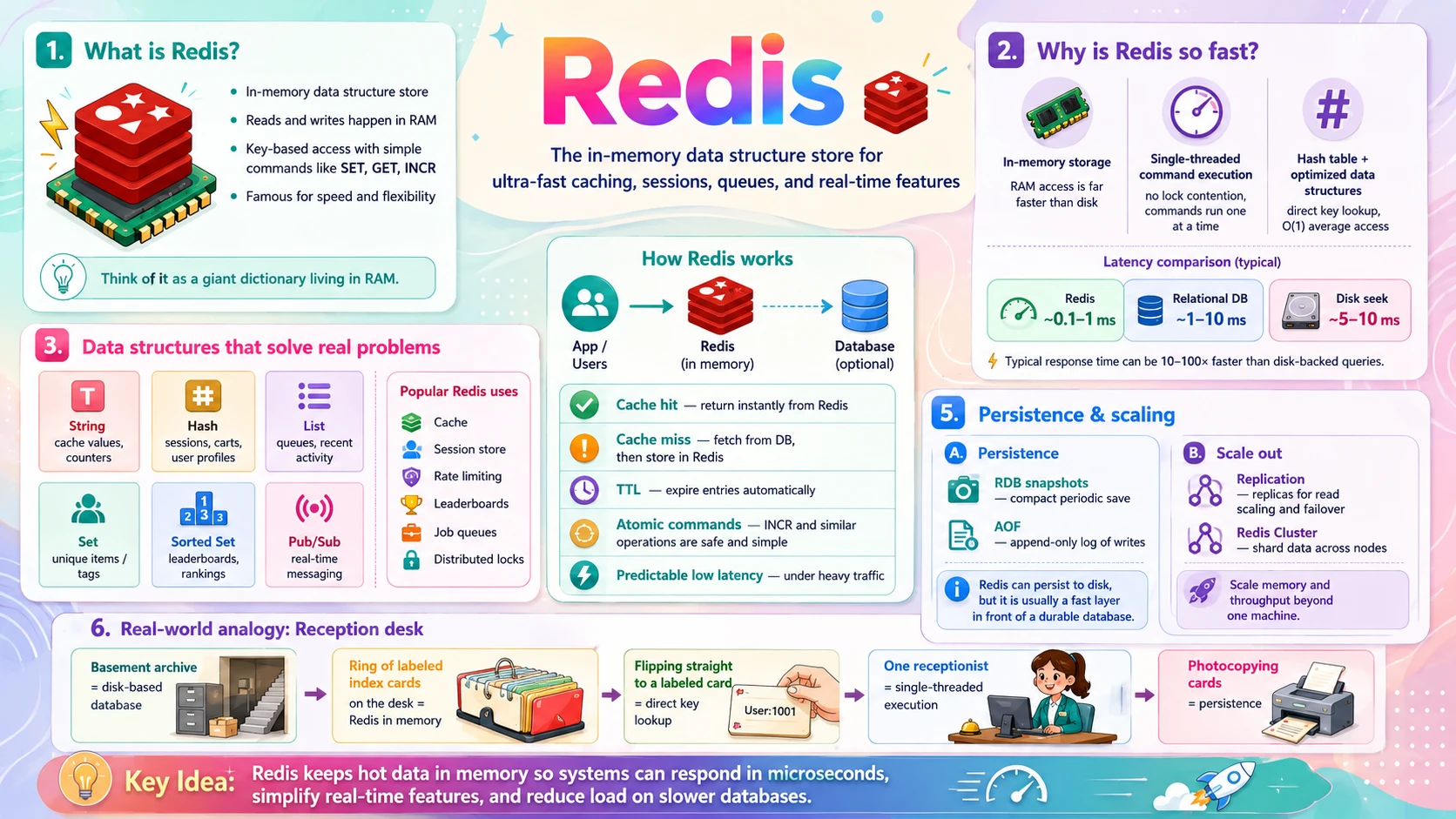
Redis (the name is short for REmote DIctionary Server) is an in-memory data structure store. Break that phrase down: in-memory means it keeps all its data in RAM rather than on disk, so reads and writes are astonishingly fast; data structure store means it's not just a plain key-value box — it natively understands strings, hashes, lists, sets, sorted sets, and more, each with its own commands. You talk to it with simple commands like SET, GET, and INCR, and it answers in microseconds.
Although it's most famous as a cache, Redis is really a general-purpose in-memory toolkit. The same speed that makes it a great cache makes it ideal for session storage, rate limiting, real-time leaderboards, job queues, pub/sub messaging, and distributed locks. This section treats Redis as a topic in its own right — how it works and why it's fast — rather than just "the thing you cache with."
💡 A dictionary that lives in RAM. At its core Redis is a giant dictionary (hash table) of keys to values, kept entirely in memory. That one design choice — data in RAM, accessed by key — is the source of both its blazing speed and its main limitation (memory is smaller and more expensive than disk).
2.2 💡 Why It Matters
Redis matters because it's everywhere and because it's fast enough to change how you design a system. It has topped the ranking as the most-loved database in developer surveys for years, and it powers the real-time layer of companies like Twitter (timelines), GitHub (background jobs), Stack Overflow, and Snapchat. A single Redis node routinely serves over 100,000 operations per second — tuned setups reach a million or more — at sub-millisecond latency.
Put that speed next to a disk-based database and the gap is enormous:
| Store | Typical read latency | Rough throughput (per node) |
|---|---|---|
| Redis (in-memory) | ~0.1–1 ms (often under 0.5 ms) | 100k–1M+ ops/sec |
| Relational DB (SSD) | ~1–10 ms per query | Thousands of complex queries/sec |
| Spinning disk read | ~5–10 ms per seek | Hundreds of ops/sec |
- Order-of-magnitude speed — Redis is typically 10–100× faster than querying a disk-based database, which is why it fronts so many of them as a cache.
- Simplifies hard problems — atomic counters, TTLs, and sorted sets turn tricky tasks (rate limiting, leaderboards, expiring sessions) into a couple of commands.
- Predictable latency — because everything is in RAM and operations are simple, response times stay flat and fast even under heavy load.
- One tool, many jobs — cache, session store, queue, lock, and pub/sub in a single well-understood system, reducing moving parts.
Why system design cares: knowing Redis's speed and data structures lets you answer "how do we make this real-time?" concretely — a leaderboard is a sorted set, a rate limiter is an atomic counter with a TTL, a session is a hash with an expiry. Redis turns many system-design sub-problems into a one-liner.
2.3 🏠 Real-world Analogy
Imagine a busy reception desk. Behind it is a vast archive room in the basement — every document the company has ever produced, perfectly organised but a slow elevator ride away. That archive is a disk-based database. On the receptionist's desk sits a ring of labelled index cards holding the answers people ask for all day: today's meeting rooms, extension numbers, the WiFi password. Grabbing a card is instant — no trip downstairs. That ring of cards is Redis.
Three details make the desk fast, and they map exactly onto why Redis is fast. First, the cards are right there on the desk, not in the basement (in memory, not on disk). Second, each card has a clear label you flip straight to — no reading through a filing cabinet (a hash table with direct key lookup). Third, one receptionist handles the cards, so there's never confusion about two people scribbling on the same card at once (a single thread, so no locking overhead).
| Reception Desk World | Redis World | Meaning |
|---|---|---|
| 🗄️ Slow basement archive | 💽 Disk-based database | Everything, but slower to reach |
| 🎴 Ring of index cards on the desk | ⚡ Redis (in memory) | Hot answers, instant to grab |
| 🏷️ Flipping to a labelled card | 🔑 Key lookup in a hash table | Direct O(1) access — no searching |
| 🧑 One receptionist, no arguments | 🧵 Single-threaded execution | No locking; commands run one at a time |
| 📸 Occasionally photocopying the cards | 💾 Persistence (RDB/AOF) to disk | A backup so cards survive a power cut |
Notice the trade the desk makes: it can only hold the cards that fit on the desk (memory is limited), and if the building loses power the cards could scatter unless they were photocopied (persistence). Those are exactly Redis's constraints — but for the hot data people ask for constantly, nothing beats a card that's already in your hand.
2.4 📖 Key Terms
| Term | Simple Definition | Quick Example |
|---|---|---|
| In-memory | Data is kept in RAM, not on disk | Reads in microseconds |
| Data structure store | Stores typed structures, not just strings | Hashes, lists, sets, sorted sets |
| Key | The unique name a value is stored under | cart:user:42 |
| Hash table | The structure giving O(1) key lookup | Jump straight to a key, no scan |
| Single-threaded | One thread runs commands one at a time | No locks; commands are atomic |
| Event loop | Handles many connections without blocking | I/O multiplexing (epoll) |
| TTL | Expiry time after which a key is removed | EXPIRE key 60 |
| Persistence | Saving in-memory data to disk for durability | RDB snapshot, AOF log |
| RDB | Point-in-time snapshot of the dataset | Save every 5 minutes |
| AOF | Append-only log of every write command | Replay to rebuild state |
| Replication | Copies (replicas) of the data for reads/failover | 1 primary + 2 replicas |
| Redis Cluster | Sharding data across multiple Redis nodes | Scale beyond one machine's RAM |
| Pipelining | Sending many commands in one round trip | Batch 100 SETs at once |
2.5 🔢 How It Works
Redis's design is a stack of deliberate choices that all point at one goal: answer as fast as physically possible. Three of them explain its speed (in-memory storage, a single-threaded event loop, and hash-table data structures), and two more make it durable and scalable (persistence and replication/clustering).
A. In-Memory Storage — The Biggest Reason It's Fast
The single biggest reason Redis is fast is that all its data lives in RAM, never touching disk on the read path. The hardware gap is staggering: reading from RAM takes roughly 100 nanoseconds, while even a fast SSD takes around 100 microseconds (~1,000× slower) and a spinning disk seek is ~10 milliseconds (~100,000× slower). A traditional database must often go to disk; Redis simply never does for a normal read.
This is also Redis's main constraint: RAM is smaller and more expensive than disk, so your entire dataset must fit in memory (or be sharded across nodes). Redis is for your hot, valuable data — not for terabytes of cold records.
B. Single-Threaded Event Loop — Fast Because It's Simple
Surprisingly, Redis processes commands on a single thread — one command at a time. That sounds like it would be slow, but it's a key reason it's fast and predictable:
- No locks, no contention — multi-threaded databases spend real effort coordinating threads (locks, latches) so they don't corrupt shared data. With one thread, none of that overhead exists.
- Every command is atomic — because commands run one at a time to completion, an
INCRcan never interleave with another. Correctness under concurrency comes for free. - Each operation is tiny — an in-memory hash lookup takes well under a microsecond, so one thread can still handle 100k+ commands per second.
To serve thousands of connected clients with one thread, Redis uses an event loop with I/O multiplexing (epoll/kqueue): instead of blocking on any one connection, it asks the OS "which connections have data ready?" and processes them as they come. The thread never sits idle waiting on the network. (Modern Redis does use extra threads for a few side tasks like network I/O and background saving, but command execution stays effectively single-threaded.)
C. Hash Table & Optimized Data Structures
At its heart Redis is one big hash table mapping keys to values. A hash table gives O(1) average lookup — to find a key, Redis hashes it and jumps straight to the slot, with no scanning regardless of how many keys exist. That's why a GET is roughly as fast with 10 keys as with 10 million.
Each value is itself a purpose-built, memory-efficient structure with its own fast operations, so you push work into Redis instead of pulling data out to process it:
A leaderboard's "give me the top 10 by score" is a single ZREVRANGE against a sorted set — no sorting a million rows in your app. The right data structure turns an expensive operation into an instant one.
D. Persistence — Surviving a Restart
Data in RAM vanishes when the process stops, so Redis offers optional persistence to disk — the "photocopy the index cards" step from the analogy. There are two mechanisms, often used together:
- RDB (snapshots) — periodically dumps the whole dataset to a compact file (e.g. every 5 minutes). Fast to load and small, but a crash can lose everything since the last snapshot.
- AOF (append-only file) — logs every write command as it happens, so it can be replayed to rebuild the exact state. More durable (down to ~1 second of loss), but larger and slower to replay.
Persistence writes happen in the background, off the command path, so they don't slow down reads and writes. Note the trade-off: even with AOF, Redis is not as bulletproof as a purpose-built database with full ACID durability — which is why Redis is usually a fast layer in front of a durable database, not the permanent home for critical data.
E. Replication & Redis Cluster — Scaling Out
One Redis node is limited by one machine's RAM and one thread. Two techniques scale it, reusing the exact ideas from the scalability post:
- Replication — a primary node streams its data to one or more replicas. Replicas serve reads (scaling read throughput) and stand ready to be promoted if the primary fails (high availability).
- Redis Cluster — shards the keyspace across many primaries, each owning a slice of the data (via hash slots). This scales both memory and write throughput beyond a single machine — the sharding pattern applied to Redis.
📌 Why Redis is fast, in one line: data in RAM (no disk), reached by hash-table key lookup (no scanning), executed on a single thread (no locking) using purpose-built data structures (no wasted work). Strip away disk, search, and coordination and what's left is close to the hardware's raw speed.
2.6 🔀 Types & Variations
Redis isn't the only in-memory store. Its success spawned a family of alternatives — some simpler, some faster, some drop-in compatible. Knowing the landscape helps you justify the choice.
Memcached
The classic in-memory cache. Multi-threaded, pure string key-value, no persistence or rich types. Simple and fast for plain caching.
Valkey
An open-source fork of Redis (created after Redis's 2024 license change), backed by the Linux Foundation. Drop-in compatible and increasingly the default in clouds.
DragonflyDB
A modern, multi-threaded, Redis-compatible store that scales vertically on one big machine — far higher throughput per node than single-threaded Redis.
KeyDB
A multi-threaded fork of Redis that keeps the same API but uses multiple cores, boosting throughput without changing your code.
Hazelcast
A distributed in-memory data grid from the Java world, built for clustering and in-memory compute across many nodes.
Aerospike
A key-value store optimised for a hybrid of RAM and flash (SSD), targeting huge datasets at low latency — larger-than-memory workloads.
The pattern: most alternatives either simplify Redis (Memcached), stay API-compatible while adding threads (KeyDB, DragonflyDB, Valkey), or push past RAM limits (Aerospike). Redis remains the default because of its maturity, rich data structures, and ecosystem — but "use more CPU cores" or "exceed memory" are the usual reasons to look elsewhere.
2.7 🎨 Illustrated Diagram
The diagram shows why Redis is fast. Many clients connect through one event loop that feeds a single command-execution thread, which reads and writes an in-memory hash table. Persistence to disk happens in the background, off the fast path.
Reading the diagram: the event loop juggles thousands of connections without blocking, the single thread runs each command to completion (so no locks are needed), and every operation touches only fast in-memory structures. Disk is reached only by a background save — never on the read path — so client latency stays in the microsecond range.
2.8 ✅ When to Use
Redis is the right tool when you need speed and your data fits in memory. It's the wrong tool as a primary store for large or must-be-durable datasets. The rule: Redis is a fast layer, not usually the source of truth.
| Use Redis when… | Don't use Redis when… |
|---|---|
| You need sub-millisecond reads/writes on hot data | It's your only copy of critical, must-never-lose data |
| The working set fits in RAM (or shards across nodes) | The dataset is huge and mostly cold (terabytes on disk) |
| Access is by key, or fits a Redis structure | You need complex multi-table joins or ad-hoc queries |
| You want ready-made counters, TTLs, or sorted sets | You need full ACID transactions across many records |
| You need pub/sub, locks, or a fast queue | Strong long-term durability is the top priority |
Where Redis shines — its greatest-hits use cases:
| Use case | Why Redis fits |
|---|---|
| Caching | Sub-ms reads with built-in TTL and eviction — the classic job |
| Session store | Fast, shared, expiring per-user state that keeps app servers stateless |
| Rate limiting | Atomic INCR with a TTL counts requests per window correctly |
| Leaderboards | Sorted sets rank millions of scores and return the top N instantly |
| Queues & pub/sub | Lists and streams back job queues; pub/sub powers real-time messaging |
| Distributed locks | Atomic set-if-not-exists coordinates work across many servers |
Rule of thumb: use Redis as a fast layer in front of a durable database, not as a replacement for it. Keep the source of truth in your SQL/NoSQL store; put the hot, speed-critical, or real-time pieces — cache, sessions, counters, leaderboards — in Redis.
2.9 🏗️ Real-world Example — One Redis, Five Jobs at ShopEasy
During a flash sale, a single Redis deployment quietly does five different jobs for ShopEasy — each using a different data structure, each answered in well under a millisecond:
| Job | Redis structure & command | What it does |
|---|---|---|
| ⚡ Cache | String — GET product:42 | Serves the hot product page without touching PostgreSQL |
| 🔑 Session | Hash — HGETALL session:abc (+ TTL) | Holds the logged-in user's state so any app server can serve them |
| 🛒 Cart | Hash — HSET cart:42 item:1 2 | Tracks cart items and quantities with instant updates |
| 🚦 Rate limit | String counter — INCR + EXPIRE | Blocks bots by counting requests per user per minute |
| 🏆 Leaderboard | Sorted set — ZREVRANGE top 0 9 | Shows the top-selling products in real time |
The payoff: one well-understood system covers caching, sessions, carts, rate limiting, and real-time ranking — jobs that would otherwise need several specialised tools. The durable record (orders, payments) still lives in the database; Redis handles everything that must be fast. This is why Redis is so often the first thing added after the database itself.
2.10 ⚖️ Trade-offs
Redis's speed comes from living in memory and running on one thread — the same choices that create its limits. The trade-offs:
| ✅ Advantages | ❌ Disadvantages |
|---|---|
| Blazing speed — sub-ms latency, 100k–1M+ ops/sec | RAM-bound — dataset must fit in memory, which is costly at scale |
| Rich data structures — hashes, sorted sets, streams, and more | Durability limits — can lose recent writes on a crash vs a full ACID DB |
| Atomic operations — correct counters and locks with no locking code | No complex queries — no joins or rich ad-hoc querying like SQL |
| Versatile — cache, sessions, queues, pub/sub, locks in one tool | Single-threaded ceiling — one node uses one core for commands |
| Simple & mature — easy commands, huge ecosystem, battle-tested | Memory management care — needs eviction/TTL tuning to avoid filling up |
📌 The core tension: Redis trades capacity and durability for raw speed. That's exactly the right trade for hot, transient, or real-time data — and exactly the wrong one for your permanent, must-never-lose system of record. Use it for what it's built for and pair it with a durable database.
2.11 🚫 Common Mistakes
| # | ❌ Common Mistake | ✅ The Reality |
|---|---|---|
| 1 | Using Redis as the primary database | Redis can lose recent writes on a crash and is RAM-bound. Keep the source of truth in a durable DB; use Redis as a fast layer in front. |
| 2 | No memory limit or eviction policy | Left unbounded, Redis fills RAM and crashes or starts swapping. Set maxmemory and an eviction policy from day one. |
| 3 | Forgetting TTLs on transient keys | Sessions and cache entries without expiry pile up forever. Set a TTL so temporary data cleans itself up. |
| 4 | Running slow commands on big keys | Commands like KEYS * or sorting a huge set block the single thread and stall everyone. Avoid O(N) commands on large data in production. |
| 5 | One round trip per command | Thousands of separate calls waste network time. Use pipelining or Lua scripts to batch many operations into one round trip. |
| 6 | Assuming Redis is single-node forever | One node is a memory and availability limit. Plan for replication (reads/failover) and Redis Cluster (sharding) before you hit the ceiling. |
2.12 📝 Summary
- Redis is an in-memory data structure store — a RAM-resident dictionary of keys to rich values (strings, hashes, lists, sets, sorted sets).
- It's fast for three reasons — data in RAM (no disk), O(1) hash-table lookups (no scanning), and a single thread (no locking) over purpose-built structures.
- 10–100× faster than a disk DB — sub-millisecond latency and 100k–1M+ ops/sec per node.
- Durability and scale are add-ons — RDB/AOF persistence, replicas for reads/failover, and Redis Cluster for sharding.
- A fast layer, not the source of truth — ideal for caching, sessions, counters, leaderboards, queues, and locks in front of a durable database.
2.13 🏋️ Design Challenge
🎮 Challenge: Use Redis in a live multiplayer game
You're building a real-time multiplayer game. You need a live global leaderboard, per-player sessions, protection against players spamming actions, and a way to broadcast events to all servers. Think through the following:
- Which Redis data structure powers the leaderboard, and how do you get the top 10 instantly?
- Players spam the "attack" button. How do you rate-limit each player with Redis, and why is it correct under concurrency?
- Where do final match results and player accounts belong — Redis or a durable database? Why?
- A single Redis node can't hold all players' live state. How do you scale it?
👁️ Show Answer
Leaderboard: a sorted set keyed by score. ZADD leaderboard <score> <player> on each update, and ZREVRANGE leaderboard 0 9 returns the top 10 in one fast call — Redis keeps it ranked for you, no sorting in your app.
Rate limiting: an atomic counter per player per window — INCR rate:player:42 with EXPIRE of, say, 1 second; if the count exceeds the limit, reject. It's correct under concurrency because Redis runs commands on a single thread, so INCR is atomic — no two attacks can race the counter.
Durable data → database: final match results, player accounts, and purchases go in a durable DB (they must never be lost). Redis holds the live, transient state (current scores, sessions) that's fine to lose on a crash — the source of truth stays in the database.
Scaling: use replication (replicas serve reads and provide failover) and Redis Cluster to shard players' state across multiple nodes, growing past one machine's RAM. Broadcasting events to all servers is a natural fit for Redis pub/sub.
2.14 ☁️ Cloud Service Mapping
You rarely operate Redis yourself in production — every cloud offers a managed, replicated Redis (or Valkey) you configure and connect to:
| Need | AWS (Primary) | GCP | Azure |
|---|---|---|---|
| Managed Redis / Valkey — cache & in-memory store | ElastiCache for Redis / Valkey | Memorystore for Redis | Azure Cache for Redis |
| Durable in-memory store — Redis-compatible, persistent | Amazon MemoryDB | Memorystore (with persistence) | Azure Cache for Redis (persistence tier) |
Simplest AWS picture: use ElastiCache for Redis/Valkey as your cache, session store, and rate limiter, with replication turned on for failover. If you need Redis speed and stronger durability as a primary store, MemoryDB is the Redis-compatible, durable option. The managed service handles replication, failover, patching, and backups for you.
🌍 3. CDN
A cache makes repeat data fast, but it can't beat physics: if your only server is in Virginia, a shopper in Tokyo still waits for data to cross the planet and back. A Content Delivery Network (CDN) solves that by keeping copies of your static content on edge servers in hundreds of cities worldwide, so each user is served from a location physically close to them. In this section you will learn what a CDN is and what an edge server and origin server are, how a request is routed to the nearest edge, how content gets cached and refreshed at the edge, what to serve from a CDN (and what not to), and how CDN cache invalidation works.
3.1 🎯 Introduction
ShopEasy's servers live in a data centre in Virginia, USA. A shopper in Virginia loads a product page in a snap. But a shopper in Tokyo? Every image on that page has to travel from Virginia to Japan and back — roughly 15,000 kilometres each way. Even at the speed of light through fibre, that round trip adds hundreds of milliseconds, and a page full of images feels sluggish. The data is fine; the distance is the problem.
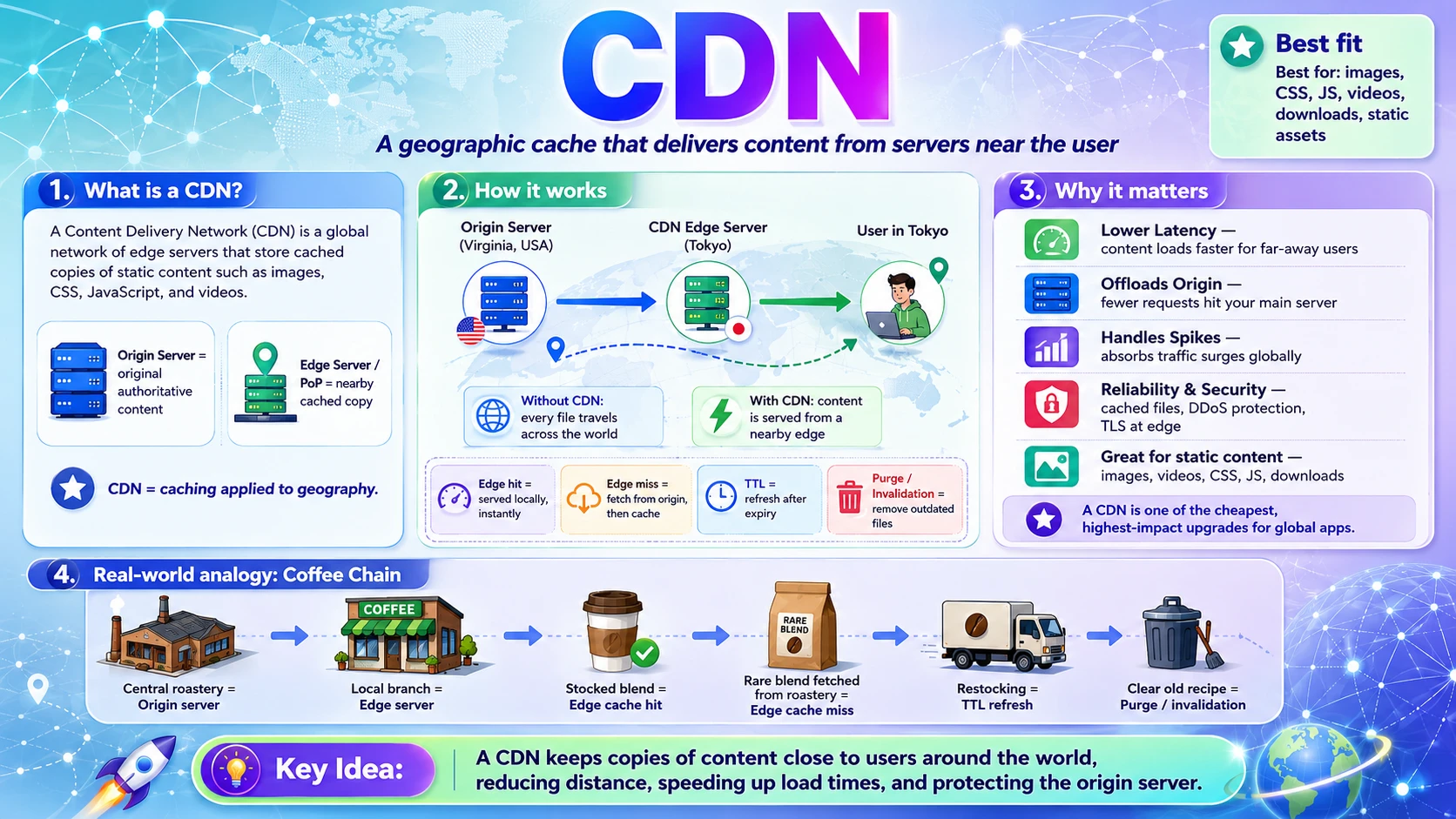
A Content Delivery Network (CDN) solves the distance problem. It's a globally distributed network of servers — called edge servers or points of presence (PoPs) — placed in hundreds of cities around the world. The CDN keeps copies of your static content (images, CSS, JavaScript, videos) on these edge servers. When the Tokyo shopper requests an image, it's served from an edge server in Tokyo — a few milliseconds away — instead of from Virginia.
Two terms anchor everything in this section. The origin server is your own server (or storage) that holds the original, authoritative copy of the content. The edge server is a CDN machine near the user that holds a cached copy. In fact, a CDN is really caching applied to geography — the same hit/miss/TTL ideas from the Caching sub-topic, now spread across the planet and focused on static files.
💡 A CDN is a geographic cache. Caching keeps data in memory to avoid a slow database; a CDN caches files on nearby servers to avoid a slow, long-distance network trip. Same core idea — keep a copy close to where it's needed — applied to physical distance.
3.2 💡 Why It Matters
For any application with users beyond a single city, a CDN is close to mandatory. The scale is staggering: Netflix delivers over 15% of the world's downstream internet traffic, almost entirely through its own CDN of edge servers placed inside ISP networks; Cloudflare and Akamai operate hundreds of points of presence serving trillions of requests a day. A CDN routinely cuts image and video load times from hundreds of milliseconds to single digits for far-away users.
- Latency — content is served from a server near the user, so distance stops dominating load time. This is the headline benefit.
- Offloads the origin — the CDN answers the vast majority of static requests, so your origin servers and bandwidth bill shrink dramatically.
- Scale & spikes — a global edge network absorbs traffic surges (a viral video, a product launch) that would flatten a single origin.
- Reliability & security — if the origin is briefly down, edges can still serve cached content; CDNs also absorb DDoS attacks and terminate TLS at the edge.
Why system design cares: in almost every design with a global audience or heavy media (photos, video, downloads), the answer to "how do users far away get this fast?" is a CDN. It pairs naturally with object storage — store the file once, let the CDN deliver it everywhere — and it's one of the cheapest, highest-impact additions you can make.
3.3 🏠 Real-world Analogy
Think of a global coffee chain with one central roastery that produces all its beans. If every customer had to order directly from the roastery and wait for shipping, coffee would be slow and expensive. Instead, the chain opens local branches in every city, each stocked with beans from the roastery. You walk into the branch near you and get your coffee in minutes. The roastery is the origin server; the local branches are the edge servers.
Each branch keeps a stock of the popular blends (cached content). If you order something a branch has, you're served instantly (an edge hit). If you order a rare blend the branch doesn't stock, it requests a batch from the roastery, serves you, and keeps some on hand for the next customer (an edge miss, then cached). Branches restock periodically so their beans don't go stale (TTL), and when the roastery changes a recipe, it tells the branches to clear the old stock (invalidation / purge).
| Coffee Chain World | CDN World | Meaning |
|---|---|---|
| 🏭 The central roastery | 🗄️ Origin server | Holds the original, authoritative content |
| 🏪 Local branch near you | 🌍 Edge server (PoP) | A nearby copy that serves you fast |
| ☕ Ordering a stocked blend | ✅ Edge cache hit | Served locally, instantly |
| 📦 Branch fetching a rare blend | ❌ Edge cache miss | Pulled from origin, then cached at edge |
| 🔁 Periodic restocking | ⏳ TTL refresh | Edge re-checks origin after expiry |
| 🧹 "Clear the old recipe" order | 🧽 Purge / invalidation | Force edges to drop outdated content |
The chain's genius is that customers never feel the distance to the roastery — the branch nearby handles almost everything, and the roastery only makes what the branches can't. A CDN gives your content that same network of always-nearby branches.
3.4 📖 Key Terms
| Term | Simple Definition | Quick Example |
|---|---|---|
| CDN | A global network of servers that deliver content close to users | CloudFront, Cloudflare, Akamai |
| Origin Server | Your server/storage holding the original content | An S3 bucket or your web server |
| Edge Server | A CDN server near users that caches content | A PoP in Tokyo |
| PoP (Point of Presence) | A physical CDN location, usually with many edge servers | 300+ PoPs worldwide |
| Edge Cache Hit | Content found on the nearby edge server | Image served from the local PoP |
| Edge Cache Miss | Edge lacks it, so it fetches from origin | First request in a region |
| Static Content | Files that don't change per request | Images, CSS, JS, videos, PDFs |
| Dynamic Content | Content generated per user/request | A personalised account page |
| TTL | How long an edge keeps content before re-checking origin | Cache an image for 24 hours |
| Purge / Invalidation | Forcing edges to drop cached content early | Clear a logo after a redesign |
| Cache-Control | HTTP header telling the CDN how to cache a response | max-age=86400 |
3.5 🔢 How It Works
Let us break a CDN into four pieces: the origin-and-edge setup, how a request is routed to the nearest edge, how the edge serves content (hit vs miss, pull vs push), and how content stays fresh through TTL and purging.
A. Origin & Edge
You keep the authoritative copy of your files on the origin — typically object storage (like S3) or your web server. You then put a CDN in front of it. Each of the CDN's hundreds of edge servers starts empty and fills up on demand with copies of the files users actually request in that region. The origin is written once; the edges are read many times, everywhere.
Crucially, you don't change your app much. You just serve your static assets from the CDN's domain (or point your domain at the CDN), and the CDN handles fetching from origin, caching at the edge, and routing users — all transparently.
The two roles have very different jobs, and telling them apart is the heart of this section:
| Aspect | Origin Server | Edge Server |
|---|---|---|
| Role | Holds the original, authoritative content | Holds a cached copy near users |
| How many | One (or a few, in a couple of regions) | Hundreds of PoPs worldwide |
| Owned by | You (your servers or object storage) | The CDN provider |
| What it stores | Everything — the full set of files | Only the hot subset requested in that region |
| Traffic it sees | Only misses and dynamic requests | The vast majority of user requests |
| Distance to user | Possibly far (one location) | Close — a few milliseconds away |
An origin can be almost anything that serves files: an object-storage bucket (S3, the most common), a web/application server, or a custom origin elsewhere. To protect it, large CDNs add tiered caching (also called origin shielding): edges don't each hit the origin directly on a miss — they fall back to a smaller set of regional "shield" caches, which hit the origin only if they too miss. So even if a file is missing from 300 edges, the origin is fetched from just once or twice, not 300 times. This keeps the origin's load tiny no matter how many edges exist.
B. Routing to the Nearest Edge
The magic is that a user automatically reaches a nearby edge without doing anything special. CDNs achieve this two common ways:
- Anycast — many edge servers share the same IP address, and internet routing naturally delivers each user to the closest one. The user connects to "the" address; the network picks the nearest physical machine.
- DNS-based geo-routing — when the user's browser looks up the CDN hostname, the CDN's DNS returns the IP of the edge nearest to them, based on their location.
Either way, the shopper in Tokyo is transparently connected to a Tokyo edge, and the shopper in London to a London edge — from the same URL. "Nearest" is usually measured by network distance (latency), not strictly geography.
C. Edge Hit, Edge Miss, Pull vs Push
Once a request reaches an edge, it's the same hit/miss logic as any cache — just geographic. On an edge hit, the file is already on that edge and returns immediately. On an edge miss, the edge fetches the file from the origin (once), serves it to the user, and stores it locally so the next request in that region is a hit.
How content first gets to the edge comes in two flavours:
- Pull CDN — edges fetch from origin lazily, on the first request (a miss). You just publish to origin; the CDN pulls as needed. Simplest and most common.
- Push CDN — you upload content to the CDN ahead of time. Good for large files you know will be requested (a new video release), avoiding a slow first-request miss.
D. Freshness — TTL, Cache-Control & Purging
Edges must know how long to keep a copy before checking the origin again. That's controlled by the Cache-Control HTTP header the origin sends with each file — its max-age sets the edge TTL:
When you change a file before its TTL expires — say you fix a logo — edges would keep serving the old one until it ages out. Two techniques fix this: purging (explicitly telling the CDN to drop a file from all edges immediately) and cache busting (changing the file's URL, e.g. logo.v2.png or app.abc123.js, so it's treated as a brand-new object). Cache busting is the standard for versioned assets because it sidesteps invalidation entirely.
📌 The freshness trick: give static assets a very long TTL and a versioned filename. Long TTL = maximum cache hits; a new filename on every change = instant "invalidation" with no purge needed. This is why build tools output files like main.9f2a1c.js.
3.6 🔀 Types & Variations
CDNs started as simple static-file delivery but have grown into a broad edge platform. These are the main jobs a modern CDN does.
Static Delivery
The classic job — caching images, CSS, JS, fonts, and downloads at the edge. Highest hit ratios and the biggest, easiest win.
Media Streaming
Delivering video and audio in chunks from nearby edges, so playback starts fast and doesn't buffer. Powers Netflix, YouTube-scale streaming.
Dynamic & Edge Compute
Speeding up non-cacheable requests via optimized routing, and running small functions at the edge (Cloudflare Workers, Lambda@Edge).
Security
Absorbing DDoS attacks, filtering traffic with a WAF, and terminating TLS at the edge — all before traffic reaches your origin.
Pull vs Push. Beyond what they deliver, CDNs differ in how content arrives: a pull CDN fetches from origin on the first miss (simplest, best for many files), while a push CDN has you upload content ahead of time (best for a few large, known files like a new video release).
3.7 🎨 Illustrated Diagram
The diagram shows users worldwide reaching their nearest edge server. Most requests are edge hits served locally; only a cache miss travels back to the single origin, which then fills that edge for everyone in the region.
Reading the diagram: the Tokyo user gets an instant edge hit — no trip to Virginia. The London edge is missing the file, so it fetches from origin once, then serves and caches it, so the next London user gets a hit too. The origin's job shrinks to filling edges on misses, not serving every user directly.
3.8 ✅ When to Use
A CDN is ideal for static content served to a geographically spread audience. It's the wrong tool for content that's personalised per request or that must be perfectly live.
| Use a CDN when… | Skip / limit the CDN when… |
|---|---|
| You serve static assets (images, CSS, JS, video, downloads) | Content is unique per request (personalised dashboards) |
| Users are spread across regions or countries | All users are in one location near your origin |
| Traffic is high or spiky and you want to offload the origin | Data must be real-time exact (live trading prices) |
| Content changes rarely, or you can version its URL | Content changes every second and can't be versioned |
| You want DDoS protection and edge TLS for free | Truly private data that shouldn't sit on shared edges |
A quick guide to what belongs on a CDN:
| Content | CDN? |
|---|---|
| Product images, logos, thumbnails | ✅ Yes — static, shared, huge win |
| CSS, JavaScript bundles, fonts | ✅ Yes — version the filename for easy busting |
| Videos and large downloads | ✅ Yes — offloads massive bandwidth |
| A logged-in user's personalised feed | ⚠️ Usually no — cache building blocks instead |
| A live stock ticker or bank balance | ❌ No — must be current, per-request |
Rule of thumb: put every static asset behind a CDN with a long TTL and versioned filenames — it's cheap and almost always helps. Leave dynamic, per-user, or must-be-live responses on the origin (or use edge compute for the parts that can be sped up). Store the file once in object storage, let the CDN deliver it everywhere.
3.9 🏗️ Real-world Example — A Tokyo Shopper Loads ShopEasy
ShopEasy's origin is in Virginia, but a shopper in Tokyo opens a product page. Follow how the CDN delivers a fast page without dragging every file across the Pacific:
| Step | Actor | What Happens |
|---|---|---|
| ① | 🗼 Shopper (Tokyo) | Requests the page; static asset URLs point at the CDN |
| ② | 🧭 CDN routing | Anycast/DNS sends her to the Tokyo edge, a few ms away |
| ③ | 🌍 Tokyo edge | Logo, CSS, and JS are already cached → instant edge hits |
| ④ | 🖼️ Tokyo edge | The product image is a miss (first request in Japan) → fetch from Virginia origin once |
| ⑤ | 🗄️ Origin (Virginia) | Sends the image with Cache-Control: max-age=86400; the edge caches it for 24h |
| ⑥ | 👥 Next Tokyo shoppers | All get the image as an edge hit — the origin is never touched again for a day |
| ⑦ | ⚙️ App server + cache | The dynamic bits (live price, stock) still come from the origin, sped up by the Redis cache from Sub-topic 2 |
The payoff: nearly the whole page loads from a server in Tokyo instead of Virginia — dropping load time from hundreds of milliseconds to single digits. The CDN handles the static bulk; the origin (with its cache) handles only the small dynamic part. Caching and CDN work together: one keeps data fast, the other keeps distance short.
3.10 ⚖️ Trade-offs
A CDN is one of the highest-value, lowest-effort upgrades for a global app — but it adds another cached layer with its own staleness and cost considerations:
| ✅ Advantages | ❌ Disadvantages |
|---|---|
| Low latency worldwide — content served from near the user | Stale content risk — edges can serve old files until TTL/purge |
| Origin offload — most static traffic never reaches your servers | Invalidation delay — purging across hundreds of edges isn't instant |
| Absorbs spikes & DDoS — the edge network takes the hit | Cost — CDN bandwidth is a real (though usually worthwhile) bill |
| Bandwidth savings — cheaper egress than serving from origin | Less useful for dynamic data — personalised/live content can't be edge-cached |
| Reliability — edges can serve cached content if origin is down | Debugging complexity — "which edge served this, and was it stale?" |
📌 Same tension as caching: a CDN trades freshness for speed and reach, just across geography instead of memory. Manage it the same way — long TTLs for things that rarely change, versioned URLs for instant updates, and never edge-cache truly dynamic or private data.
3.11 🚫 Common Mistakes
| # | ❌ Common Mistake | ✅ The Reality |
|---|---|---|
| 1 | Putting dynamic, per-user content on the CDN | Edge-caching a personalised page can serve one user's data to another. Only cache shared, static content; mark private responses no-store. |
| 2 | No cache-busting on updated assets | Reusing style.css after a change leaves users on the old cached file until TTL expires. Version the filename (style.abc123.css). |
| 3 | Setting TTLs too short | Tiny TTLs cause constant edge misses back to origin, defeating the CDN. Use long TTLs plus versioned URLs instead. |
| 4 | Relying on purge for every change | Purging hundreds of edges is slower and rate-limited. Prefer versioned filenames; reserve purge for emergencies. |
| 5 | Forgetting the origin still needs protecting | Misses and dynamic requests still hit origin. Keep origin scalable and cached; the CDN reduces load, it doesn't remove it. |
| 6 | Ignoring Cache-Control headers | Without correct headers the CDN may cache too long, too short, or not at all. The origin's headers are how you control edge behaviour. |
3.12 📝 Summary
- A CDN is a geographic cache — edge servers worldwide hold copies of static content close to users, beating the latency of distance.
- Origin vs edge — the origin holds the authoritative copy; edges serve cached copies and fetch from origin only on a miss.
- Users reach the nearest edge automatically — via Anycast or DNS geo-routing, from the same URL.
- Freshness via TTL + versioned URLs — long TTLs maximise hits; changing the filename gives instant, purge-free updates.
- Static yes, dynamic no — cache shared static assets at the edge; keep per-user and must-be-live content on the origin.
3.13 🏋️ Design Challenge
🎥 Challenge: Deliver a global video platform
You're launching a video platform with viewers on every continent. Videos are large; the homepage and thumbnails are shown to everyone; each user also has a private watch history. Think through the following:
- Which content goes on the CDN, and which stays on the origin?
- For a brand-new blockbuster release you know will be watched instantly, would you use a pull or push CDN — and why?
- You re-encode a video and must replace the old file. How do you make every edge serve the new version without a slow global purge?
- Where does the origin's own cache (from Sub-topic 1) still help, even with a CDN in front?
👁️ Show Answer
CDN vs origin: videos, thumbnails, the homepage assets, CSS/JS → CDN (static, shared, huge bandwidth). The private watch history and any personalised recommendations → origin (per-user, not edge-cacheable), though you can still cache their building blocks in Redis.
Push for the blockbuster: use a push CDN (pre-load the file to edges before launch). You know it'll be requested everywhere immediately, so pre-warming avoids a wave of first-request misses all hammering the origin at release time.
Replacing a video: don't purge — use cache busting. Give the re-encoded file a new URL (e.g. movie_v2.mp4 or a content hash) so every edge treats it as a new object and fetches it fresh, while the old URL harmlessly ages out. Instant, global, no purge storm.
Origin cache still helps: on edge misses and for the dynamic requests the CDN can't cache (watch history, recommendations), the origin's Redis cache keeps those responses fast and shields the database. CDN handles distance; the cache handles repeat work — you want both.
3.14 ☁️ Cloud Service Mapping
Every major cloud (and dedicated CDN providers) offers a managed global edge network you point your content at:
| Need | AWS (Primary) | GCP | Azure |
|---|---|---|---|
| Managed CDN — global static delivery | Amazon CloudFront | Cloud CDN | Azure Front Door / CDN |
| Edge compute — run code at the edge | Lambda@Edge / CloudFront Functions | Cloud Functions (edge) | Azure Functions (edge) |
Simplest AWS picture: store static assets in S3, put CloudFront in front as the CDN, set long Cache-Control TTLs with versioned filenames, and serve dynamic requests from your origin (backed by the ElastiCache Redis cache from Sub-topic 2). Dedicated providers like Cloudflare and Akamai offer the same, often with more edge locations. Distance handled by the CDN, repeat work handled by the cache.
📚 References
- System Design Interview (Vol. 1) — Alex Xu — Uses caching and a CDN as two of the earliest additions when scaling a web system.
- Designing Data-Intensive Applications — Martin Kleppmann — Covers caching layers, consistency, and the cost of stale data.
- Cloudflare Learning Center — Excellent beginner-friendly explanations of CDNs, edge servers, and how content is cached close to users.
- AWS — Amazon CloudFront & ElastiCache docs — Practical references for running a managed CDN and in-memory cache.
- Redis Documentation — The canonical guide to in-memory caching, TTLs, and eviction policies.