System Design Phase 1 — Part 5: Scalability Basics
📚 Table of Contents
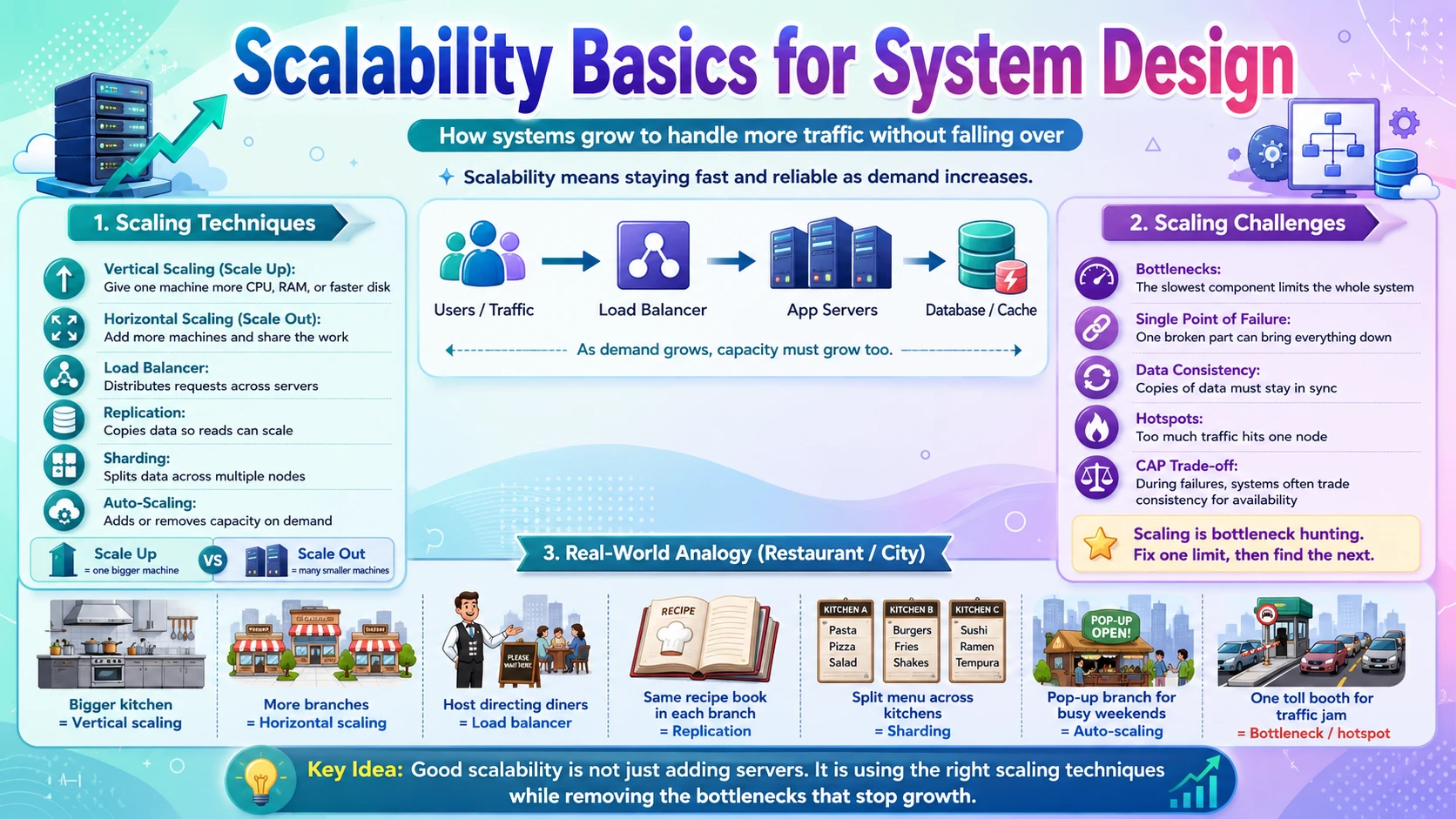
A system that runs perfectly for a thousand users can collapse the moment a million show up. Scalability is the property that decides whether your system grows gracefully with demand or falls over under it — and it's one of the most important themes in all of system design. This post covers two sides of the same coin. You will start with Scaling Techniques — the concrete tools used to handle more load: scaling a server up versus adding more servers, spreading traffic with a load balancer, copying data with replication, splitting it with sharding, and growing capacity automatically with auto-scaling. Then you will learn about Scaling Challenges — why scaling is hard in practice: bottlenecks, single points of failure, keeping data consistent across copies, uneven hotspots, and the fundamental CAP trade-off. Each topic is explained with real-world analogies, step-by-step examples, and clear diagrams — starting from zero.
📈 1. Scaling Techniques
When traffic grows, you have a small toolbox of proven techniques to grow with it. In this section you will learn the two fundamental directions of scaling — vertical (a bigger machine) and horizontal (more machines) — and then the techniques that make horizontal scaling work: load balancing to spread requests, replication to copy data for more reads, sharding to split data across nodes for more writes, and auto-scaling to add and remove capacity automatically as demand changes.
1.1 🎯 Introduction
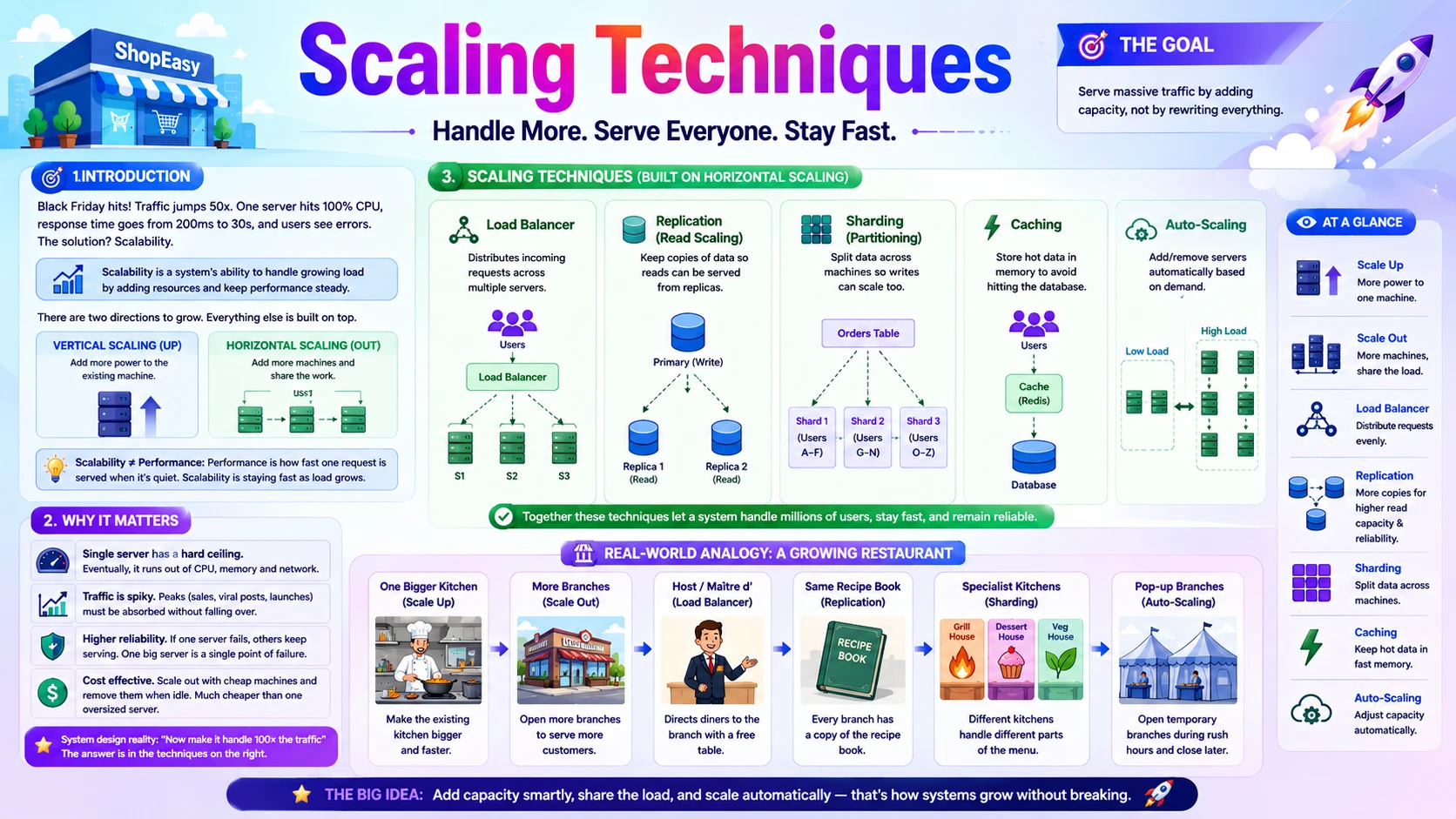
It's Black Friday, and our online store ShopEasy is about to have its busiest day of the year. On a normal Tuesday one server comfortably handles the traffic. But at 9 AM on Black Friday, requests arrive 50 times faster than usual. That single server's CPU hits 100%, response times climb from 200 milliseconds to 30 seconds, and customers start seeing error pages. Nothing is broken — the code is fine, the database is fine — there simply isn't enough capacity to serve everyone at once.
Scalability is a system's ability to handle growing load by adding resources. A scalable system responds to that Black Friday surge by getting more capacity — a bigger machine, or more machines — and keeps serving customers as if it were a quiet Tuesday. A system that is not scalable can only be made faster by rewriting it, which you can't do in the middle of a sale.
There are exactly two directions you can grow in, and every technique in this section is built on top of them:
- Scale vertically (up) — give the existing machine more power: more CPU, more RAM, faster disks. One bigger box.
- Scale horizontally (out) — add more machines and share the work between them. Many ordinary boxes.
Almost everything else — load balancers, replication, sharding, auto-scaling — exists to make horizontal scaling actually work. This section walks through each one.
💡 Scalability is not the same as performance. Performance is how fast one request is served when the system is quiet. Scalability is whether it stays fast as load grows. A fast system that slows to a crawl under load is performant but not scalable.
1.2 💡 Why It Matters
Scalability is what separates a hobby project from a system that serves the world. The scale that real companies handle is hard to imagine on a single machine: Google processes over 8.5 billion searches a day; Amazon during Prime Day peaks at millions of requests per second; WhatsApp famously served 900 million users with an engineering team of around 50, entirely because their architecture scaled horizontally. No single server on earth could do any of that — the only way is to spread the work across many machines.
- A single server has a hard ceiling — even the biggest machine money can buy runs out of CPU, memory, and network eventually.
- Load is rarely steady. Traffic spikes — Black Friday, a viral post, a product launch — and a system must absorb the peak without falling over.
- Scaling horizontally also buys reliability: with many servers, one can fail and the others keep serving. One big server is a single point of failure.
- Cost matters. Scaling out with cheap commodity machines and removing them when idle is far cheaper than paying for one permanently oversized server.
Why system design cares: almost every design question ends with "now make it handle 100× the traffic." The answer is always some combination of the techniques in this section — spread the load, replicate the reads, shard the writes, and scale automatically. Knowing which to reach for, and why, is the core skill.
1.3 🏠 Real-world Analogy
Picture a popular restaurant that keeps getting busier. There are two ways to serve more diners. The first is to make the one kitchen bigger and faster — buy a larger stove, hire a superstar chef, add counter space. That's vertical scaling: one location, more powerful. It works up to a point, but eventually the kitchen can't physically grow and the star chef can only cook so fast.
The second way is to open more branches of the restaurant across the city, all serving the same menu. That's horizontal scaling: many ordinary kitchens instead of one giant one. Now you need a host at a central number who sends each customer to the branch with a free table — that's the load balancer. Every branch needs the same recipes, so you copy the recipe book to each one — that's replication. And when a citywide festival triples demand, you open pop-up branches for the weekend and close them Monday — that's auto-scaling.
| Restaurant World | Scaling World | Meaning |
|---|---|---|
| 🍳 One bigger, faster kitchen | ⬆️ Vertical scaling (scale up) | Add power to a single machine |
| 🏢 More branches of the restaurant | ➡️ Horizontal scaling (scale out) | Add more machines sharing the load |
| 🧑💼 Host directing diners to a free branch | ⚖️ Load balancer | Spreads requests across servers |
| 📖 Same recipe book in every branch | 📑 Replication | Copies of the data on each node |
| 🍽️ Splitting the menu across specialist kitchens | 🧩 Sharding | Splitting data/work across nodes |
| ⛺ Pop-up branches for a festival weekend | 🔄 Auto-scaling | Add/remove capacity on demand |
The lesson every growing restaurant learns is the same one every growing system learns: making one kitchen bigger only takes you so far. Sooner or later you open more branches — and then the interesting work becomes coordinating them.
1.4 📖 Key Terms
| Term | Simple Definition | Quick Example |
|---|---|---|
| Scalability | Handling more load by adding resources | Serving 50× traffic on Black Friday |
| Vertical Scaling | Making one machine more powerful | Upgrade to more CPU and RAM |
| Horizontal Scaling | Adding more machines to share load | Run 20 app servers instead of 1 |
| Load Balancer | Spreads incoming requests across servers | Nginx, AWS ELB |
| Replication | Keeping copies of data on several nodes | Read replicas of a database |
| Read Replica | A copy that serves reads to offload the primary | 5 replicas behind one primary DB |
| Sharding | Splitting data across nodes by a key | Users A–M on shard 1, N–Z on shard 2 |
| Auto-scaling | Adding/removing servers automatically by demand | Scale out at 70% CPU |
| Elasticity | Scaling up and back down as load changes | Grow for the peak, shrink overnight |
| Stateless Service | A server that keeps no client data between requests | Any app server can handle any request |
| Throughput | How much work the system handles per unit time | Requests per second (RPS) |
1.5 🔢 How It Works
Let us walk through the five techniques in the order you'd typically reach for them: scale up first, then scale out behind a load balancer, then replicate to handle more reads, shard to handle more writes, and finally automate the whole thing with auto-scaling.
A. Vertical Scaling — A Bigger Machine
The simplest response to load is to move your app onto a more powerful machine — double the CPU cores, add RAM, switch to faster SSDs. Nothing about your code or architecture changes; you just run the same thing on stronger hardware. This is the right first move because it's zero engineering effort.
The catch is a hard ceiling: there is a biggest machine you can buy, and cost rises sharply — a machine with twice the power often costs far more than twice as much. Worse, that one big machine is still a single point of failure: if it dies, everything is down. Vertical scaling buys you time, not a long-term answer.
B. Horizontal Scaling & Load Balancing
The real path to scale is to run many servers and split the traffic between them. But now a new question appears: when a request arrives, which server handles it? That's the job of a load balancer — a component that sits in front of your servers and forwards each incoming request to one of them, spreading the load evenly.
Load balancers use simple strategies to pick a server: round-robin (each server in turn), least-connections (whichever is least busy), or hashing by some key. This only works cleanly if your app servers are stateless — as covered in the Core Backend Concepts post — so any server can handle any request. If a server holds a user's session in memory, the load balancer can't freely route around it.
📌 Stateless is the key that unlocks horizontal scaling. When servers keep no per-user state, they're interchangeable — you can add, remove, or replace them at will, and the load balancer can send any request anywhere. Push session data to a shared cache or a token instead.
C. Replication — Scaling Reads
Adding app servers is easy because they're stateless. The database is harder, because it holds state. The first tool for scaling a database is replication: keep one primary node that accepts writes, and several read replicas that each hold a full copy of the data and serve read queries.
Most applications read far more than they write — think how many times a product page is viewed versus purchased. By sending all reads to replicas and only writes to the primary, you multiply read capacity by adding replicas. The primary streams its changes to the replicas continuously.
The subtlety: replication takes a little time, so a replica can be a fraction of a second behind the primary. A read right after a write might return slightly stale data — a consistency wrinkle we'll dig into in the next sub-topic.
D. Sharding — Scaling Writes
Replication multiplies reads, but every write still goes through the single primary — so writes stay capped. When one machine can no longer hold all the data or absorb all the writes, you shard (also called horizontal partitioning): split the data across multiple databases, each holding a slice of the rows and handling its own reads and writes.
You split by a shard key. For ShopEasy users you might shard by the first letter of the user id — users A–M live on shard 1, N–Z on shard 2 — so each shard carries roughly half the data and half the writes. Add more shards and total write capacity keeps growing.
Sharding is the most powerful scaling tool and also the most painful. Queries that need data from many shards (like "count all orders") become hard, cross-shard transactions are tricky, and a badly chosen shard key can pile most traffic onto one shard — the hotspot problem covered next sub-topic. Shard only when replication is no longer enough.
E. Auto-scaling & Elasticity
The final piece is doing all this automatically. Instead of manually adding servers before Black Friday and removing them after, auto-scaling watches a metric — CPU usage, request rate, queue length — and adds servers when it crosses a threshold, then removes them when load drops. This two-way ability to grow and shrink is called elasticity.
A typical rule: "keep between 3 and 30 servers; add one whenever average CPU exceeds 70% for 5 minutes; remove one when it drops below 30%." You pay only for what you use during the peak, and scale back to a handful of servers overnight. Auto-scaling only works on the stateless tier — the interchangeable servers behind the load balancer — which is exactly why statelessness matters so much.
The full picture: a load balancer spreads traffic across an auto-scaling group of stateless app servers; those servers read from database replicas and write to a primary (or to shards when writes outgrow one primary). That single sentence describes the backbone of almost every large-scale web system.
1.6 🔀 Types & Variations
Scaling techniques group into two buckets: the two fundamental directions, and the techniques that make scaling out work in practice.
A. Two Directions
Vertical (Scale Up)
One machine, more power.
- Simple — no code changes
- Hits a hard ceiling; costly
- Still a single point of failure
Horizontal (Scale Out)
Many machines sharing load.
- Near-unlimited growth
- Adds reliability (no single box)
- Needs a load balancer + stateless apps
B. Enabling Techniques
Load Balancing
Spreads requests across servers (round-robin, least-connections). The front door to a horizontal fleet.
Replication
Full copies of the data on read replicas. Multiplies read capacity behind one write primary.
Sharding
Splits data across nodes by a shard key. Scales writes and storage past a single machine.
Auto-scaling
Adds and removes servers automatically by demand. Turns manual capacity planning into elasticity.
They stack, not compete. A real system uses several at once: scale up a little, scale out behind a load balancer, replicate the database for reads, shard it for writes, and let auto-scaling handle the daily peaks. Each technique removes a different ceiling.
1.7 🎨 Illustrated Diagram
The diagram shows the classic scalable backbone. Clients hit a load balancer, which spreads requests across a horizontally-scaled, auto-scaling group of stateless app servers. Those servers send writes to the primary database and reads to its replicas.
Reading the diagram: every layer scales on its own. Need more request capacity? Add app servers — the load balancer picks them up. Need more read capacity? Add replicas. The dotted lines show the primary streaming its changes to the replicas so they stay in sync.
1.8 ✅ When to Use
The first decision is vertical versus horizontal. Vertical is quick but capped; horizontal is more work but scales far. Here's how to choose.
| Scale vertically (up) when… | Scale horizontally (out) when… |
|---|---|
| Load is modest and you just need more headroom fast | Load is large or growing and one machine won't keep up |
| The workload is hard to distribute (some legacy apps) | The app is stateless and easy to run in many copies |
| You want a quick fix with zero code changes | You need reliability — no single machine can take everything down |
| Cost of a bigger box is still reasonable | Cheap commodity machines plus elasticity are more cost-effective |
For the data layer, the order is almost always the same:
| Technique | Reach for it when… |
|---|---|
| Read replicas | Reads dominate and the primary is busy serving them — the usual first database scaling step |
| Caching | The same data is read repeatedly — put it in front of the database (a dedicated Phase 2 topic) |
| Sharding | Writes or data volume exceed what one primary can hold — the last resort, highest complexity |
| Auto-scaling | Traffic is variable or spiky and you want capacity to track demand automatically |
Rule of thumb: scale up first for a quick win, then scale out for real growth. On the database, add replicas and a cache before you ever shard — sharding is powerful but the hardest to undo, so postpone it until simpler options run out.
1.9 🏗️ Real-world Example — Scaling ShopEasy for Black Friday
Follow ShopEasy as it grows from a single server to a system that survives a 50× Black Friday surge — each step adding one technique to remove the next bottleneck:
| Step | Action | What It Solves |
|---|---|---|
| ① | 🖥️ Start on one server | Fine for launch-day traffic; app + database on a single box |
| ② | ⬆️ Scale up the machine | Traffic doubled; a bigger box buys headroom with zero code changes — but a ceiling looms |
| ③ | ⚖️ Add a load balancer + more app servers | Stateless app servers now scale horizontally; the LB spreads requests across all of them |
| ④ | 📑 Add database read replicas | Product pages (reads) were overloading the database; replicas absorb the read traffic |
| ⑤ | 🔄 Turn on auto-scaling | The Black Friday spike is handled automatically — servers scale from 3 to 30 and back |
| ⑥ | 🧩 Shard the orders database | Write volume finally outgrew one primary; sharding by user splits writes across nodes |
New term above? A cache would usually sit between steps ④ and ⑤ to serve hot product data without touching the database at all — it gets its own dedicated post in Phase 2. For now, notice the pattern: each step removes the current bottleneck, and you only take the next (harder) step when the previous one runs out.
1.10 ⚖️ Trade-offs
Horizontal scaling is the path to serving the world, but distributing a system across many machines is never free. Here's what you gain and what you pay:
| ✅ Advantages of scaling out | ❌ Disadvantages of scaling out |
|---|---|
| Near-unlimited growth — add nodes to keep raising the ceiling | More complexity — load balancers, replicas, and shards to run and monitor |
| Higher reliability — one node can fail without downing the system | Data consistency is harder — copies can briefly disagree |
| Cost efficiency — cheap commodity machines, released when idle | Distributed bugs — network failures and partial outages appear |
| Elasticity — capacity tracks demand automatically | Harder queries — joins and transactions across shards are painful |
| No hard ceiling — unlike a single machine, the fleet keeps growing | Operational overhead — deployment and debugging span many nodes |
📌 The core tension: scaling out trades simplicity for capacity and resilience. The moment your data lives on more than one machine, you inherit a set of hard problems — which is exactly the subject of the next sub-topic, Scaling Challenges.
1.11 🚫 Common Mistakes
| # | ❌ Common Mistake | ✅ The Reality |
|---|---|---|
| 1 | Scaling before you need to | Sharding a database with 10,000 users adds huge complexity for no benefit. Scale when data shows a real limit — not preemptively. |
| 2 | Only scaling the app servers | Adding app servers is easy, but they all hit the same database. The database is usually the real bottleneck — scale it too. |
| 3 | Keeping state on the app server | Sessions in server memory break horizontal scaling and auto-scaling. Externalize state to a token or shared cache. |
| 4 | Reaching for sharding first | Sharding is the last resort. Try vertical scaling, read replicas, and caching before splitting your data across nodes. |
| 5 | Picking a bad shard key | A key that concentrates traffic (e.g. sharding by date, so "today" is one hot shard) defeats the purpose. Choose a key that spreads load evenly. |
| 6 | Forgetting the load balancer is also a SPOF | A single load balancer can itself fail. Production setups run redundant balancers so the entry point isn't a single point of failure. |
1.12 📝 Summary
- Two directions — scale vertically (a bigger machine, simple but capped) or horizontally (more machines, unlimited but complex).
- Load balancing spreads requests — the front door to a horizontal fleet; it needs stateless app servers to work freely.
- Replication scales reads — read replicas copy the data; writes still go to one primary.
- Sharding scales writes — split data across nodes by a shard key; powerful but the hardest to manage.
- Auto-scaling adds elasticity — capacity grows and shrinks with demand automatically, on the stateless tier.
1.13 🏋️ Design Challenge
🎬 Challenge: Scale a video-streaming site for a viral moment
A small video site normally serves 5,000 viewers on one server. A creator's video goes viral and 2 million people arrive in an hour. Think through the following:
- Would you scale up, out, or both — and in what order?
- What single component must sit in front of your servers, and what does it need from them to work?
- Viewers mostly read (watch), rarely write (comment). How does that shape your database scaling?
- The spike lasts hours, then fades. How do you avoid paying for 400 servers next week?
👁️ Show Answer
Up, then out: a quick vertical bump buys minutes, but 400× traffic can only be met by scaling out — many stateless app servers running in parallel. Do both, but the real answer is horizontal.
The front component: a load balancer spreads viewers across all servers. For it to route freely, the app servers must be stateless — no viewer session pinned to one box — so any server can serve any request.
Read-heavy database: since viewers overwhelmingly read, add read replicas (and a cache in front) so watch traffic never touches the write primary. Comments are rare writes the single primary handles easily — no sharding needed yet.
Don't overpay: use auto-scaling so the fleet grows during the spike and automatically shrinks back to a handful of servers once traffic fades. You pay for the peak only while it lasts. (The video files themselves would be served from object storage + a CDN, not your app servers.)
1.14 ☁️ Cloud Service Mapping
Clouds provide managed building blocks for each horizontal-scaling technique, so you configure them rather than build them:
| Technique | AWS (Primary) | GCP | Azure |
|---|---|---|---|
| Load balancer — spread requests | Elastic Load Balancing (ALB/NLB) | Cloud Load Balancing | Azure Load Balancer |
| Auto-scaling — grow/shrink the fleet | EC2 Auto Scaling | Managed Instance Groups | Virtual Machine Scale Sets |
| Database read replicas — scale reads | RDS / Aurora Read Replicas | Cloud SQL / AlloyDB replicas | Azure SQL read replicas |
Simplest AWS picture: put your stateless app servers in an EC2 Auto Scaling group behind an Application Load Balancer, and add RDS/Aurora read replicas for read traffic. Set a target like 70% CPU and the fleet grows for Black Friday and shrinks overnight — horizontal scaling, fully managed.
🧗 2. Scaling Challenges
The techniques in the last section make a system bigger — but the moment work and data are spread across many machines, a new set of hard problems appears. In this section you will learn why scaling is genuinely difficult: how one slow component becomes a bottleneck that caps the whole system, why a single point of failure can take everything down, why keeping data consistent across copies is so tricky, how uneven hotspots ruin an otherwise balanced design, and the fundamental CAP trade-off that forces every distributed system to choose between consistency and availability when the network breaks.
2.1 🎯 Introduction
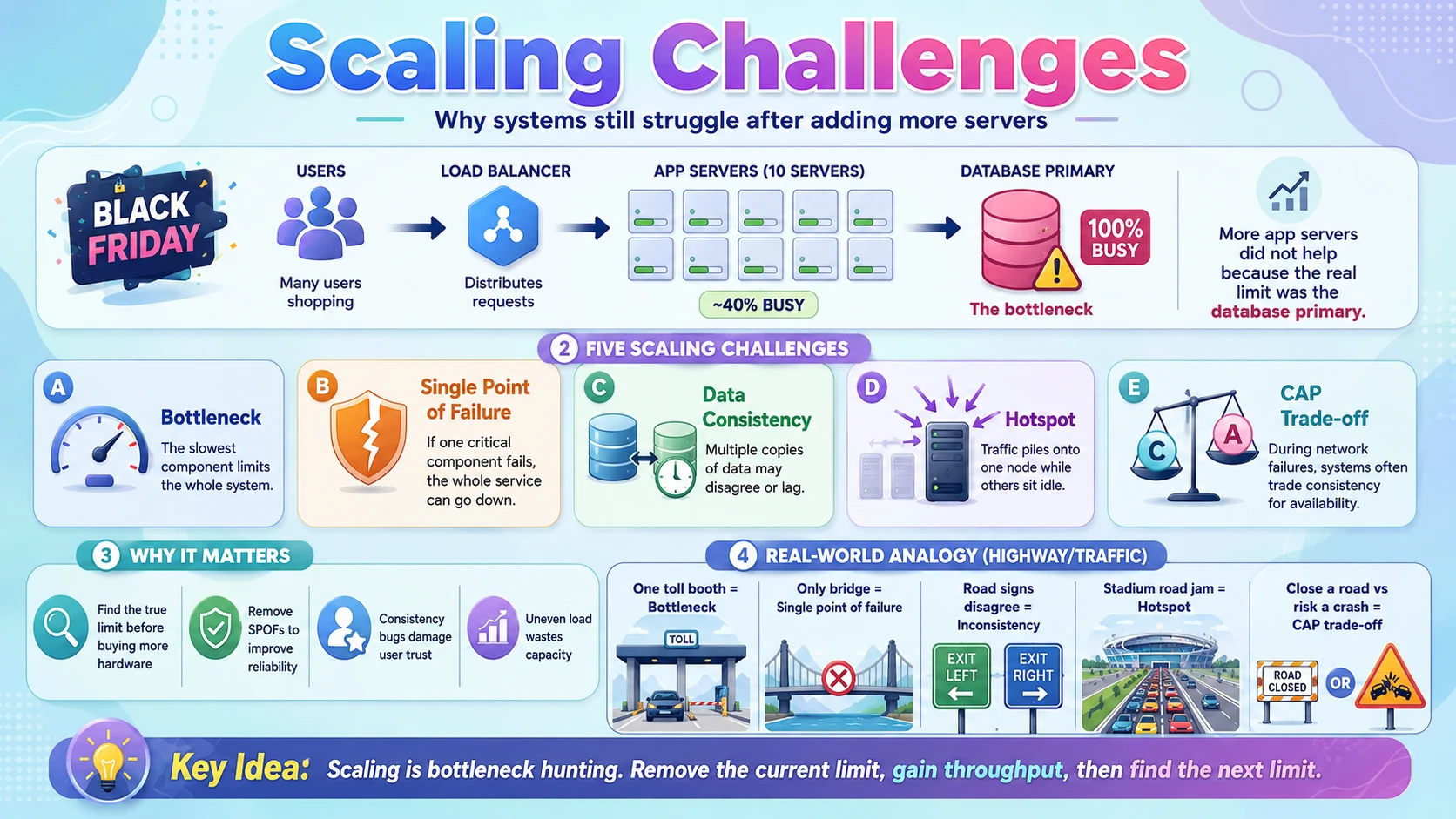
ShopEasy did everything right for Black Friday — a load balancer, twenty app servers, database replicas, auto-scaling. Yet at the peak, checkouts still slowed to a crawl. The app servers were barely at 40% CPU. The problem was that every one of those twenty servers wrote to the same single database primary, and that one machine was maxed out. Adding more app servers did nothing, because the real limit was somewhere else entirely.
That is the essence of scaling challenges: a system is only as scalable as its least scalable part. You can scale nine components perfectly, but if the tenth can't keep up, it becomes a bottleneck that caps the whole system. Scaling is less about making things bigger and more about hunting down and removing these limits, one at a time — and each fix often reveals the next.
This section covers the recurring challenges that make scaling hard in the real world:
- Bottlenecks — the one component that limits everything else.
- Single points of failure — one component whose failure takes down the whole system.
- Data consistency — keeping many copies of data in agreement.
- Hotspots — load piling onto one node instead of spreading evenly.
- The CAP trade-off — the unavoidable choice between consistency and availability when the network fails.
💡 Scaling is bottleneck hunting. There is always a limiting component. Remove it and throughput jumps — until the next one appears. Good scaling work is a continuous cycle of finding the current ceiling and raising it.
2.2 💡 Why It Matters
These challenges are not theoretical — they cause the outages you read about. When AWS has a regional incident, a huge slice of the internet goes down because so many systems shared one dependency. Companies obsess over these limits: Amazon long ago found that every 100 ms of extra latency cost about 1% of sales; a bottleneck that adds seconds under load isn't just slow, it's lost revenue. And a single point of failure that takes a payment system offline for an hour can cost millions.
- Throwing hardware at a system that has a bottleneck wastes money and fixes nothing — you must find the actual limit first.
- A missed single point of failure turns a minor hardware fault into a full outage; reliability at scale means having no such component.
- Consistency bugs are the worst kind — a user sees their own change disappear, an item is sold twice, a balance is briefly wrong. They're hard to reproduce and erode trust.
- Hotspots mean you've paid for 100 nodes but one of them is on fire while the rest idle — capacity you can't actually use.
Why system design cares: anyone can say "add more servers." The real signal of understanding is naming what won't scale — the shared database, the single load balancer, the stateful node — and explaining the consistency and availability trade-offs of fixing it. That's what this section trains.
2.3 🏠 Real-world Analogy
Think of a highway system at rush hour. You can add as many lanes as you like, but if they all funnel into a single toll booth, traffic backs up for miles — the toll booth is the bottleneck, and widening the road behind it changes nothing. If that toll booth is the only way through and it breaks, the whole route is closed — a single point of failure.
Now suppose the city posts road signs to balance traffic across routes, but the signs on different streets disagree — one says "bridge open," another says "bridge closed." Drivers get conflicting information: that's a consistency problem, where different copies of the truth don't match. And when everyone piles onto the one road past a stadium on game night while other roads sit empty, that's a hotspot — uneven load, not total load, is the problem.
| Highway World | Scaling World | Meaning |
|---|---|---|
| 🚧 One toll booth all lanes funnel into | 🔴 Bottleneck | The slowest part caps total flow |
| 🌉 The only bridge across the river | 💥 Single point of failure | Its failure closes the whole route |
| 🪧 Road signs that disagree | 🔀 Inconsistency | Copies of the truth don't match |
| 🏟️ Everyone on the one stadium road | 🔥 Hotspot | Load concentrates on one node |
| 🚗 Choosing to close a road vs risk a crash | ⚖️ CAP trade-off | Consistency vs availability under failure |
City planners spend their careers on exactly these problems — not on building more roads, but on removing chokepoints, adding alternate routes, and keeping the signs in sync. Scaling a system is the same discipline applied to servers and data.
2.4 📖 Key Terms
| Term | Simple Definition | Quick Example |
|---|---|---|
| Bottleneck | The component that limits the whole system's throughput | One DB primary all writes go through |
| Single Point of Failure (SPOF) | A component whose failure takes the system down | A lone load balancer or database |
| Redundancy | Running spare copies so one failure isn't fatal | Two load balancers, standby DB |
| Failover | Automatically switching to a standby when one fails | Promote a replica to primary |
| Consistency | All copies of data showing the same value | Every replica agrees on a balance |
| Replication Lag | Delay before a write reaches all replicas | A reply not yet visible on a replica |
| Hotspot | One node getting a disproportionate share of load | A celebrity's shard overwhelmed |
| Cascading Failure | One failure overloading others, spreading the outage | A dead node floods the survivors |
| CAP Theorem | Under a network partition, pick consistency or availability | Reject writes, or accept stale data |
| Partition (network) | Nodes that can't talk to each other for a time | A link between data centres drops |
| Backpressure | Slowing intake when downstream can't keep up | A queue that rejects when full |
2.5 🔢 How It Works
Let us examine each challenge in turn: how a bottleneck caps the system, why single points of failure are so dangerous, why consistency gets hard once data is copied, how hotspots form, and the CAP trade-off that ties consistency and availability together.
A. Bottlenecks
Every system has one component that gives out first under load — that's the bottleneck, and it sets the ceiling for everything else. It doesn't matter how fast your app servers are if they all wait on one overloaded database; total throughput equals the throughput of the slowest link in the chain.
The trap is fixing the wrong thing. Engineers often add app servers because that's easy, when the real limit is the database, the network, or a slow external API. The discipline is to measure first — find where requests actually pile up — then scale that specific component. Fix one bottleneck and throughput jumps until the next one appears; the database bottleneck is simply the most common, which is why replicas, caching, and sharding exist.
📌 Amdahl's law, in plain words: the part you can't parallelise limits your total speedup. If 10% of the work funnels through one shared resource, no amount of extra servers gets you past roughly a 10× improvement. Attack the shared, un-splittable part.
B. Single Points of Failure
A single point of failure (SPOF) is any component that, if it dies, brings the whole system down because there's only one of it. The lone database primary, a single load balancer, one shared cache — each is a SPOF. Scaling for throughput and scaling for reliability are different goals: twenty app servers give you throughput, but if they all depend on one database, you still have a SPOF.
The cure is redundancy plus failover: run at least two of every critical component, and detect a failure and switch to the standby automatically. A database keeps a standby replica ready to be promoted to primary; load balancers run in redundant pairs. The goal is that no single machine's death is ever fatal.
C. Data Consistency
The techniques that scale reads — replication — create the hardest problem: keeping copies in agreement. When you write to the primary, it takes time to copy that change to every replica. That delay is replication lag, and during it a read from a replica returns stale data.
Concretely: a user updates their profile photo (write → primary), then reloads the page (read → replica that hasn't caught up) and sees the old photo. Nothing is broken, but the user is confused. Systems resolve this by choosing a consistency level: strong consistency (always read the latest, even if slower) or eventual consistency (accept brief staleness for speed and availability). A common fix is "read your own writes" — route a user's reads to the primary right after they write.
D. Hotspots
Splitting data across shards only helps if the load spreads evenly. A hotspot is when one shard or node receives far more traffic than the others — so you've added ten machines but one is overwhelmed while nine idle. Hotspots usually come from a poor shard key or naturally skewed data.
Classic examples: sharding by date means today's shard takes nearly all the writes while old shards sit cold. Sharding social data by user means a celebrity with 100 million followers hammers one shard. Fixes include choosing a high-cardinality, evenly-distributed key, hashing the key to scatter load, or giving the hot item special handling (a dedicated cache or its own shard).
E. The CAP Theorem
CAP is the fundamental law of distributed data. It says that when a network partition happens — some nodes can't talk to each other — a system can guarantee only one of two things, not both:
- Consistency (C) — every read sees the latest write, or an error. To guarantee this during a partition, you must refuse requests the isolated node can't answer correctly.
- Availability (A) — every request gets a (non-error) response. To guarantee this, an isolated node must answer from possibly stale data.
Since networks will partition, the real choice is C vs A when they do. A bank balance chooses consistency (better to reject a request than show wrong money); a social feed chooses availability (better to show a slightly old feed than an error page). This is the same strong-vs-eventual consistency dial from the database post, now framed as a hard theorem.
CAP in one line: when the network breaks, would you rather be right (consistent, may reject requests) or up (available, may serve stale data)? There is no third option — and no system escapes the choice.
2.6 🔀 Types & Variations
The CAP trade-off gives us a useful way to classify real distributed data stores by which guarantee they favour when the network partitions.
CP — Consistent
Favours correctness; may reject requests during a partition.
- Examples: traditional SQL (with sync replication), MongoDB, HBase
- Use for: payments, inventory, bookings
AP — Available
Favours uptime; serves possibly-stale data during a partition.
- Examples: Cassandra, DynamoDB, Riak
- Use for: feeds, carts, counters, catalogs
CA — Single-node
Consistent and available — but only when there's no partition to survive.
- Examples: a single non-distributed database
- Reality: not an option once data spans machines
Nuance: real systems aren't purely CP or AP — many let you tune consistency per request (e.g. Cassandra's tunable consistency, DynamoDB's optional strongly-consistent reads). CAP describes behaviour during a partition; the rest of the time, a well-built system delivers both. Think of it as which way the system leans when forced to choose.
2.7 🎨 Illustrated Diagram
The diagram shows the CAP choice in action. The network link between two nodes has broken (a partition), and a client writes to Node A. Node B can no longer hear about that write — so the system must choose: stay consistent (Node B rejects reads it can't verify) or stay available (Node B answers with stale data).
Reading the diagram: the broken link means Node B is out of date. There is no way for B to be both correct and responsive — it either refuses (consistency) or answers with old data (availability). The partition forces the choice; the system's design decides which way it goes.
2.8 ✅ When to Use
These aren't techniques you "use" — they're pitfalls you address. The practical skill is knowing which challenge to prioritise for a given system, and which side of the CAP dial to pick.
| Prioritise consistency (CP) when… | Prioritise availability (AP) when… |
|---|---|
| Money, inventory, or bookings are involved | Brief staleness is harmless (feeds, likes, view counts) |
| Showing wrong data is worse than showing an error | An error page is worse than slightly old data |
| Double-spending or overselling must be impossible | The system must stay up through partial outages |
| Users must always see their own latest change | Global scale and low latency matter most |
For the other challenges, the guidance is more direct:
| Challenge | Address it by… |
|---|---|
| Bottleneck | Measuring to find the real limit, then scaling that specific component — never guessing |
| Single point of failure | Running redundant copies of every critical component with automatic failover |
| Hotspot | Choosing an even, high-cardinality shard key; hashing; special-casing hot items with a cache |
| Replication lag | Reading from the primary for read-your-own-writes, or accepting eventual consistency where safe |
Rule of thumb: assume every component will fail and every network will partition, then design so neither is fatal — redundancy for failures, an explicit CAP choice for partitions. Pick consistency for anything involving money, availability for anything involving engagement.
2.9 🏗️ Real-world Example — Diagnosing ShopEasy's Slowdown
Back to the opening puzzle: ShopEasy scaled its app tier but checkouts still crawled. Follow the on-call engineer as they hunt the real limits, hitting one challenge after another:
| Step | Finding | Challenge & Fix |
|---|---|---|
| ① | 📊 App servers at 40% CPU, yet checkouts are slow | Bottleneck — the limit isn't the app tier; keep looking |
| ② | 🗄️ The single DB primary is at 100%, all writes queue on it | Bottleneck — shard the orders DB so writes spread across nodes |
| ③ | 🔥 After sharding by date, today's shard is overwhelmed | Hotspot — re-shard by hashed user_id for an even spread |
| ④ | 👤 A user updates an address, reloads, sees the old one | Consistency — replication lag; route read-your-own-writes to the primary |
| ⑤ | 💥 The lone load balancer briefly fails; the whole site drops | SPOF — run a redundant pair with automatic failover |
| ⑥ | ⚖️ During a data-centre link blip, must checkout stay up or stay correct? | CAP — choose CP for payments: reject rather than risk a double charge |
The pattern: scaling is iterative bottleneck-hunting. Each fix exposes the next limit — app tier → database → hotspot → consistency → SPOF → CAP choice. There's no single "make it scale" switch; there's a disciplined loop of measure, fix, repeat.
2.10 ⚖️ Trade-offs
Addressing scaling challenges means adding redundancy, distribution, and safeguards — which brings its own costs. The trade-offs of building a robust, scalable system:
| ✅ Advantages of addressing them | ❌ Costs of addressing them |
|---|---|
| No fatal failures — redundancy means one dead component isn't an outage | Duplicated resources — running spares costs more money |
| Even utilisation — fixing hotspots means paid-for capacity is actually used | Design effort — good shard keys and failover need careful thought |
| Predictable behaviour — an explicit CAP choice removes nasty surprises | Complexity — more moving parts to build, test, and operate |
| Graceful degradation — the system bends instead of breaking under load | Consistency compromises — availability often means tolerating stale reads |
| Higher real throughput — removing bottlenecks unlocks the capacity you added | Harder debugging — distributed failures are subtle and intermittent |
📌 The meta-trade-off: there is no perfectly scalable, perfectly consistent, perfectly simple system. Scaling is the art of choosing which compromises to make — and making them on purpose, with eyes open, rather than discovering them during an outage.
2.11 🚫 Common Mistakes
| # | ❌ Common Mistake | ✅ The Reality |
|---|---|---|
| 1 | Scaling without measuring | Adding servers before finding the bottleneck wastes money and often changes nothing. Measure where requests pile up first. |
| 2 | Assuming "CA" is achievable | Once data spans machines, partitions are inevitable, so you must choose C or A. There is no consistent-and-available option under a partition. |
| 3 | Ignoring replication lag | Reading from a replica right after a write can return stale data. Route read-your-own-writes to the primary, or design for eventual consistency. |
| 4 | Leaving a hidden single point of failure | A lone load balancer, cache, or DNS entry can down everything. Audit for "how many of these are there?" — the answer must never be one. |
| 5 | Treating all data as needing strong consistency | Forcing strong consistency everywhere kills scalability. Payments need it; a like counter doesn't. Match the guarantee to the data. |
| 6 | Not planning for cascading failure | When one node dies, its load shifts to the others and can topple them in turn. Use timeouts, backpressure, and circuit breakers to contain it. |
2.12 📝 Summary
- A system scales only as well as its weakest part — find the bottleneck, scale that, repeat; never scale blindly.
- Eliminate single points of failure — run redundant copies of every critical component with automatic failover.
- Copies create consistency problems — replication lag causes stale reads; choose strong or eventual consistency per data type.
- Watch for hotspots — uneven load wastes capacity; a good, evenly-distributed shard key is essential.
- CAP forces a choice — under a network partition, pick consistency or availability; money picks C, engagement picks A.
2.13 🏋️ Design Challenge
🎟️ Challenge: Find the challenges in a ticket-booking system
A concert ticket site sells 50,000 seats the instant they go on sale — a massive, sudden spike. Think through the following:
- Where is the likely bottleneck when 500,000 people try to buy 50,000 seats at once?
- Selling the same seat twice is unacceptable. Does this system lean CP or AP, and why?
- Where might a hotspot appear, given everyone wants the same popular show?
- What are the single points of failure you'd need to remove before the on-sale moment?
👁️ Show Answer
Bottleneck: the write path that reserves seats. Reads (browsing the event) scale easily with replicas and caches, but the seat-reservation writes all contend for the same rows — that's the choke point. A waiting-room/queue in front (backpressure) smooths the spike into a rate the database can handle.
CP, firmly: selling one seat to two people is far worse than making someone wait or retry. The system must favour consistency — better to reject or hold a reservation than to double-sell. Each seat needs an atomic "reserve if still available" operation (a transaction/lock).
Hotspot: the single hot event — and within it, the best seats — concentrate nearly all traffic on a few rows or one shard. Sharding by event helps across shows, but the one blockbuster show is still hot; techniques like per-seat locking, a queue, and caching availability counts spread and absorb the pressure.
Single points of failure: a lone load balancer, a single database primary, and the payment gateway. Run redundant load balancers, keep a standby primary ready to fail over, and make payment calls retry-safe (idempotent) so a blip doesn't double-charge or lose an order.
2.14 ☁️ Cloud Service Mapping
Clouds give you managed tools to remove single points of failure and to spot bottlenecks before they hurt:
| Need | AWS (Primary) | GCP | Azure |
|---|---|---|---|
| High availability / redundancy — survive a zone failure | Multi-AZ deployments & Availability Zones | Regional / multi-zone resources | Availability Zones |
| Automatic DB failover — no primary SPOF | RDS / Aurora Multi-AZ failover | Cloud SQL high availability | Azure SQL auto-failover groups |
| Monitoring — find bottlenecks & hotspots | Amazon CloudWatch | Cloud Monitoring | Azure Monitor |
Simplest AWS picture: deploy across multiple Availability Zones, run RDS/Aurora Multi-AZ so a dead primary fails over automatically, and watch CloudWatch metrics to catch the next bottleneck before customers do. Redundancy removes the SPOFs; monitoring turns bottleneck-hunting from guesswork into data.
📚 References
- System Design Interview (Vol. 1) — Alex Xu — Chapter on scaling from zero to millions of users; the canonical walkthrough of load balancers, replicas, and sharding.
- Designing Data-Intensive Applications — Martin Kleppmann — Deep coverage of replication, partitioning (sharding), consistency, and the trade-offs of distributed data.
- AWS Well-Architected Framework — The Reliability and Performance Efficiency pillars cover auto-scaling, load balancing, and eliminating single points of failure.
- The CAP Theorem (Eric Brewer) — The original statement of the consistency–availability–partition-tolerance trade-off in distributed systems.
- Google SRE Book — Practical treatment of bottlenecks, cascading failures, and running large-scale systems reliably.