System Design Phase 1 — Part 4: Database Basics
📚 Table of Contents
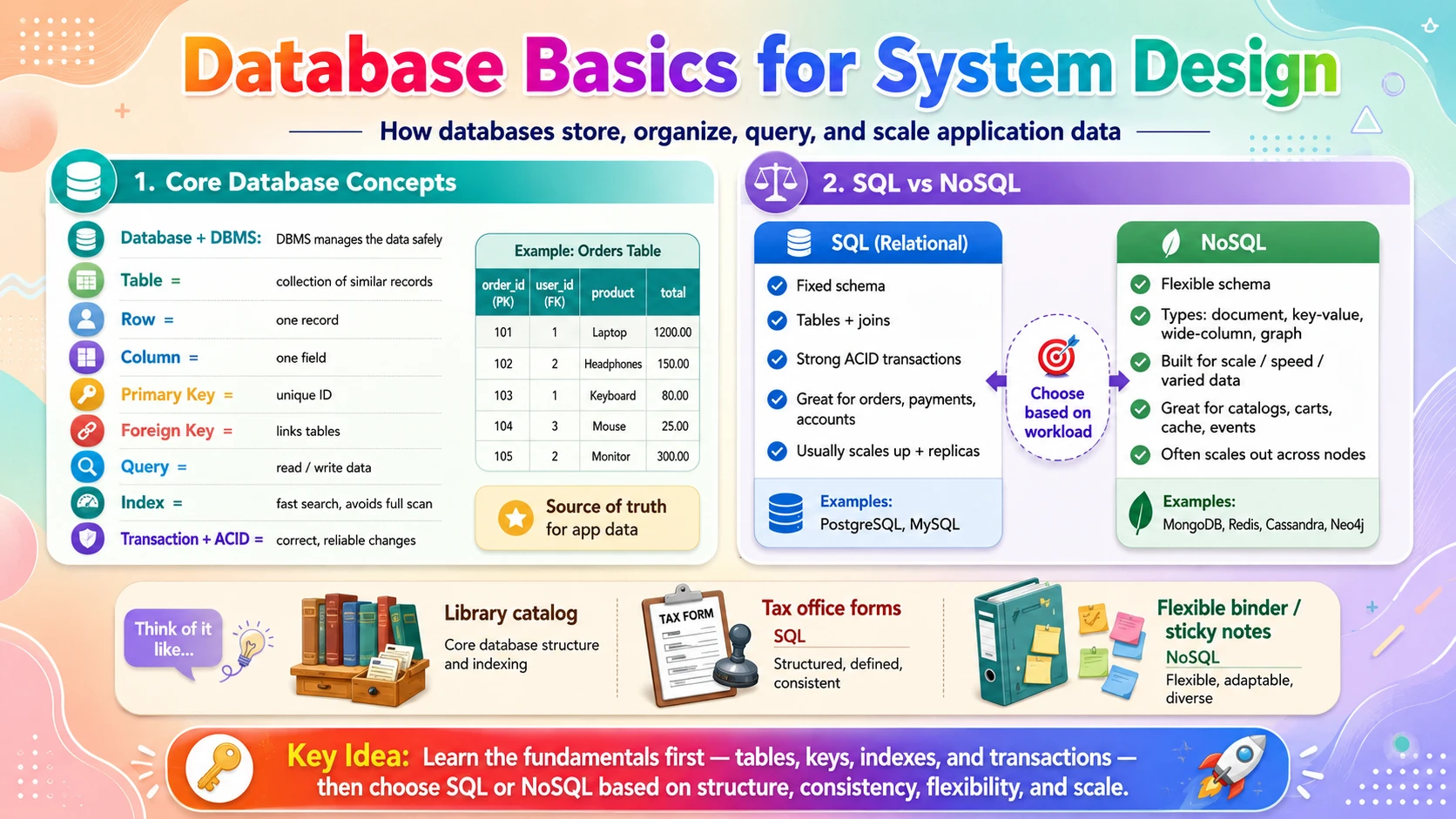
Every application that remembers anything — your orders, your messages, your profile — needs a place to keep that data safely and find it again fast. That place is a database, and understanding how databases work is one of the most important foundations in system design. This post covers two database fundamentals. You will start with Core Database Concepts — what a database really is, how data is organised into tables, rows, and columns, how keys connect records together, how you read and write data with queries, why indexes make searches fast, and how transactions and ACID keep your data correct even when things go wrong. Then you will learn about SQL vs NoSQL — the difference between rigid relational databases and flexible non-relational ones, the four main NoSQL families, and how to decide which one fits a given problem. Each topic is explained with real-world analogies, step-by-step examples, and clear diagrams — starting from zero.
🗄️ 1. Core Database Concepts
Before you can compare database types or design one for scale, you need the vocabulary and mental model that every database shares. In this section you will learn what a database and a database management system actually are, how the relational model organises data into tables of rows and columns, how primary and foreign keys link records, how CRUD operations and SQL queries read and change data, why indexes turn slow scans into instant lookups, and how transactions and the ACID guarantees keep your data trustworthy.
1.1 🎯 Introduction
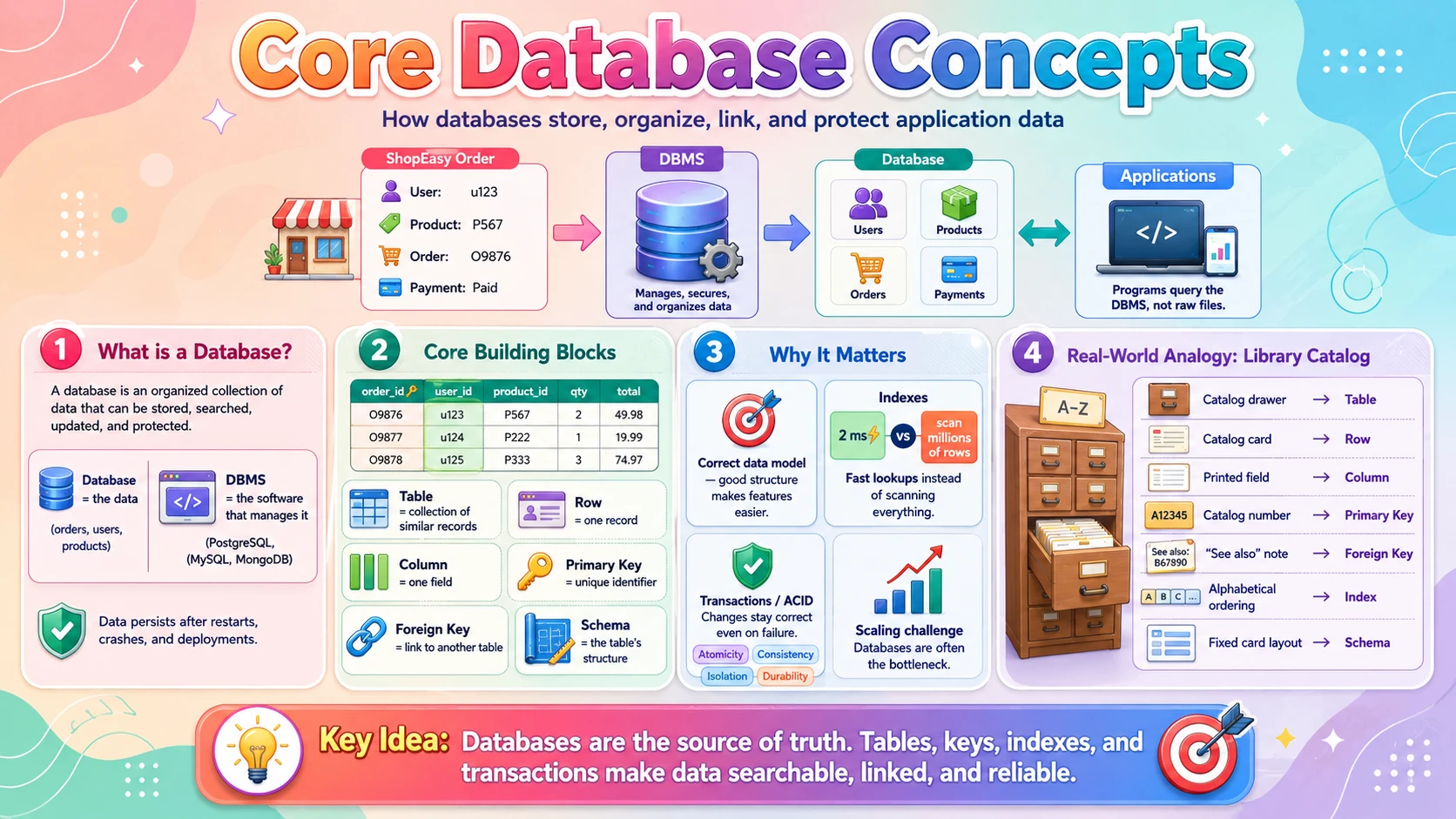
Imagine you place an order on our online store ShopEasy. You add a laptop to your cart, enter your address, pay, and see "Order confirmed." Weeks later you open your account and every detail is still there — the exact laptop, the price you paid, the delivery address, the date. Nobody wrote that on a sticky note. It was saved in a database, and it will still be there whether you return in an hour or a year.
A database is an organised collection of data that a program can store, search, update, and protect. You almost never talk to the raw data directly. Instead you talk to a database management system (DBMS) — the software that actually runs the database, such as PostgreSQL, MySQL, or MongoDB. The DBMS handles the hard parts for you: writing data safely to disk, finding rows quickly, letting thousands of users read and write at the same time without corrupting anything, and making sure a crash halfway through an order doesn't leave your data in a broken state.
For most of this section we'll use the relational model — the classic way of organising data into tables, used by SQL databases. It's the foundation everyone learns first, and once you understand tables, keys, queries, indexes, and transactions, the alternatives in the next sub-topic make far more sense.
💡 Database vs DBMS: the database is the data itself (your orders, users, products). The DBMS is the program that manages it. People often say "database" to mean both — that's fine, just know the distinction exists.
1.2 💡 Why It Matters
The database is usually the single most important — and most fragile — part of a system. Servers can crash and be replaced in seconds because they're stateless (as you saw in the previous post), but the database holds the one copy of truth that a business cannot afford to lose or corrupt. The numbers are enormous: Facebook stores social data for over 3 billion users; Amazon processes millions of orders a day, each a set of database writes that must never double-charge or vanish; a busy database can serve hundreds of thousands of queries per second.
- Get the data model wrong and every feature you build on top fights the structure — slow queries, duplicated data, painful migrations.
- Indexes are the difference between a query that returns in 2 milliseconds and one that scans 50 million rows and times out.
- Transactions and ACID are why you're never charged twice or shown an order that was never really saved — correctness under concurrency and failure.
- The database is the usual scaling bottleneck. It's easy to add more app servers; it's hard to make one database serve more traffic — which is why understanding it deeply matters.
Why system design cares: nearly every design question — "design Twitter," "design a URL shortener," "design an e-commerce checkout" — hinges on the data model and how the database scales. Everything later in this series (caching, replication, sharding) exists to protect and speed up the database.
1.3 🏠 Real-world Analogy
Think of a well-run library. Every book sits on a shelf, but nobody finds a book by walking every aisle. Instead there's a card catalog: for each book, one card records the title, author, and — crucially — the exact shelf location. Want "all books by a certain author"? You flip to that section of the catalog and get answers in seconds, without touching a single shelf. The catalog even cross-references: a card can point to another card ("see also…").
A relational database works exactly like this. Each table is a catalog drawer of the same kind of thing (one drawer for books, one for members, one for loans). Each row is a single card. Each column is a field printed on every card (title, author, year). The primary key is the unique catalog number stamped on each card, and a foreign key is the "see also" note that points from a loan card to the member who borrowed the book. The index is the alphabetical ordering that lets you jump straight to the right card instead of reading them all.
| Library World | Database World | Meaning |
|---|---|---|
| 🗂️ One catalog drawer (books, members…) | 📋 A table | A collection of the same kind of record |
| 📇 A single catalog card | ➡️ A row (record) | One item — one book, one member |
| 🏷️ A field printed on every card | 📊 A column (field) | One attribute — title, price, email |
| 🔢 The unique catalog number | 🔑 Primary key | Uniquely identifies each row |
| ↪️ A "see also" note to another card | 🔗 Foreign key | Links a row to a row in another table |
| 🔤 The alphabetical ordering of cards | ⚡ Index | Lets you find records without scanning all |
| 📚 The fixed layout every card follows | 📐 Schema | The agreed structure of the table |
The library never lets two books share a catalog number, never files a loan card for a member who doesn't exist, and never leaves a checkout half-recorded. Those same guarantees — uniqueness, valid links, and all-or-nothing changes — are exactly what a database enforces with keys and transactions.
1.4 📖 Key Terms
| Term | Simple Definition | Quick Example |
|---|---|---|
| Database | An organised collection of data stored for easy access | ShopEasy's store of users and orders |
| DBMS | The software that runs and manages a database | PostgreSQL, MySQL, MongoDB |
| Table | A collection of rows holding the same kind of record | The orders table |
| Row (Record) | A single entry in a table | One specific order |
| Column (Field) | One named attribute every row has | email, price |
| Schema | The defined structure: tables, columns, and their types | price is a decimal number |
| Primary Key | A column whose value uniquely identifies each row | order_id = 1001 |
| Foreign Key | A column that references another table's primary key | user_id in orders |
| Query | A command that reads or changes data | A SELECT statement |
| SQL | The language used to talk to relational databases | SELECT * FROM orders |
| Index | An extra structure that speeds up searching a column | An index on email |
| Transaction | A group of changes that all succeed or all fail together | Charge card + create order as one unit |
| ACID | Four guarantees that keep transactions correct | Atomicity, Consistency, Isolation, Durability |
1.5 🔢 How It Works
Let us break a relational database into five pieces: how data is organised into tables, how keys connect those tables, how you read and write with SQL, why indexes make searches fast, and how transactions keep everything correct.
A. Tables, Rows, Columns & Schema
A relational database stores data in tables — grids that look just like a spreadsheet. Each row is one record, and each column is one attribute that every row shares. The schema defines the columns and their data types up front, and the database enforces it: try to put the word "cheap" into a numeric price column and the write is rejected. That strictness is a feature — it guarantees every row is shaped the same way.
Here is a tiny users table for ShopEasy:
| user_id (PK) | name | created_at | |
|---|---|---|---|
| 1 | Alice Chen | alice@mail.com | 2026-01-04 |
| 2 | Bimal Roy | bimal@mail.com | 2026-02-11 |
| 3 | Carla Diaz | carla@mail.com | 2026-03-20 |
Every column has a fixed type (user_id is an integer, email is text, created_at is a date), and user_id is marked as the primary key — the column that identifies each row uniquely.
B. Keys & Relationships
A single table is rarely enough. ShopEasy needs users and orders, and every order belongs to a user. Rather than copy the user's name and email into every order (wasteful and error-prone), the orders table stores just the user's id as a foreign key pointing back to the users table.
| order_id (PK) | user_id (FK) | total | status |
|---|---|---|---|
| 1001 | 1 | 899.00 | shipped |
| 1002 | 1 | 24.50 | delivered |
| 1003 | 3 | 149.99 | pending |
Orders 1001 and 1002 both point to user_id = 1 (Alice). The foreign key does two jobs: it links the two tables so you can join them, and it protects integrity — the database refuses to create an order for a user_id that doesn't exist, and can refuse to delete a user who still has orders. This connection is called a relationship, and the most common kind here is one-to-many: one user has many orders.
C. Reading & Writing with SQL (CRUD)
You interact with a relational database using SQL (Structured Query Language). Almost everything you do falls into four operations, remembered as CRUD: Create, Read, Update, Delete.
| Operation | SQL Keyword | What It Does |
|---|---|---|
| Create | INSERT | Adds a new row |
| Read | SELECT | Fetches rows that match a condition |
| Update | UPDATE | Changes values in existing rows |
| Delete | DELETE | Removes rows |
A read that joins both tables — "show every order placed by Alice" — looks like this:
The JOIN follows the foreign key to stitch the two tables together, and WHERE filters to just Alice's rows. This declarative style — you say what you want, not how to fetch it — is a defining strength of relational databases.
D. Indexes — Why Searches Are Fast
Suppose ShopEasy has 50 million users and you run WHERE email = 'alice@mail.com'. Without help, the database must check every single row — a full table scan of 50 million records. An index fixes this. It's a separate, sorted structure (usually a B-tree) that maps a column's values to the rows that contain them — much like the alphabetical thumb-tabs on a dictionary. With an index on email, the database jumps straight to Alice in a handful of steps instead of 50 million.
Indexes sound like free speed, but they have a cost. Each index takes extra disk space, and because it must stay in sync, every INSERT, UPDATE, or DELETE has to update the index too — so writes get slightly slower. The rule: index the columns you frequently search, join, or sort on (like email or user_id), and don't index everything blindly.
📌 The core trade-off: indexes make reads dramatically faster but make writes a little slower and use more storage. Most systems read far more than they write, so well-chosen indexes are almost always worth it — but "an index on every column" is a classic mistake.
E. Transactions & ACID
Some actions are really several changes that must happen together. When you check out on ShopEasy, the database must charge your card, create the order, and reduce the stock count. If it charges you but crashes before creating the order, you've paid for nothing. A transaction bundles those steps into one all-or-nothing unit — either every step commits, or none of them do and the database rolls back to how it was before.
The guarantees a transaction provides are summed up by the acronym ACID:
| Letter | Property | What It Guarantees |
|---|---|---|
| A | Atomicity | All steps happen, or none do — no half-finished checkout. |
| C | Consistency | The database moves from one valid state to another; rules (like foreign keys) always hold. |
| I | Isolation | Concurrent transactions don't step on each other; the result is as if they ran one at a time. |
| D | Durability | Once committed, the data survives crashes and power loss — it's safely on disk. |
ACID transactions are the headline feature of relational (SQL) databases and the reason they dominate anything involving money, inventory, or bookings. Keep this in mind — it's the sharpest dividing line when we compare SQL and NoSQL in the next sub-topic.
1.6 🔀 Types & Variations
The way tables connect to each other defines how you model a whole application. There are three fundamental relationship types, and almost every schema you'll ever design is built from combinations of them.
One-to-One
One row links to exactly one row in another table.
- A user has one profile.
- An order has one invoice.
- Used to split rarely-used or sensitive columns into a separate table.
One-to-Many
One row links to many rows in another table.
- One user has many orders.
- One product has many reviews.
- The most common relationship; the "many" side holds the foreign key.
Many-to-Many
Many rows on each side link to many on the other.
- Orders contain many products; products appear in many orders.
- Modelled with a third join table (e.g.
order_items).
The join table trick: databases can't store a "many-to-many" link directly, so you add a middle table. order_items has one row per (order, product) pair — turning one hard many-to-many into two easy one-to-many relationships. Recognising when you need a join table is a core schema-design skill.
1.7 🎨 Illustrated Diagram
The diagram below shows ShopEasy's core tables and how keys connect them. A user has many orders (one-to-many), and an order links to many products through the order_items join table (many-to-many). Notice how the arrows always run along a foreign key pointing back to a primary key.
Reading the diagram: to answer "which products did Alice buy?", the database starts at her row in users, follows the foreign key to her orders, hops through order_items, and lands on the matching products. Keys are the roads that connect the tables, and indexes are what make travelling them fast.
1.8 ✅ When to Use
The concepts above describe the relational way of doing things. It's the right default for most applications, but not for everything. Here's when a structured, table-based database with keys and transactions shines — and when you might reach for something else (the topic of the next sub-topic).
| Use a relational database when… | Consider alternatives when… |
|---|---|
| Your data is structured and fits neat rows and columns | Data is highly variable or has no fixed shape |
| Records relate to each other and you'll join them | You store huge blobs or documents fetched whole |
| Correctness is critical — money, orders, bookings (needs ACID) | You need extreme write scale and can accept eventual consistency |
| You need flexible, ad-hoc queries and reporting | Access is always by a single known key |
| The schema is stable and well understood | The schema changes constantly during rapid prototyping |
Rule of thumb: start with a relational database. It handles the vast majority of applications well, gives you transactions for free, and lets you query data in ways you didn't anticipate. Only move to a specialised store when you hit a concrete limit relational can't meet — a decision the SQL vs NoSQL sub-topic will make precise.
1.9 🏗️ Real-world Example — Alice Checks Out on ShopEasy
Alice buys a laptop. Watch how tables, keys, an index, and a single transaction all cooperate to make the checkout correct and fast:
| Step | Actor | What Happens |
|---|---|---|
| ① | 👤 App server | Looks up Alice by email — the index on email finds her row instantly, returning user_id = 1 |
| ② | 🛒 App server | Confirms the laptop (product_id = 42) still has stock > 0 in the products table |
| ③ | 🔐 Database | Opens a transaction — the next three writes are now all-or-nothing |
| ④ | 💳 Database | Deducts $899 from Alice's balance (or records the payment) |
| ⑤ | 🧾 Database | Inserts a new row in orders with user_id = 1 (the foreign key) and one row per item in order_items |
| ⑥ | 📦 Database | Reduces products.stock by 1 |
| ⑦ | ✅ Database | COMMIT — all changes save together. Had the server crashed at step ⑤, Atomicity would roll everything back, so Alice is never charged for an order that doesn't exist |
New terms coming later? In a real high-traffic store, a cache would hold the product details and replicas would serve reads — both covered in Phase 2. For now, just notice that a single transaction is what keeps the payment, the order, and the stock count perfectly in sync.
1.10 ⚖️ Trade-offs
The relational model — strict schema, keys, and ACID transactions — buys you enormous correctness and flexibility, but it isn't free. Understanding the costs is what lets you decide when to reach for something different.
| ✅ Advantages | ❌ Disadvantages |
|---|---|
| Strong consistency — ACID transactions keep data correct under concurrency and failure | Rigid schema — changing structure on a huge table can be slow and disruptive |
| No duplication — foreign keys let each fact live in exactly one place | Joins get expensive — combining many large tables can be slow |
| Flexible queries — SQL answers questions you didn't plan for in advance | Harder to scale writes — a single primary node is the usual bottleneck |
| Data integrity — the database enforces types and relationships for you | Object–relational mismatch — app objects don't always map cleanly to tables |
| Mature & trusted — decades of tooling, expertise, and reliability | Fixed shape — awkward for highly variable or nested data |
1.11 🚫 Common Mistakes
| # | ❌ Common Mistake | ✅ The Reality |
|---|---|---|
| 1 | No indexes (or one on every column) | Missing indexes make searches crawl; too many slow every write and waste space. Index the columns you actually search, join, and sort on. |
| 2 | Duplicating data across tables | Copying a user's name into every order means updating it in a hundred places. Store each fact once and link with a foreign key. |
| 3 | Skipping transactions for multi-step writes | Charging a card and creating an order as separate writes risks charging with no order. Wrap related changes in one transaction. |
| 4 | Using the wrong primary key | Keys built from mutable data (like email) break when the value changes. Use a stable, generated id as the primary key. |
| 5 | Ignoring the schema / using text for everything | Storing numbers and dates as text disables validation, sorting, and math. Pick the correct column type so the database can help you. |
| 6 | SELECT * on huge tables | Fetching every column and row wastes memory and bandwidth. Select only the columns you need and filter with WHERE. |
1.12 📝 Summary
- A database stores data; a DBMS manages it — the relational model organises data into tables of rows and columns with a fixed schema.
- Keys connect everything — a primary key uniquely identifies a row; a foreign key links to another table and protects integrity.
- SQL does CRUD — create, read, update, delete; joins follow foreign keys to combine tables in flexible queries.
- Indexes make reads fast — at the cost of slightly slower writes and more storage; index what you search and join on.
- Transactions + ACID keep data correct — all-or-nothing changes that survive concurrency and crashes — the hallmark of SQL databases.
1.13 🏋️ Design Challenge
📚 Challenge: Design the schema for a small library app
A local library wants to track books, members, and who has borrowed what. Think through the following:
- What tables would you create, and what is the primary key of each?
- A member can borrow many books, and a book (title) can be borrowed by many members over time. What relationship is this, and how do you model it?
- Members search for books by title constantly. What would you add to keep that fast?
- When a book is checked out, you must mark it unavailable and create a loan record. How do you make sure both happen or neither does?
👁️ Show Answer
Tables & primary keys:
- 📗
books— PKbook_id(title, author, available) - 👥
members— PKmember_id(name, email) - 🔗
loans— PKloan_id, FKsbook_idandmember_id, plus borrowed/returned dates
The relationship: members-to-books over time is many-to-many. You model it with the loans join table — each row is one borrowing event linking one member to one book, turning the many-to-many into two one-to-many relationships.
Fast title search: add an index on books.title (and likely author) so lookups don't scan the whole table.
Checkout correctness: wrap both writes — UPDATE books SET available = false and INSERT INTO loans … — in a single transaction. Atomicity guarantees you never mark a book borrowed without a matching loan record, or vice versa.
1.14 ☁️ Cloud Service Mapping
You rarely run a relational database yourself in production. Every cloud offers managed relational databases that handle backups, patching, and replication for you — you just pick the engine (PostgreSQL, MySQL) and connect.
| Need | AWS (Primary) | GCP | Azure |
|---|---|---|---|
| Managed relational database — run SQL without ops | Amazon RDS | Cloud SQL | Azure Database for PostgreSQL/MySQL |
| Cloud-native, auto-scaling relational — higher scale & availability | Amazon Aurora | AlloyDB | Azure SQL Database |
Simplest AWS picture: put your data in Amazon RDS running PostgreSQL, define your tables and keys, add indexes on the columns you query, and let RDS handle backups and failover. When one database can't keep up, Aurora adds read replicas and higher availability — the scaling techniques that come later in the series build directly on this foundation.
⚖️ 2. SQL vs NoSQL
You now know how a relational database works. But relational isn't the only choice — a whole family of NoSQL databases trades the rigid schema and joins for flexibility and raw scale. In this section you will learn what SQL and NoSQL really mean, the four main NoSQL families (document, key-value, wide-column, and graph), how the two approaches differ on schema, scaling, and consistency, and — most importantly — a clear framework for choosing the right one for a given job. You'll see that it's rarely "one or the other": large systems use both, each for what it does best.
2.1 🎯 Introduction
Imagine ShopEasy is growing fast and adds two new features. First, a product catalog where every category has wildly different attributes — a laptop has RAM and screen size, a shirt has fabric and size, a book has an author and page count. Second, a shopping-cart store that must handle millions of tiny reads and writes per second as people add and remove items. Forcing both into neat, fixed relational tables suddenly feels like a fight. This is exactly where NoSQL databases enter.
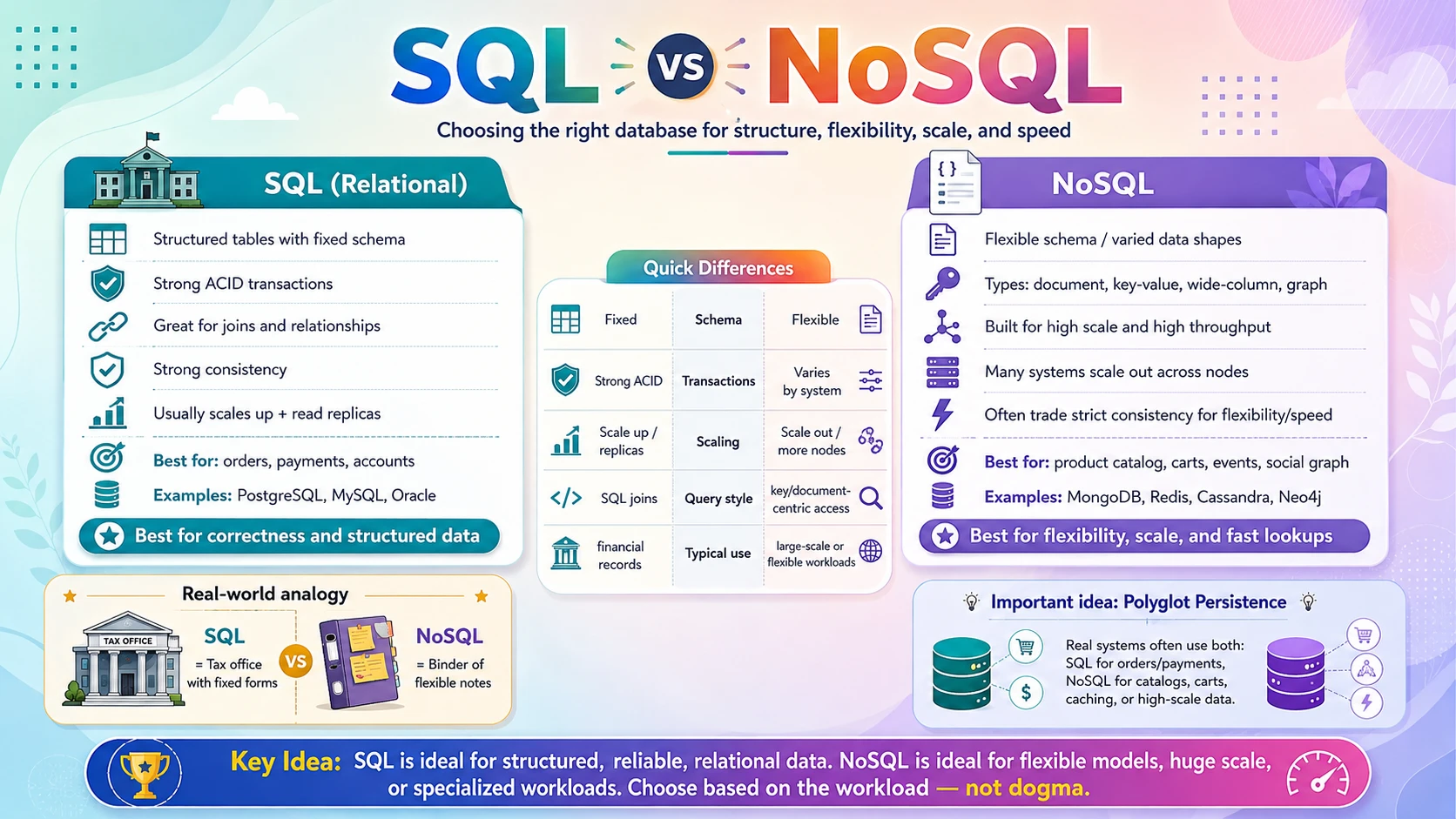
SQL databases (also called relational) store data in tables with a fixed schema and speak the SQL language — PostgreSQL, MySQL, and Oracle are examples. Everything from the previous sub-topic applies to them. NoSQL — "Not Only SQL" — is an umbrella term for databases that don't use the rigid table model. Instead they store data as flexible documents, simple key-value pairs, wide columns, or graphs, and they're built to scale across many machines. MongoDB, Redis, Cassandra, and Neo4j are examples.
The label "NoSQL" is misleading — it isn't anti-SQL, and it isn't one thing. It's a category of very different databases that share one trait: they relax the strict relational rules to gain flexibility, scale, or speed for a specific kind of workload. The goal of this section is not to crown a winner but to help you match the right tool to the right job.
💡 Not a versus fight: "SQL vs NoSQL" reads like a rivalry, but real systems use both. ShopEasy can keep orders and payments in PostgreSQL (needs ACID) while storing the product catalog in MongoDB and shopping carts in Redis. This is called polyglot persistence.
2.2 💡 Why It Matters
Choosing the wrong database type is one of the most expensive mistakes in system design, because migrating a live database later is painful and risky. The stakes are shown by how the biggest companies split their storage: Netflix uses Cassandra (wide-column) for viewing history at massive scale; Facebook built and runs enormous MySQL fleets and uses graph-style stores for the social graph; Amazon created DynamoDB (key-value) to handle Prime Day traffic that peaks at tens of millions of requests per second.
- Pick SQL when you don't need to and a simple key lookup at huge scale becomes a bottleneck a relational database struggles to serve.
- Pick NoSQL when you shouldn't and you lose transactions and joins — then rebuild them badly in application code, introducing the exact bugs ACID was designed to prevent.
- The choice drives how you scale: SQL usually scales up (a bigger machine) and via read replicas; many NoSQL stores scale out (more machines) almost linearly.
- It also drives consistency: SQL leans on strong consistency; many NoSQL systems offer eventual consistency for speed and availability — a trade you must make on purpose.
Why system design cares: almost every design discussion includes "SQL or NoSQL, and why?". The strong answer is never dogmatic — it names the workload (transactions? huge scale? flexible shape? relationships?) and picks the store that fits, often more than one.
2.3 🏠 Real-world Analogy
Think about how you organise paperwork. A SQL database is like a government tax office: every form has fixed fields, everyone fills in the same boxes, nothing is accepted unless it's complete and valid, and everything cross-references cleanly. It's rigid on purpose — that's what makes it trustworthy for money and records.
A NoSQL database is like a personal binder of sticky notes and folders. One note can hold anything you want, in any shape; you don't declare the format in advance. Need to find something? If you filed it under a labelled tab (the key), you grab it instantly. It's wonderfully flexible and fast to add to — but nobody stops you from writing inconsistent notes, and there's no built-in "find every note that mentions X over $500" the way the tax office can.
| Everyday World | Database World | Meaning |
|---|---|---|
| 🏛️ Tax office with fixed forms | 🗄️ SQL / relational database | Strict schema, validated, cross-referenced |
| 📒 Binder of free-form notes | 🍃 NoSQL database | Flexible shape, no fixed schema |
| 🏷️ Grabbing a note by its tab label | 🔑 Key-value lookup | Instant fetch when you know the key |
| 📄 A folder holding one full case file | 📑 A document (JSON) | All related data stored together |
| ➕ Opening more identical binders | 📈 Scaling out across machines | Add capacity by adding nodes |
Neither is "better." You want the tax office for your finances and the binder for your brainstorming. The skill is knowing which kind of paperwork you're dealing with — and that's what the rest of this section builds.
2.4 📖 Key Terms
| Term | Simple Definition | Quick Example |
|---|---|---|
| SQL / Relational | Databases using fixed tables, keys, and the SQL language | PostgreSQL, MySQL |
| NoSQL | Non-relational databases with flexible models, built to scale out | MongoDB, Redis, Cassandra |
| Document DB | Stores flexible JSON-like documents | MongoDB storing a product |
| Key-Value DB | Stores values fetched by a unique key | Redis holding a cart |
| Wide-Column DB | Stores rows with flexible columns, huge scale | Cassandra for time-series |
| Graph DB | Stores nodes and the relationships between them | Neo4j for a social graph |
| Schema-on-write | Structure enforced when data is saved (SQL) | Reject an invalid row |
| Schema-on-read | Structure interpreted when data is read (NoSQL) | Each document may differ |
| Scale up (vertical) | Make one machine bigger | Add CPU/RAM to the DB server |
| Scale out (horizontal) | Add more machines and split the data | Shard across 20 nodes |
| Sharding | Splitting data across nodes by a key | Users A–M on node 1, N–Z on node 2 |
| Eventual Consistency | Copies briefly disagree, then converge | A like count that lags a second |
| Denormalization | Storing data together (with duplication) to avoid joins | Embedding reviews inside a product |
2.5 🔢 How It Works
SQL and NoSQL differ along four axes that matter most in system design: how they model data, how they scale, how they handle consistency, and how you query them. Understanding these four is enough to make a confident choice.
A. Data Model — Fixed Tables vs Flexible Documents
A SQL database splits a product across normalized tables and enforces the schema when you write (schema-on-write) — every row must match. A document database stores the whole product as one self-contained JSON document, and each document can have a different shape (schema-on-read). Compare the same product:
The document keeps everything about the product in one place, so reading it is a single fetch with no joins — and adding a new attribute needs no migration. The trade-off: the database no longer guarantees every product has the same fields, so your application must cope with variation.
B. Scaling — Up vs Out
A classic SQL database usually scales up (vertical scaling): you move it to a machine with more CPU, RAM, and faster disks, and add read replicas to spread reads. But there's a ceiling — the biggest single machine you can buy — and writes still funnel through one primary node.
Most NoSQL databases are built to scale out (horizontal scaling): data is sharded — split by a key across many ordinary machines — so storage and write throughput grow almost linearly as you add nodes. This is why NoSQL powers workloads with tens of millions of operations per second. The cost is that spreading data across nodes makes joins and multi-record transactions hard or unavailable.
C. Consistency — ACID vs BASE
SQL databases favour strong consistency: the moment a transaction commits, every reader sees the new value (the ACID guarantees from the last sub-topic). Many distributed NoSQL systems instead offer eventual consistency, summarised as BASE (Basically Available, Soft state, Eventually consistent): a write propagates to copies over time, so a reader might briefly see stale data — but the system stays fast and available even when nodes fail.
This isn't sloppiness; it's a deliberate trade. A bank balance needs strong consistency. A "likes" counter or a view count can lag by a second with no harm — and in exchange you get enormous scale and availability. Choosing the right consistency level for each piece of data is a core design decision.
D. Querying — Joins vs Denormalized Access
In SQL you keep data normalized (each fact once) and combine tables with joins at query time — flexible, but joins get expensive at scale. In NoSQL you typically denormalize: store data the way you'll read it, duplicating as needed so a single lookup returns everything, with no join. Embedding a product's reviews inside the product document means one read serves the whole page — at the cost of updating that data in more than one place.
📌 The mental flip: SQL is "store it cleanly, figure out queries later." NoSQL is "know your queries first, then store data shaped for them." That's why changing access patterns is easy in SQL and can force a data redesign in NoSQL.
2.6 🔀 Types & Variations
"NoSQL" is not one database — it's four distinct families, each shaped for a different job. Alongside them sits the relational (SQL) family you already know. Here are the four NoSQL types.
Document
Stores flexible JSON-like documents; each can differ in shape.
- Examples: MongoDB, Couchbase
- Great for: catalogs, user profiles, content — data read as a whole
Key-Value
A giant dictionary: one value fetched by one key. Blazing fast.
- Examples: Redis, DynamoDB
- Great for: caching, sessions, shopping carts, counters
Wide-Column
Rows with flexible columns, built for massive write scale across nodes.
- Examples: Cassandra, HBase, Bigtable
- Great for: time-series, logs, IoT, huge event streams
Graph
Stores nodes and the relationships between them as first-class data.
- Examples: Neo4j, Amazon Neptune
- Great for: social networks, recommendations, fraud detection
Match the type to the shape of the question. "Give me this one thing by its id" → key-value. "Give me this whole object" → document. "Store billions of writes cheaply" → wide-column. "How are these things connected?" → graph. "Combine and filter structured records with guarantees" → relational.
2.7 🎨 Illustrated Diagram
The diagram shows polyglot persistence at ShopEasy: one application server routing each kind of data to the store that fits it best. Orders go to a SQL database for ACID safety; the product catalog lives in a document store; carts and sessions sit in a key-value store for speed; and product recommendations come from a graph database.
Reading the diagram: there's no single "best" database here — each store earns its place by matching a specific workload. Real large-scale systems look exactly like this: SQL at the trustworthy core, with NoSQL stores added around it wherever flexibility or scale is worth more than joins and transactions.
2.8 ✅ When to Use
The cleanest way to choose is to ask what your data and workload demand. Here's the decision boiled down.
| Choose SQL when… | Choose NoSQL when… |
|---|---|
| You need ACID transactions (payments, orders, inventory) | You need massive horizontal write scale |
| Data is structured with clear relationships | Data is unstructured, nested, or varies per record |
| You'll run flexible, ad-hoc queries and reports | Access is by a known key, or reads a whole object |
| Strong consistency is required | Eventual consistency is acceptable for the gain |
| The schema is stable and well understood | The schema evolves fast during rapid iteration |
And within NoSQL, pick the family by the question you ask most:
| If you need to… | Reach for |
|---|---|
| Fetch one value by a key, extremely fast (cache, cart, session) | Key-Value (Redis, DynamoDB) |
| Store flexible objects read as a whole (catalog, profile, CMS) | Document (MongoDB) |
| Absorb huge write volumes across nodes (logs, time-series, IoT) | Wide-Column (Cassandra) |
| Traverse relationships (friends-of-friends, recommendations, fraud) | Graph (Neo4j) |
Rule of thumb: default to SQL, and add a NoSQL store for a specific need it can't meet well — a cache, a flexible catalog, a firehose of events, or a relationship graph. "SQL core + NoSQL around the edges" is the shape of most real systems.
2.9 🏗️ Real-world Example — One Shopping Session, Four Databases
Follow Alice through a single visit to ShopEasy and watch each action land on the database best suited to it — the four stores working together:
| Step | Store | What Happens |
|---|---|---|
| ① | 📄 MongoDB (Document) | Alice browses laptops; each product — with its category-specific specs — is fetched as one flexible document, no joins |
| ② | 🔑 Redis (Key-Value) | She adds a laptop to her cart; the cart is written and read by her session key in under a millisecond |
| ③ | 🕸️ Neo4j (Graph) | "Customers who bought this also bought…" traverses the purchase graph to suggest a laptop bag |
| ④ | 🗄️ PostgreSQL (SQL) | She checks out; payment, order creation, and stock decrement run in one ACID transaction — all or nothing |
| ⑤ | 🧱 Cassandra (Wide-Column) | Every click and page view from the session is appended to a high-volume event log for later analytics |
The takeaway: no single database would do all five jobs well. The checkout needs SQL's transactions; the cart needs key-value speed; the event log needs wide-column write scale. Choosing per-workload — polyglot persistence — is the mark of a mature design.
2.10 ⚖️ Trade-offs
Since SQL's trade-offs were covered in the last sub-topic, here the focus is on what you gain and give up by reaching for NoSQL:
| ✅ Advantages of NoSQL | ❌ Disadvantages of NoSQL |
|---|---|
| Horizontal scale — add nodes to grow storage and throughput almost linearly | Weaker guarantees — many stores give up multi-record ACID transactions |
| Flexible schema — evolve data shape without migrations | Eventual consistency — reads can be briefly stale, adding app-level complexity |
| High performance — single-key access and denormalized reads are very fast | Limited ad-hoc queries — no rich joins; you must design around access patterns |
| Handles unstructured data — documents, blobs, nested objects fit naturally | Data duplication — denormalization means updating the same fact in many places |
| Built for availability — designed to survive node failures | Less mature tooling — and per-database quirks; expertise is more fragmented |
📌 The essence: NoSQL trades some of SQL's guarantees and query flexibility for scale, speed, and schema freedom. Whether that trade is worth it depends entirely on the workload — which is why "it depends" is the honest, and correct, answer.
2.11 🚫 Common Mistakes
| # | ❌ Common Mistake | ✅ The Reality |
|---|---|---|
| 1 | "NoSQL is newer, so it's better" | They solve different problems. NoSQL isn't an upgrade to SQL — for transactional, relational data, SQL is usually the right choice. |
| 2 | Choosing NoSQL to "scale" a small app | Most apps never outgrow a well-indexed SQL database with replicas. Adopt NoSQL for a real, measured need — not hype. |
| 3 | Putting money/orders in an eventually-consistent store | Transactional data needs ACID. Losing or double-counting a payment is far costlier than the scale you gained. |
| 4 | Treating "NoSQL" as one thing | Document, key-value, wide-column, and graph are as different from each other as each is from SQL. Pick the specific family. |
| 5 | Designing NoSQL like SQL tables | Normalizing and expecting joins in a document store fights the model. Design around your read patterns and denormalize. |
| 6 | Ignoring that they can coexist | It's not either/or. Polyglot persistence — SQL plus one or more NoSQL stores — is normal and often the best design. |
2.12 📝 Summary
- SQL = relational — fixed schema, joins, strong ACID guarantees; the right default for structured, transactional data.
- NoSQL = four families — document, key-value, wide-column, and graph, each shaped for a different workload.
- They differ on four axes — data model, scaling (up vs out), consistency (ACID vs eventual), and querying (joins vs denormalized).
- Choose by workload — transactions and flexible queries → SQL; huge scale, flexible shape, or key access → the matching NoSQL type.
- Use both — polyglot persistence, a SQL core with NoSQL stores around it, is how most real systems are built.
2.13 🏋️ Design Challenge
📱 Challenge: Pick the databases for a social media app
You're designing a social app like a small Instagram. For each kind of data below, decide which database type fits best and why:
- User accounts & payments for the "verified" subscription
- Posts — each with a caption, tags, and a variable set of fields
- The "who follows whom" network, used for friend suggestions
- Live like & view counters that update thousands of times per second
- The raw activity feed / event log of every action for analytics
👁️ Show Answer
No single database wins — this is textbook polyglot persistence:
- 💳 Accounts & payments → SQL (PostgreSQL). Money and subscriptions need ACID transactions and strong consistency.
- 📄 Posts → Document (MongoDB). Flexible, self-contained objects whose fields vary — read as a whole, no joins.
- 🕸️ Follow graph → Graph (Neo4j). "Friends of friends" and suggestions are relationship traversals, exactly what graph DBs excel at.
- 🔑 Like/view counters → Key-Value (Redis). In-memory increments handle thousands of writes/second; eventual consistency on a counter is fine.
- 🧱 Activity log → Wide-Column (Cassandra). An append-only firehose of events needs cheap, massive write scale across nodes.
Key insight: start from the workload of each data type — its consistency needs, access pattern, and write volume — and the right store follows. The correct answer is "several, each for its job," not "one database for everything."
2.14 ☁️ Cloud Service Mapping
Every cloud offers a fully-managed service for each NoSQL family, so you can adopt the right store without operating it yourself. (Managed relational databases were covered in the previous sub-topic.)
| NoSQL Type | AWS (Primary) | GCP | Azure |
|---|---|---|---|
| Document | DocumentDB | Firestore | Cosmos DB (MongoDB API) |
| Key-Value | DynamoDB / ElastiCache (Redis) | Memorystore | Azure Cache for Redis |
| Wide-Column | Keyspaces (Cassandra) | Bigtable | Cosmos DB (Cassandra API) |
| Graph | Neptune | — | Cosmos DB (Gremlin API) |
Simplest AWS picture: keep transactional data in RDS/Aurora (SQL), serve the flexible catalog from DynamoDB or DocumentDB, cache carts and sessions in ElastiCache (Redis), and stream events into a wide-column store. One product family, every database shape — mix them to fit each workload.
📚 References
- System Design Interview (Vol. 1) — Alex Xu — Uses the database and its data model as the starting point of nearly every design.
- Designing Data-Intensive Applications — Martin Kleppmann — The definitive deep dive into relational vs non-relational models, indexes, transactions, and consistency.
- PostgreSQL Documentation — Clear reference for tables, keys, indexes, and ACID transactions in a relational database.
- MongoDB Manual — Beginner-friendly explanation of the document model and schema design for NoSQL.
- AWS Databases — Overview of managed relational (RDS/Aurora) and NoSQL (DynamoDB, DocumentDB, Keyspaces, Neptune) services.