System Design Phase 1 — Part 3: Core Backend Concepts
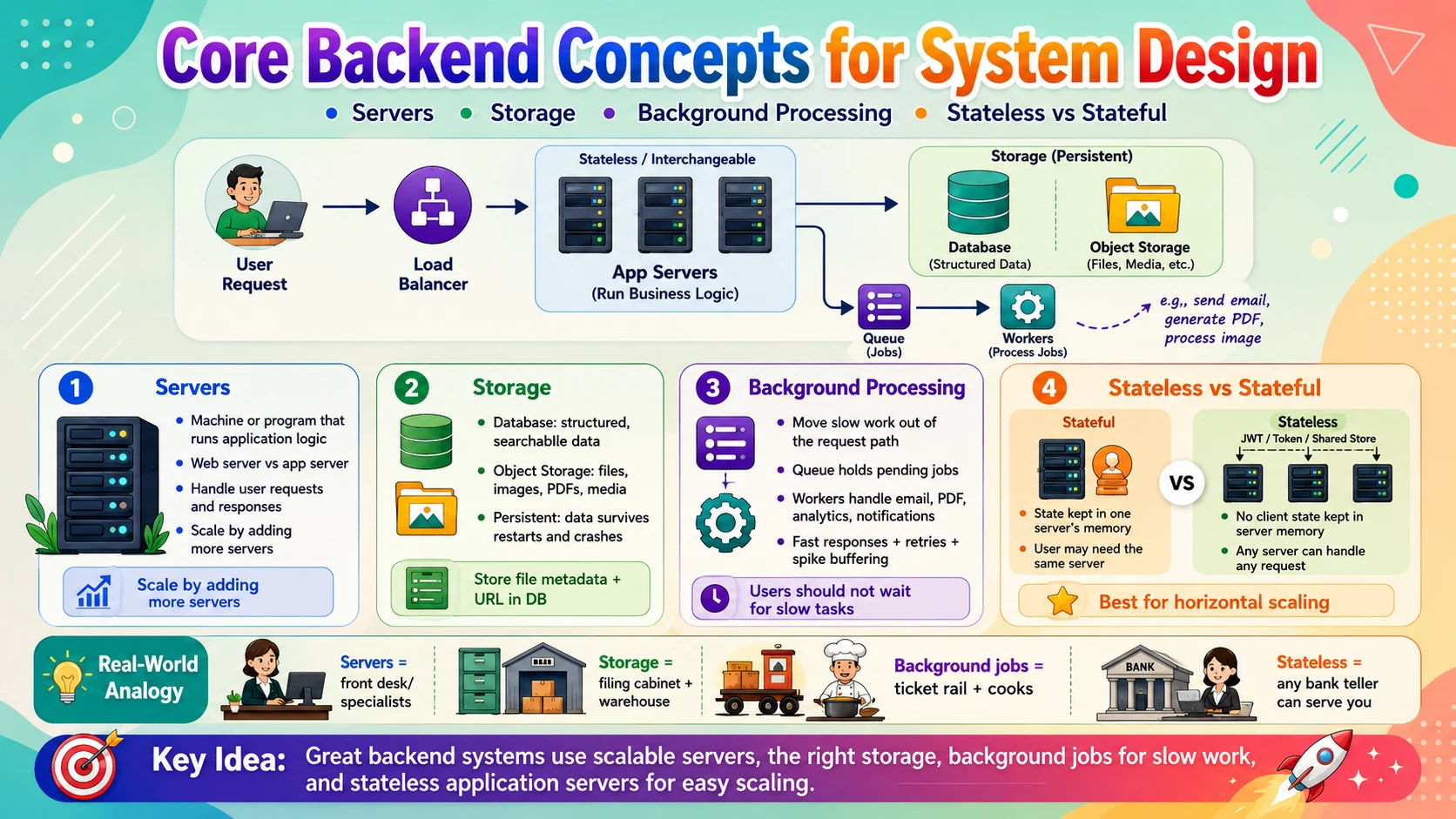
📚 Table of Contents
When a request reaches your backend, four questions decide what happens next: what machine runs the code, where the data is kept, what work can wait until later, and whether the server remembers anything between requests. This post covers the four core backend concepts that answer them. You will start with Servers — the machines and programs that run your application logic. Then you will learn about Storage — the difference between databases for structured data and object storage for files and media. Next comes Background Processing — doing slow work outside the request path so users never wait. Finally you will understand Stateless vs Stateful — the single most important property that decides how easily your system scales. Each topic is explained with real-world analogies, step-by-step examples, and clear diagrams — starting from zero.
🖥️ 1. Servers
Every backend begins with a simple physical fact: your code has to run somewhere. That "somewhere" is a server. But "server" means two things at once — a program that listens for requests, and the machine it runs on. In this section we will separate those meanings, learn the crucial difference between a web server and an application server, see how one server juggles thousands of requests at the same time, and understand how servers are packaged today — from bare metal to containers to serverless.
1.1 🎯 Introduction
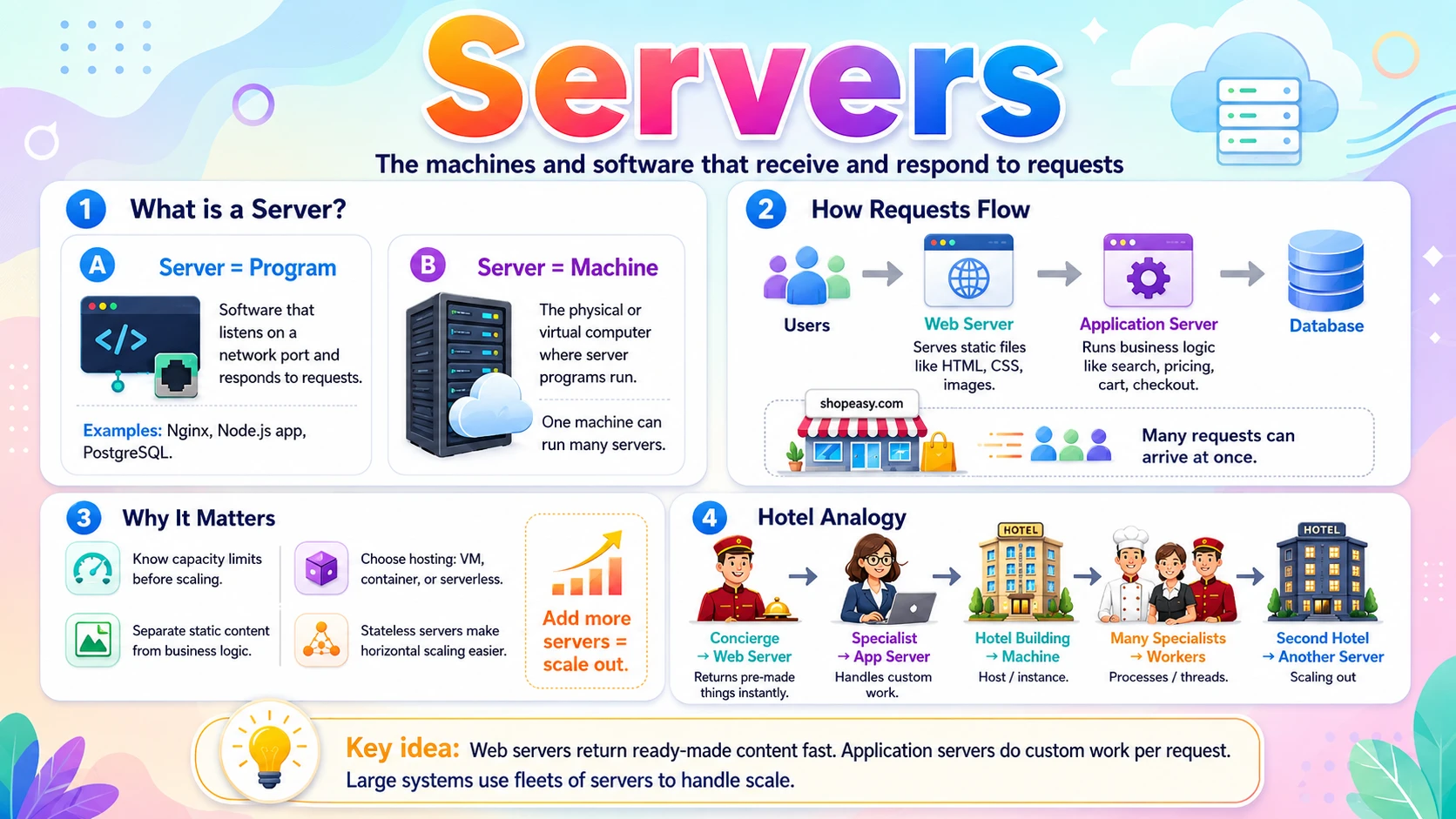
Imagine it's 7 PM and thousands of people open your online store shopeasy.com at once. Every tap — browse products, search, add to cart, check out — becomes a request that must land on a machine somewhere running your code. That machine, and the program on it that answers the request, is a server.
The word "server" is used two ways, and keeping them straight is the first step:
- Server (the program) — software that listens on a network port and responds to requests. Nginx, a Node.js app, and PostgreSQL are all "servers" in this sense.
- Server (the machine) — the physical or virtual computer the program runs on. One machine can run many server programs at once.
There are also two very different jobs a server can do. A web server hands back files that already exist — HTML, CSS, images. An application server runs your business logic — checking prices, processing the order, talking to the database. Most real systems use both, and telling them apart is the heart of this section.
1.2 💡 Why It Matters
A single server can only do so much. A well-tuned machine might handle a few thousand simple requests per second, but heavy work — image processing, complex queries — drops that number fast. That is why large systems run fleets of servers: Google operates millions of servers across its data centres, Netflix runs on tens of thousands of instances, and even a mid-sized startup at scale runs dozens. Almost every scaling decision in system design starts with "how many servers, of what kind, doing what?"
- If you don't know a server's capacity limit, you can't decide when to add more — the core of scalability.
- Separating web serving from application logic lets you scale each independently — cheap file servers for static content, powerful compute for logic.
- Choosing how servers are hosted (VM, container, serverless) decides your cost, speed of deployment, and operational burden.
- Understanding how a server handles concurrency explains why one crashed process can drop thousands of users at once.
Why system design cares: "Add more servers" is the answer to a huge share of scaling problems — but only if the server is stateless (covered in Sub-topic 4). Servers and statelessness together are what make horizontal scaling possible.
1.3 🏠 Real-world Analogy
Think of a large hotel. At the front desk, the concierge hands you things that are already prepared — a city map, a printed menu, a brochure. No custom work; instant. That is the web server: it returns files that already exist. But when you want a tailored 3-day itinerary with restaurant bookings, the concierge sends your request to a specialist in the back office who does custom work for you. That specialist is the application server.
| Hotel World | Server World | Role |
|---|---|---|
| 🛎️ Concierge handing over a printed map | 🌐 Web server serving a static file | Returns something pre-made, instantly |
| 🧑💼 Specialist building a custom itinerary | ⚙️ Application server running logic | Does bespoke work per request |
| 🏨 The hotel building | 🖥️ The machine (host / instance) | The hardware everything runs on |
| 👥 Many specialists working in parallel | 🧵 Processes / threads / workers | Handling many guests at once |
| 🏢 Opening a second identical hotel | ➕ Adding another server instance | Scaling out to serve more guests |
The key idea: pre-made things come back instantly from the front desk (web server), while custom work is routed to a specialist (application server). Real systems put a fast, simple front desk in front of the expensive specialists — exactly how backends are structured.
1.4 📖 Key Terms
| Term | Simple Definition | Quick Example |
|---|---|---|
| Web Server | Software that serves static files and forwards other requests | Nginx, Apache |
| Application Server | Software that runs your business logic to build responses | Node.js, Django, Spring Boot |
| Host / Instance | The machine (physical or virtual) a server program runs on | An EC2 instance |
| Process | A running instance of a program with its own memory | One Node.js process |
| Thread | A lightweight unit of work inside a process | A worker thread handling one request |
| Concurrency | Handling many requests during the same period of time | 1,000 users served "at once" |
| Port | A number identifying a specific server program on a machine | 80 (HTTP), 443 (HTTPS) |
| Reverse Proxy | A server that receives requests and forwards them to the right backend | Nginx in front of app servers |
| Virtual Machine | A software-emulated computer running on shared hardware | An AWS EC2 VM |
| Container | A lightweight, isolated package of an app and its dependencies | A Docker container |
1.5 🔢 How It Works
Let us break servers down into four pieces: what "running a server" actually means, how web and application servers split the work, how one server handles many requests at once, and how servers are packaged today.
A. What "Running a Server" Means
A server is simply a program that starts up, binds to a port, and waits. It sits in a loop: accept a connection, read the request, produce a response, send it back, repeat. When people say "the server is listening on port 443," they mean exactly this loop is running and waiting for HTTPS connections. Kill that process and the machine is still on — but nothing answers.
B. Web Server vs Application Server
These two do different jobs, and production systems usually chain them. The web server is the fast front door; the application server is where your code runs.
| Aspect | Web Server | Application Server |
|---|---|---|
| Job | Serve static files, route traffic | Run business logic, build dynamic responses |
| Returns | Pre-existing HTML, CSS, JS, images | Data computed per request (prices, orders) |
| Examples | Nginx, Apache | Node.js, Django, Spring Boot, Rails |
| Speed | Very fast (just reads a file) | Slower (runs code, hits the database) |
| Talks to DB? | No | Yes |
A typical flow: the web server (often acting as a reverse proxy) receives every request. If it's for a static file like /logo.png, it returns it directly. If it's for something dynamic like /checkout, it forwards the request to the application server, which runs the logic and returns the result.
C. Handling Many Requests at Once
A server almost never handles one request at a time — it serves thousands concurrently. There are three common models for how:
- Process-per-request / process pool — the server runs several copies (processes), each handling one request at a time. Robust but memory-heavy.
- Thread-per-request — one process spawns many lightweight threads, one per request. Cheaper than processes; used by Java/Spring.
- Event loop (async) — a single thread juggles thousands of requests by never waiting idle — while one request waits on the database, it works on others. Used by Node.js and Nginx.
Why this matters: a server's model sets its capacity. An event-loop server handles huge numbers of slow, waiting connections cheaply; a thread-per-request server can be simpler but runs out of memory sooner. When you hear "this server maxes out at 10,000 concurrent connections," this is why.
D. How Servers Are Packaged
The same server program can be deployed in very different wrappers, trading control for convenience:
- Bare metal — your program runs directly on a physical machine. Maximum performance, maximum operational work.
- Virtual machine (VM) — a software computer sharing physical hardware with others. The classic cloud unit (EC2).
- Container — a lightweight, isolated package (Docker) that starts in seconds and packs many per machine.
- Serverless — you upload a function; the cloud runs it only when called and manages the servers entirely (AWS Lambda).
1.6 🔀 Types & Variations
Servers vary along two axes: the role they play and how they're hosted.
A. By Role
Web Server
Nginx, Apache — serves static files and acts as a reverse proxy in front of app servers. Fast and simple.
Application Server
Node.js, Django, Spring Boot — runs business logic: login, checkout, recommendations, order processing.
Database Server
PostgreSQL, MySQL — a specialised server whose whole job is storing and retrieving data (covered in Sub-topic 2).
B. By How It's Hosted
Bare Metal
Runs directly on physical hardware. Top performance, no virtualization overhead — but you manage everything.
Virtual Machine
A full software computer sharing a physical host. The default cloud building block — flexible and isolated.
Container
A lightweight, portable package of app + dependencies. Starts in seconds; the standard unit for microservices.
Serverless
You provide a function; the cloud runs and scales it on demand. No servers to manage — you pay per call.
"Serverless" still uses servers. The name means you don't manage them — the cloud provider does. Your code still runs on real machines; they're just invisible to you and scale automatically.
1.7 🎨 Illustrated Diagram
The diagram below shows the classic backend layout: a web server receives every request, serves static files itself, and forwards dynamic requests to the application server, which runs the logic and talks to the database.
Reading the diagram: the web server answers static requests instantly on its own, and only passes dynamic work to the application server. That split keeps cheap, fast file-serving separate from expensive logic — and lets you scale each layer on its own.
1.8 ✅ When to Use
Two decisions come up constantly: whether to separate web and application servers, and how to host them. Here's a practical guide.
| Separate web + app servers when… | Keep it simple (one server) when… |
|---|---|
| You serve significant static content (images, JS bundles) | It's a small app or prototype with light traffic |
| You want to scale file-serving and logic independently | Splitting adds ops overhead you can't justify yet |
| You need a reverse proxy for TLS, routing, or rate limiting | A single framework already serves both adequately |
For how to host, match the wrapper to your needs:
| Hosting | Choose it when… |
|---|---|
| Bare metal | You need maximum, predictable performance and control (databases, high-frequency workloads) |
| Virtual machine | You want flexible, isolated, long-running servers with full OS control — the general default |
| Container | You run microservices and want fast, portable, densely-packed deployments |
| Serverless | Traffic is spiky or infrequent and you want zero server management and pay-per-use |
Rule of thumb: Start with a VM (or a container) running your app, and put a web server / reverse proxy in front once you serve real static content or need TLS and routing. Reach for serverless when workloads are event-driven or bursty and you'd rather not manage capacity at all.
1.9 🏗️ Real-world Example — Loading a Product Page on ShopEasy
When a shopper opens a product page, a single page load fans out across several server types, each doing what it's best at:
| Step | Actor | What Happens |
|---|---|---|
| ① | 📱 Browser | Requests /products/42 from shopeasy.com |
| ② | 🌐 Web Server (Nginx) | Receives it; serves the page shell, CSS, and JS bundle straight from disk |
| ③ | 🌍 CDN | Product images load from edge servers close to the user — not the origin |
| ④ | ⚙️ Application Server | Web server forwards GET /api/products/42 here; it runs logic to fetch price, stock, reviews |
| ⑤ | 🗄️ Database Server | Returns the product record and inventory count |
| ⑥ | ⚙️ Application Server | Builds a JSON response and returns it through the web server to the browser |
New terms above? The CDN in step ③ gets its own dedicated post in Phase 2. For now, just notice that static images come from a separate, closer server so the application server never wastes effort serving files — it focuses only on logic.
1.10 ⚖️ Trade-offs
Splitting your backend into specialised server tiers (web, application, database) is powerful, but it isn't free:
| ✅ Advantages | ❌ Disadvantages |
|---|---|
| Independent scaling — add cheap web servers or powerful app servers separately, as needed | More moving parts — more servers to deploy, monitor, and keep healthy |
| Specialization — each tier is tuned for its job (fast file-serving vs heavy compute) | Extra network hops — each tier boundary adds a little latency |
| Security — only the web server faces the internet; app and DB servers stay private | Operational complexity — configuration, service discovery, and failure modes multiply |
| Fault isolation — a crash in one tier need not take down the others | Cost — running several always-on servers is more expensive than one |
| Flexibility — swap or upgrade one tier without touching the rest | Over-engineering risk — small apps don't need this split and pay complexity for nothing |
1.11 🚫 Common Mistakes
| # | ❌ Common Mistake | ✅ The Reality |
|---|---|---|
| 1 | "Server" always means a physical machine | A server is usually a program. One machine runs many server programs; one server program can be spread across many machines. |
| 2 | Web server and app server are the same thing | A web server serves files and routes traffic; an application server runs logic and talks to the database. Most systems use both, chained. |
| 3 | Serving static files from the app server | Letting your application server return images and CSS wastes expensive compute. Push static content to a web server or CDN. |
| 4 | Designing for a single server | One server is a single point of failure and a hard ceiling. Assume multiple servers behind a load balancer from the start. |
| 5 | Ignoring the concurrency model | A blocking, thread-per-request server behaves very differently under load than an async one. Know how your server handles many requests. |
| 6 | "Serverless means no servers" | Servers still run your code — the provider just manages and scales them for you. It's about who operates them, not their absence. |
1.12 📝 Summary
- "Server" = program + machine — the software that listens, and the host it runs on.
- Web server vs application server — one serves pre-made files fast; the other runs your logic and hits the database.
- One server serves many requests — via processes, threads, or an event loop; the model sets its capacity.
- Servers come in wrappers — bare metal, VM, container, or serverless, trading control for convenience.
- Design for many servers — never a single one; specialise the tiers and scale each independently.
1.13 🏋️ Design Challenge
📸 Challenge: Plan the servers for a photo-sharing app
You are designing a photo-sharing app like a small Instagram. Think through the following:
- Which server types would you use, and what does each one do?
- Where should the photo files be served from — and why not the application server?
- A photo upload needs thumbnail generation, which is slow. Which server handles the upload request, and is generating the thumbnail the right job for it?
- Traffic spikes 10× every evening. How do your server choices help you handle that?
👁️ Show Answer
Server types:
- 🌐 Web server / reverse proxy (Nginx) — terminates HTTPS, serves the app shell and static assets, routes API calls
- ⚙️ Application servers — handle login, feed building, likes, comments (run several behind a load balancer)
- 🗄️ Database server — stores users, posts, and metadata
- 🌍 Object storage + CDN — stores and delivers the actual photo files
Serving photos: photo files live in object storage and are delivered by a CDN, not the application server — serving large files from your compute tier wastes CPU and memory and slows down real logic. (Object storage is Sub-topic 2.)
Slow thumbnail generation: the application server accepts the upload and returns quickly, but it should not generate the thumbnail inline — that would block the request. It hands the job to a background worker (Sub-topic 3) and responds "upload received" immediately.
Evening 10× spike: because the application servers are stateless (Sub-topic 4), you run them behind a load balancer and simply add more instances during peak — containers or serverless make that scaling fast and automatic — then scale back down overnight.
1.14 ☁️ Cloud Service Mapping
Every cloud offers the same ladder of options for running server code, from a raw VM you control fully to a function the platform runs for you:
| How to Run a Server | AWS (Primary) | GCP | Azure |
|---|---|---|---|
| Virtual machine — full control of the server | Amazon EC2 | Compute Engine | Azure VMs |
| Containers — run and orchestrate containers | Amazon ECS / EKS | Cloud Run / GKE | Container Apps / AKS |
| Serverless functions — run code on demand | AWS Lambda | Cloud Functions | Azure Functions |
Simplest AWS picture: run your application server on an EC2 instance (or a container on ECS), put it behind a load balancer, and serve static files from S3 + CloudFront. For bursty, event-driven work, replace the always-on server with a Lambda function.
🗄️ 2. Storage
Servers run your logic, but the moment a server restarts, everything in its memory is gone. For data to survive, it has to be written somewhere permanent — that is storage. But not all data is alike: an order record and a product photo need completely different homes. In this section you will learn the difference between a database for structured records and object storage for files, meet the three fundamental storage types (block, file, object), and see the standard pattern real systems use to store big files without slowing down their database.
2.1 🎯 Introduction
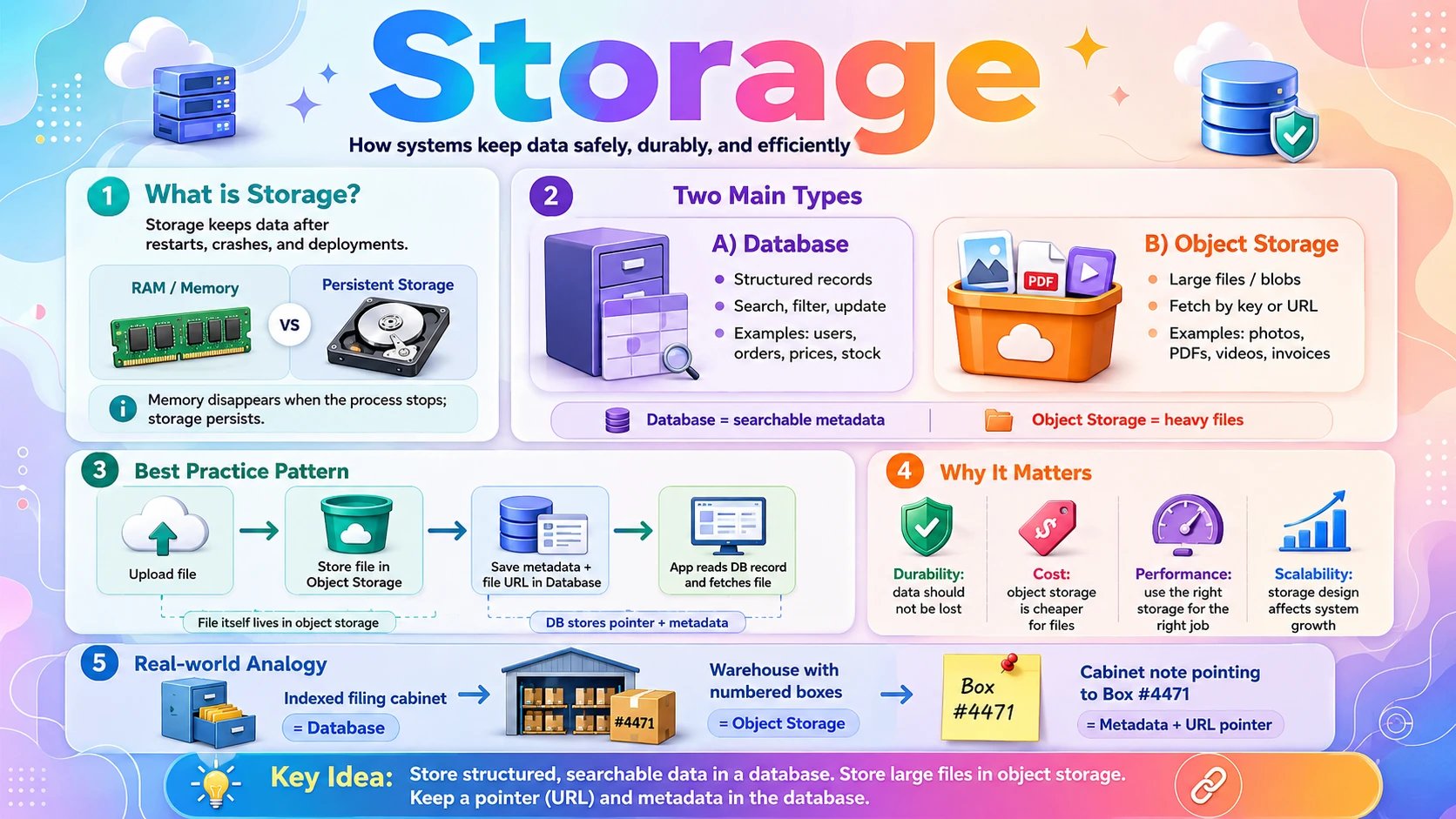
Back to our online store, ShopEasy. It needs to store two very different kinds of data. First, structured records: users, orders, prices, stock counts — neat rows of fields you constantly search and update ("show me all orders over $50 from last week"). Second, big files: product photos, invoice PDFs, review images — large blobs you save once and hand back whole.
These two needs pull in opposite directions, so they use different storage. Structured records live in a database — built to query, filter, and update fields fast. Files live in object storage — built to hold huge amounts of data cheaply and serve each file by its address. Putting a 5 MB photo inside a database row, or trying to run a "find all orders" query against a pile of files, are both mistakes this section will help you avoid.
Underneath both is one non-negotiable idea: persistence. Storage must keep data safely on disk so it survives restarts, crashes, and deployments — unlike a server's memory, which vanishes the moment the process stops.
2.2 💡 Why It Matters
Storage is where your users' data lives forever, so getting it right is critical. The scale is staggering: Amazon S3 holds well over 100 trillion objects; Netflix stores its entire media library as files in object storage; Dropbox manages exabytes of user files. Meanwhile a company's structured data — orders, accounts, transactions — is its lifeblood, and losing it can end a business.
- Choosing the wrong storage makes systems slow and expensive — a database choking on huge files, or files you can't search.
- Durability (data never lost) is a hard requirement; storage systems achieve it by keeping multiple copies. S3 advertises 99.999999999% ("eleven nines") durability.
- Cost differs by orders of magnitude — object storage is far cheaper per gigabyte than database storage, so files belong there.
- Nearly every system design question includes "where does the data go?" — and the answer is almost always "structured data in a database, files in object storage."
Why system design cares: the classic pattern — store the file in object storage, store a pointer (URL) plus metadata in the database — appears in the design of almost every media-heavy system (Instagram, YouTube, Dropbox). Recognising it instantly is a mark of solid fundamentals.
2.3 🏠 Real-world Analogy
Think of a company's back office. It has a filing cabinet with labelled, indexed folders — you can instantly find "all invoices from March over $500" because everything is structured and cross-referenced. That is a database. It also has a warehouse full of numbered shelves holding big sealed boxes. You can't search inside a box, but if you know its shelf number you can fetch the whole box in seconds, and the warehouse holds far more, far more cheaply. That is object storage.
| Back Office World | Storage World | Meaning |
|---|---|---|
| 🗃️ Indexed filing cabinet | 🗄️ Database | Structured, searchable records |
| 🔎 "Find all March invoices over $500" | 🔍 A database query | Filter and sort by fields — fast |
| 📦 Numbered box in a warehouse | 🧱 Object in object storage | A whole file fetched by its key |
| 🏷️ The shelf number on a box | 🔗 The object's key / URL | How you locate and retrieve it |
| 📇 A note in the cabinet saying "Box #4471" | 🧾 A DB row storing the file's URL | The metadata-plus-pointer pattern |
The everyday trick the office uses is the key one for system design: keep a small indexed note in the cabinet ("Contract for Acme → Box #4471") and the bulky document itself in the warehouse. Databases store the searchable metadata and a pointer; object storage holds the heavy file.
2.4 📖 Key Terms
| Term | Simple Definition | Quick Example |
|---|---|---|
| Persistence | Data survives after the program or machine stops | Orders saved to disk, not just memory |
| Durability | Data is not lost even if hardware fails, via copies | S3's "eleven nines" durability |
| Database | A system for storing and querying structured records | PostgreSQL holding the orders table |
| Object Storage | A store for whole files, each fetched by a key | Amazon S3, Google Cloud Storage |
| Block Storage | Raw disk volumes attached to a server | An AWS EBS volume on an EC2 instance |
| File Storage | A shared filesystem with folders, mounted by servers | A network drive (NFS), AWS EFS |
| Blob | A "binary large object" — any big unstructured file | A video, image, or PDF |
| Bucket | A named container that holds objects | An S3 bucket shopeasy-images |
| Metadata | Small descriptive data about a larger item | A photo's size, owner, upload date |
| Replication | Keeping copies of data on multiple machines | 3 copies across data centres |
2.5 🔢 How It Works
Let us break storage into four pieces: what makes data persistent and durable, how databases hold structured records, how object storage holds files, and the three fundamental storage types you should know.
A. Persistence & Durability
A server's memory (RAM) is fast but volatile — cut the power and it's gone. Storage writes data to disk (SSD/HDD), which survives restarts. But a single disk can fail, so durable storage keeps multiple copies (replication) across machines or data centres. Persistence means "survives a restart"; durability means "survives a hardware failure." Production systems need both.
B. Databases — Structured Data
A database organises data into a defined shape — for example rows and columns — so you can query by any field, filter, sort, and update precisely. When ShopEasy asks "all pending orders for user 128, newest first," the database answers efficiently using indexes. That power is why structured, frequently-queried data belongs in a database — not in files.
🔗 SQL vs NoSQL: databases come in families — relational (SQL) and non-relational (NoSQL). The differences and when to choose each are a big topic covered fully in blog_23 (Database Basics). Here, just hold the idea: "structured, queryable data → a database."
C. Object Storage — Files
Object storage keeps each file as an object: the raw bytes, a unique key, and some metadata, sitting inside a bucket. You PUT a file to store it and GET it by key to retrieve it — often via a plain HTTPS URL. You do not edit an object in place; you replace the whole thing. In return you get near-unlimited capacity, very low cost, and built-in durability. The database then just stores the object's URL plus searchable metadata:
The heavy image bytes live in object storage at that URL; the database holds only the pointer and the fields it needs to search on. Small and fast in the database, big and cheap in object storage.
D. Block vs File vs Object Storage
At the infrastructure level there are three fundamental ways to store bytes. Knowing the difference is a common gap:
| Type | What It Is | Accessed As | Best For |
|---|---|---|---|
| Block | A raw disk volume attached to one server | A hard drive the OS formats | Databases, boot disks — low-latency read/write |
| File | A shared filesystem with folders | A mounted network drive (paths) | Shared files across several servers |
| Object | Files as objects with keys in buckets | An API / HTTPS URL by key | Media, backups, static assets at massive scale |
2.6 🔀 Types & Variations
Storage splits along two lines: the infrastructure storage type (how bytes are stored) and the database family (how structured data is organised).
A. The Three Storage Types
Block Storage
Raw, fast disk volumes attached to a single server. What databases and operating systems run on. Example: AWS EBS.
File Storage
A shared filesystem with folders that many servers can mount at once. Example: NFS, AWS EFS.
Object Storage
Files as objects fetched by key over HTTPS. Near-infinite, cheap, durable. Example: Amazon S3, GCS.
B. Database Families (preview)
Relational (SQL)
Tables with fixed schemas and relationships. Strong consistency. Example: PostgreSQL, MySQL.
Document / NoSQL
Flexible JSON-like documents, easy to scale horizontally. Example: MongoDB, DynamoDB.
Key-Value / Cache
Ultra-fast lookups by key, often in memory. Example: Redis, Memcached.
Coming in Phase 1 & 2: the database families above are previewed here only to place them in the storage picture. blog_23 (Database Basics) covers SQL vs NoSQL in depth, and Caching gets its own dedicated post. For now: structured data → database; files → object storage.
2.7 🎨 Illustrated Diagram
The diagram below shows the standard split: the application server writes small structured records to the database and big files to object storage, and the database keeps the file's URL so the two stay linked.
Reading the diagram: the app server saves the searchable record (plus the file's URL) to the database and pushes the actual bytes to object storage. Later the client fetches the file directly from object storage by its URL — the database and app server never handle the heavy bytes.
2.8 ✅ When to Use
Picking the right home for each kind of data is one of the most common design decisions. This table maps the need to the storage:
| You need to store… | Use… | Why |
|---|---|---|
| Structured records you query and update (users, orders) | 🗄️ Database | Fast filtering, sorting, and precise updates by field |
| Large files: images, video, PDFs, backups | 🪣 Object storage | Cheap, near-infinite, durable; served by URL |
| A fast disk for a database or OS on one server | 🧱 Block storage | Low-latency raw read/write attached to that server |
| A shared folder several servers read/write together | 📁 File storage | Familiar filesystem semantics across machines |
| Millisecond lookups of hot data by key | ⚡ Cache (key-value) | In-memory speed for repeated reads |
Rule of thumb: structured data → database; big files → object storage; a fast disk for a database → block storage; a shared filesystem → file storage. When a file is large, never put the bytes in the database — store the file in object storage and keep just the URL in the database.
2.9 🏗️ Real-world Example — Adding a Product with Photos on ShopEasy
When a seller adds a new product with a photo, the request splits cleanly across the two storage systems — the exact pattern used by Instagram, YouTube, and every media-heavy app:
| Step | Actor | What Happens |
|---|---|---|
| ① | 📱 Seller's Browser | Uploads product details + a photo to the app server |
| ② | ⚙️ App Server | Sends the photo bytes to object storage (a PUT into the shopeasy-images bucket) |
| ③ | 🪣 Object Storage | Stores the file, returns its URL: https://cdn.shopeasy.com/products/42/main.webp |
| ④ | ⚙️ App Server | Writes the product row (name, price, stock) plus that URL into the database |
| ⑤ | 🗄️ Database | Stores the small, searchable record — no image bytes inside it |
| ⑥ | 📱 Shopper (later) | Loads the product page; the browser fetches the image straight from object storage / CDN by its URL |
Notice the division of labour: the database stays small and fast because it never holds image bytes — only the URL. Object storage holds the heavy file cheaply and serves it directly to browsers. This "metadata in the DB, file in object storage" split is one of the most reused patterns in all of system design.
2.10 ⚖️ Trade-offs
The database-plus-object-storage split is the default for good reasons, but it has costs worth knowing:
| ✅ Advantages | ❌ Disadvantages |
|---|---|
| Right tool per job — fast queries in the DB, cheap bulk storage for files | Two systems to manage — more infrastructure than a single store |
| Lean database — stays small and fast because files live elsewhere | Consistency gap — a DB row can point to a file that failed to upload (or vice-versa) |
| Cheap at scale — object storage costs a fraction of database storage per GB | Two-step writes — upload the file, then save the record; must handle partial failures |
| Direct delivery — files served straight to clients (and via CDN), off-loading your servers | Orphaned files — deleting a record must also delete its object, or storage leaks |
| Independent scaling & durability — object storage replicates and scales on its own | Eventual consistency — some object stores don't reflect updates instantly |
2.11 🚫 Common Mistakes
| # | ❌ Common Mistake | ✅ The Reality |
|---|---|---|
| 1 | Storing large files in the database | Putting images or videos in DB rows bloats it, slows queries, and costs far more. Store files in object storage; keep only the URL in the DB. |
| 2 | Treating object storage like a filesystem | You can't edit an object in place or rename cheaply. You replace whole objects. It's key-to-blob, not a folder tree you mutate. |
| 3 | Confusing persistence with durability | Persistence means surviving a restart; durability means surviving hardware failure via copies. You need both — one disk is not durable. |
| 4 | No backups or replication | A single copy on one disk is one failure away from total loss. Real storage keeps multiple replicas and regular backups. |
| 5 | Storing files on the app server's local disk | That disk disappears when the server is replaced, and other servers can't see it. Use shared object (or file) storage instead. |
| 6 | Serving files through the app server | Streaming big files through your compute wastes CPU and bandwidth. Let clients fetch directly from object storage / CDN. |
2.12 📝 Summary
- Storage makes data survive — memory is volatile; storage persists to disk and stays durable via replicas.
- Database vs object storage — structured, queryable records go in a database; large files go in object storage.
- Three storage types — block (raw disk for one server), file (shared filesystem), object (files by key at scale).
- The reused pattern — store the file in object storage, store the URL + metadata in the database.
- Never put big files in the DB, on a local disk, or stream them through the app server — use object storage and a CDN.
2.13 🏋️ Design Challenge
🎥 Challenge: Design storage for a video platform
You are designing storage for a small video platform like a mini-YouTube. Think through the following:
- Where should the video files and thumbnails go, and where should video titles, view counts, and comments go?
- How does a video's database record stay linked to its file?
- When a viewer plays a video, should the bytes flow through your app server — why or why not?
- What happens to the stored file when a user deletes their video?
👁️ Show Answer
Where each thing goes:
- 🪣 Object storage — the video files and thumbnails (large blobs, cheap and durable)
- 🗄️ Database — title, description, uploader, view count, and comments (structured, queryable), plus the video's object-storage URL
Linking: the video's DB row stores the object key/URL (e.g. videos/9f3/master.mp4). The metadata is searchable in the database; the bytes live in object storage.
Playback: the bytes should not flow through the app server — that would waste enormous bandwidth and CPU. The player streams directly from object storage, fronted by a CDN so it's delivered from a location near the viewer. (CDN is a Phase 2 topic.)
Deletion: deleting the video must remove both the database record and the object in storage. If you only delete the row, the file becomes an orphan that silently costs money forever — a common real-world bug.
2.14 ☁️ Cloud Service Mapping
Each storage type maps to a well-known managed service on every cloud:
| Storage Type | AWS (Primary) | GCP | Azure |
|---|---|---|---|
| Object storage — files, media, backups | Amazon S3 | Cloud Storage | Blob Storage |
| Block storage — disks for servers/DBs | Amazon EBS | Persistent Disk | Managed Disks |
| File storage — shared filesystem | Amazon EFS | Filestore | Azure Files |
| Managed database — structured data | Amazon RDS / DynamoDB | Cloud SQL / Firestore | Azure SQL / Cosmos DB |
Simplest AWS picture: keep structured records in RDS (or DynamoDB), store files in S3, and put the DB's disk on EBS. When a user uploads a photo, the bytes go to S3 and the returned URL goes into RDS — the pattern behind almost every media app.
⏳ 3. Background Processing
Not every piece of work needs to finish before you reply to the user. Sending a confirmation email, generating an invoice PDF, or encoding a video can take seconds or minutes — far too long to make someone stare at a spinner. Background processing is the art of doing slow or deferrable work outside the request path, so the user gets an instant response while the heavy lifting happens later. In this section you will learn the synchronous-vs-asynchronous split, the queue-and-worker pattern that powers almost all background work, the different kinds of background jobs, and how to make them reliable.
3.1 🎯 Introduction
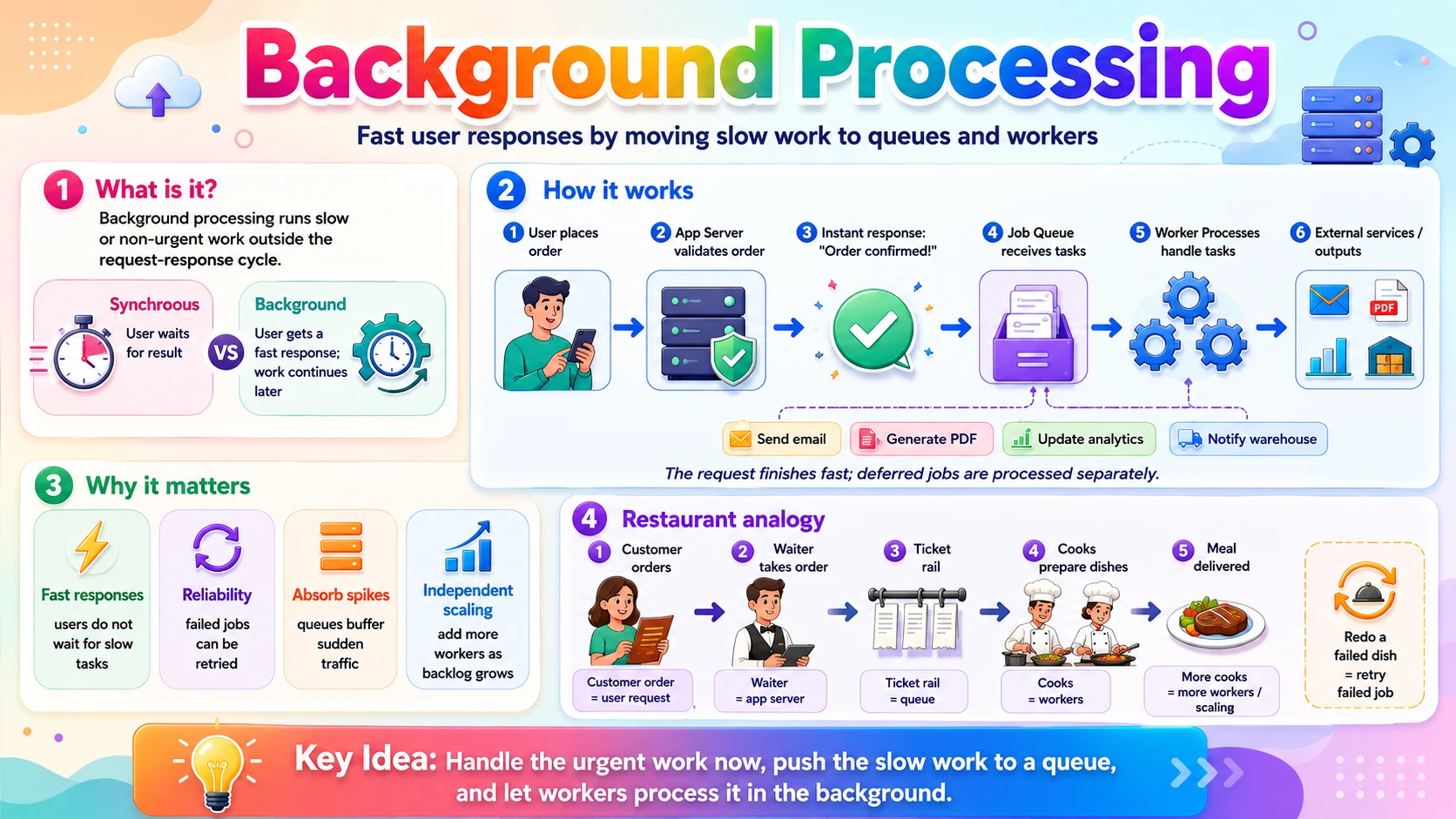
Picture a shopper on ShopEasy clicking Place Order. Behind that one click, a lot needs to happen: validate the order, reserve stock, charge the card, send a confirmation email, generate an invoice PDF, update sales analytics, and notify the warehouse. If the app server did all of that before responding, the shopper would watch a spinner for ten seconds — and if the email service were slow, the whole checkout would hang.
The fix is to split the work. The few things the user truly needs confirmed — order validated, stock reserved, payment taken — happen synchronously, and the server replies "Order confirmed!" in a fraction of a second. Everything else — email, PDF, analytics, warehouse notification — is handed off to run in the background, moments later, without the user waiting.
Background processing means running work outside the request-response cycle. The request finishes fast; the deferred work is dropped into a queue and picked up by separate worker processes that chew through it on their own time.
3.2 💡 Why It Matters
Background processing is what keeps large systems fast and resilient. YouTube accepts your video upload in seconds but transcodes it into every resolution in the background over minutes. Every major service queues its emails rather than sending them inline. When a task takes anywhere from a few hundred milliseconds (sending an email) to several minutes (encoding video), forcing the user to wait for it is simply not an option.
- Fast responses — users get an instant reply; slow work never blocks the request.
- Reliability — a queued job that fails can be retried automatically; an inline failure would just break the user's request.
- Absorbing spikes — a queue acts as a buffer. If 10,000 orders arrive at once, workers drain the queue steadily instead of the system collapsing.
- Independent scaling — when the backlog grows, add more workers without touching the web tier.
Why system design cares: "Do this in the background with a queue and workers" is one of the most common answers in system design — for emails, notifications, media processing, analytics, and search indexing. Recognising which work belongs in the background is a core skill.
3.3 🏠 Real-world Analogy
Think of a busy restaurant kitchen. When you order, the waiter doesn't stand at your table cooking — they write a ticket, clip it to the ticket rail, and immediately move on to the next customer. The cooks pull tickets off the rail one by one and prepare dishes at their own pace. If the kitchen gets slammed, tickets simply queue up on the rail; add another cook and they clear faster.
| Restaurant World | Background Processing World | Role |
|---|---|---|
| 🧑💼 Waiter taking your order | ⚙️ App server handling the request | Accepts work, responds fast |
| 🎫 Writing a ticket, clipping it to the rail | 📥 Enqueuing a job | Hand off work to be done later |
| 📋 The ticket rail | 🗂️ The task queue | Holds pending work in order |
| 👨🍳 Cooks pulling tickets | 🛠️ Worker processes | Do the actual heavy work |
| ➕ Adding another cook at rush hour | ➕ Adding more workers | Scale to clear the backlog |
| 🔁 Re-cooking a dish sent back | ♻️ Retrying a failed job | Recover from failures |
The key move: the waiter never blocks. They take your order, hand it off, and stay free to serve others — exactly how an app server enqueues background work and immediately returns to handling new requests.
3.4 📖 Key Terms
| Term | Simple Definition | Quick Example |
|---|---|---|
| Synchronous | Work done inside the request; the caller waits for it | Validating a password at login |
| Asynchronous | Work deferred to run later; the caller doesn't wait | Sending the welcome email |
| Background Job / Task | A unit of deferred work to be run by a worker | "Generate invoice #5567" |
| Task Queue | An ordered buffer that holds jobs until a worker takes them | An SQS queue of email jobs |
| Producer | The code that creates and enqueues a job | The checkout handler |
| Worker / Consumer | A process that pulls jobs and executes them | An email-sending worker |
| Cron / Scheduled Job | Work that runs on a fixed schedule, not on demand | "Send the daily digest at 8 AM" |
| Retry | Re-running a job that failed | Retry a failed email 3 times |
| Dead-Letter Queue | Where jobs go after repeated failures, for inspection | Emails that failed 5 times |
| Idempotency | Running a job twice has the same effect as once | Don't charge the card twice on retry |
3.5 🔢 How It Works
Let us break background processing into four pieces: the synchronous-vs-asynchronous decision, the queue-and-worker pattern, the kinds of background work, and what makes it reliable.
A. Synchronous vs Asynchronous
Synchronous work happens inside the request, and the user waits for the result — you need it to log in, to see a search result, to confirm payment. Asynchronous work is deferred: the request returns immediately and the work runs later. The question to ask for every task is simple: does the user need this finished before they get a response? If no, it belongs in the background.
B. The Queue-and-Worker Pattern
Almost all background processing uses the same three-part shape. A producer (your app server) drops a job into a queue; one or more workers pull jobs off the queue and execute them. The queue decouples the two sides — producers and workers don't need to run at the same speed, or even at the same time. A job is just a small message describing the work:
The app server enqueues this in under a millisecond and returns "Order confirmed!" The email worker picks it up moments later, renders the email, and sends it — completely outside the user's request.
C. Kinds of Background Work
- Deferred tasks (on-demand) — triggered by a user action but run after the response: send email, generate PDF, resize an image.
- Scheduled jobs (cron) — run at fixed times: "send the daily digest at 8 AM," "expire old sessions at midnight."
- Recurring / polling workers — run continuously or on an interval: retry failed payments every 10 minutes.
- Batch processing — crunch large data sets periodically: nightly analytics roll-ups, report generation.
D. Making It Reliable
Because a worker runs away from the user, failures must be handled automatically. Three mechanisms do the heavy lifting:
- Retries — if a job fails (the email service was down), the worker tries again, usually with increasing delays (backoff).
- Idempotency — since a job might run more than once (retry after a partial success), it must be safe to repeat. Charging a card twice is the classic disaster; an idempotency key prevents it.
- Dead-letter queue — a job that keeps failing after N attempts is moved aside for humans to inspect, instead of blocking the queue forever.
🔗 Queues get their own post: the internals of message queues — delivery guarantees, ordering, at-least-once vs exactly-once, and reliability patterns — are covered in depth in blog_26 (Message Queues & Async). Here we focus on the idea: defer work via a queue and workers.
3.6 🔀 Types & Variations
Background work is triggered in a few distinct ways. Knowing which pattern fits a task is the practical skill.
Task / Job Queue
On-demand jobs enqueued by a user action and run just after the response. Example: send email, resize image. Tools: Celery, Sidekiq, SQS.
Scheduled / Cron
Jobs that run at fixed clock times. Example: 8 AM daily digest, midnight cleanup. Tools: cron, EventBridge, Cloud Scheduler.
Recurring Worker
A long-running process that polls or repeats on an interval. Example: retry failed payments every 10 minutes.
Batch Processing
Periodically process a large dataset in one run. Example: nightly analytics roll-ups, report generation.
Event-Driven (Pub/Sub)
Work triggered when an event is published; many subscribers can react. Example: "order.placed" fans out to email, analytics, warehouse.
Stream Processing
Continuously process an unbounded flow of events in near-real-time. Example: live metrics, fraud detection. Tools: Kafka, Kinesis.
Simple rule: user-triggered slow work → task queue; time-triggered work → cron; reacting to something that happened → event-driven; heavy periodic number-crunching → batch.
3.7 🎨 Illustrated Diagram
The diagram below shows the fast path and the background path. The app server responds to the user immediately, drops a job on the queue, and separate workers process it afterwards — the user never waits for the slow work.
Reading the diagram: steps ① and ② are the fast synchronous path — the user gets a response right away. Steps ③–⑤ are the background path — the job sits in the queue and is processed by workers independently. Add more workers and the queue drains faster, with zero impact on response time.
3.8 ✅ When to Use
The decision is almost always about one question: does the user need the result now? If not, push it to the background.
| Run it in the background when… | Keep it synchronous when… |
|---|---|
| The work is slow (email, PDF, video encoding, image resize) | The user needs the result to continue (login, search, payment confirmation) |
| The user doesn't need the result to continue | The response is meaningless without it |
| It can safely be retried if it fails | It must be reflected instantly and consistently |
| It depends on a flaky external service | It's trivially fast (a simple DB read/write) |
| Traffic is spiky and you want a queue to absorb bursts | Deferring it would confuse the user ("where's my result?") |
Rule of thumb: keep the request handler doing the minimum the user needs to see a correct response, and defer everything else. A checkout should reserve stock and take payment synchronously, then queue the email, invoice, analytics, and warehouse notification.
3.9 🏗️ Real-world Example — Placing an Order on ShopEasy
Here is how a single "Place Order" click splits into a fast synchronous part and several background jobs:
| Step | Actor | What Happens |
|---|---|---|
| ① | 📱 Shopper | Clicks "Place Order" |
| ② | ⚙️ App Server (sync) | Validates the order, reserves stock, charges the card — the essentials |
| ③ | ⚙️ App Server (sync) | Responds "Order confirmed! ✅" in ~200 ms |
| ④ | 📥 App Server | Enqueues background jobs: send email, generate invoice PDF, update analytics, notify warehouse |
| ⑤ | 🛠️ Email Worker | Renders and sends the confirmation email (retries if the mail service is down) |
| ⑥ | 🛠️ PDF Worker | Generates the invoice and stores it in object storage |
| ⑦ | 🛠️ Analytics Worker | Updates dashboards and sales metrics |
| ⑧ | 🛠️ Warehouse Worker | Sends the fulfilment request to the warehouse system |
Notice: the shopper waited only for steps ② and ③ — the essentials — and got a response in a fraction of a second. Everything in steps ⑤–⑧ happened moments later, in parallel, and could each fail and retry independently without ever affecting the shopper's experience. This is exactly how real checkout systems are built.
3.10 ⚖️ Trade-offs
Moving work to the background is powerful, but it trades immediacy and simplicity for speed and resilience:
| ✅ Advantages | ❌ Disadvantages |
|---|---|
| Fast responses — users never wait for slow work | Eventual, not instant — the result appears later, not immediately |
| Resilience — failed jobs retry automatically instead of breaking the request | More moving parts — a queue and workers to deploy, monitor, and operate |
| Absorbs spikes — the queue buffers bursts of work | Harder to debug — work runs elsewhere, later; tracing failures is trickier |
| Independent scaling — add workers when the backlog grows | Needs idempotency — jobs may run more than once; code must handle it |
| Decoupling — producers and workers evolve and scale separately | Ordering & delivery caveats — jobs may arrive out of order or be delayed under load |
3.11 🚫 Common Mistakes
| # | ❌ Common Mistake | ✅ The Reality |
|---|---|---|
| 1 | Doing slow work inside the request | Sending email or encoding video inline makes the user wait and ties up a server thread. Enqueue it and respond immediately. |
| 2 | Non-idempotent workers | Jobs can run twice (retries, redelivery). If "charge card" isn't idempotent, a retry double-charges. Use idempotency keys. |
| 3 | No retries or dead-letter queue | A job that fails once shouldn't vanish. Retry with backoff, and after N failures move it to a dead-letter queue for inspection. |
| 4 | An in-memory queue that loses jobs | If the queue lives only in a server's memory, a crash loses every pending job. Use a durable, persisted queue. |
| 5 | No monitoring of the backlog | An unwatched queue can silently grow forever. Track queue depth and worker health; alert when the backlog spikes. |
| 6 | Assuming instant completion | Background work is eventual. Don't tell the user "done" for something still queued — show "processing" and update when it finishes. |
3.12 📝 Summary
- Background processing defers slow work — it runs outside the request so the user gets a fast response.
- Synchronous vs asynchronous — do only what the user needs now inline; queue the rest.
- Queue + workers — a producer enqueues jobs; workers pull and run them, scaling independently.
- Many trigger types — on-demand task queues, scheduled cron, recurring, batch, event-driven, and streaming.
- Reliability is essential — retries, idempotency, dead-letter queues, and backlog monitoring keep jobs safe.
3.13 🏋️ Design Challenge
📨 Challenge: Design background processing for a newsletter app
You run an app that lets creators send a newsletter to up to 1 million subscribers with one click. Think through the following:
- What should happen synchronously when the creator clicks "Send," and what should be deferred?
- How would you structure the 1 million emails as background work?
- The email provider fails on some sends. How do you make sure nobody is skipped and nobody gets the email twice?
- How do you handle a sudden burst of 50 creators all sending at once?
👁️ Show Answer
Synchronous vs deferred: when the creator clicks "Send," the app synchronously validates the newsletter, saves it, and responds "Your newsletter is being sent to 1,000,000 subscribers ✅." The actual sending is entirely background work.
Structuring the million emails: enqueue one job per subscriber (or per small batch, e.g. 500 recipients). A pool of email workers pulls jobs off the queue and sends them. Because it's a queue, the million jobs drain steadily rather than all at once.
No skips, no duplicates: use a durable queue so no job is lost on a crash, and retry failed sends with backoff. Make each job idempotent — record "sent" per (newsletter, subscriber) so a retried job that already succeeded doesn't send a second copy. Jobs that keep failing go to a dead-letter queue.
Burst of 50 creators: the queue absorbs the 50 million jobs as a buffer; you simply autoscale the worker pool based on queue depth to drain faster, then scale back down. The web tier stays fast because it only ever enqueues.
3.14 ☁️ Cloud Service Mapping
Every cloud provides managed queues, worker compute, and schedulers so you rarely build this plumbing yourself:
| Need | AWS (Primary) | GCP | Azure |
|---|---|---|---|
| Task queue — hold jobs for workers | Amazon SQS | Cloud Tasks / Pub/Sub | Azure Queue Storage / Service Bus |
| Run workers — process jobs | Lambda / ECS | Cloud Functions / Cloud Run | Azure Functions / Container Apps |
| Scheduled / cron — time-triggered jobs | EventBridge Scheduler | Cloud Scheduler | Azure Logic Apps / Timer |
| Event streaming — high-volume event flows | Amazon Kinesis / MSK | Pub/Sub / Dataflow | Event Hubs |
Simplest AWS picture: the app server drops a job into SQS → a Lambda (or ECS worker) is triggered to process it → failed messages retry and land in an SQS dead-letter queue. For scheduled work, EventBridge Scheduler fires the job on a cron.
🔄 4. Stateless vs Stateful
This last concept ties the whole post together. Back in Sub-topic 1 we said the answer to most scaling problems is "add more servers" — but that only works if the servers are stateless. Whether a server remembers anything between requests is the single property that decides how easily your system scales. In this section you will learn exactly what "state" means, why stateless services scale effortlessly while stateful ones fight you, and the standard techniques for keeping servers stateless by pushing state somewhere else.
4.1 🎯 Introduction
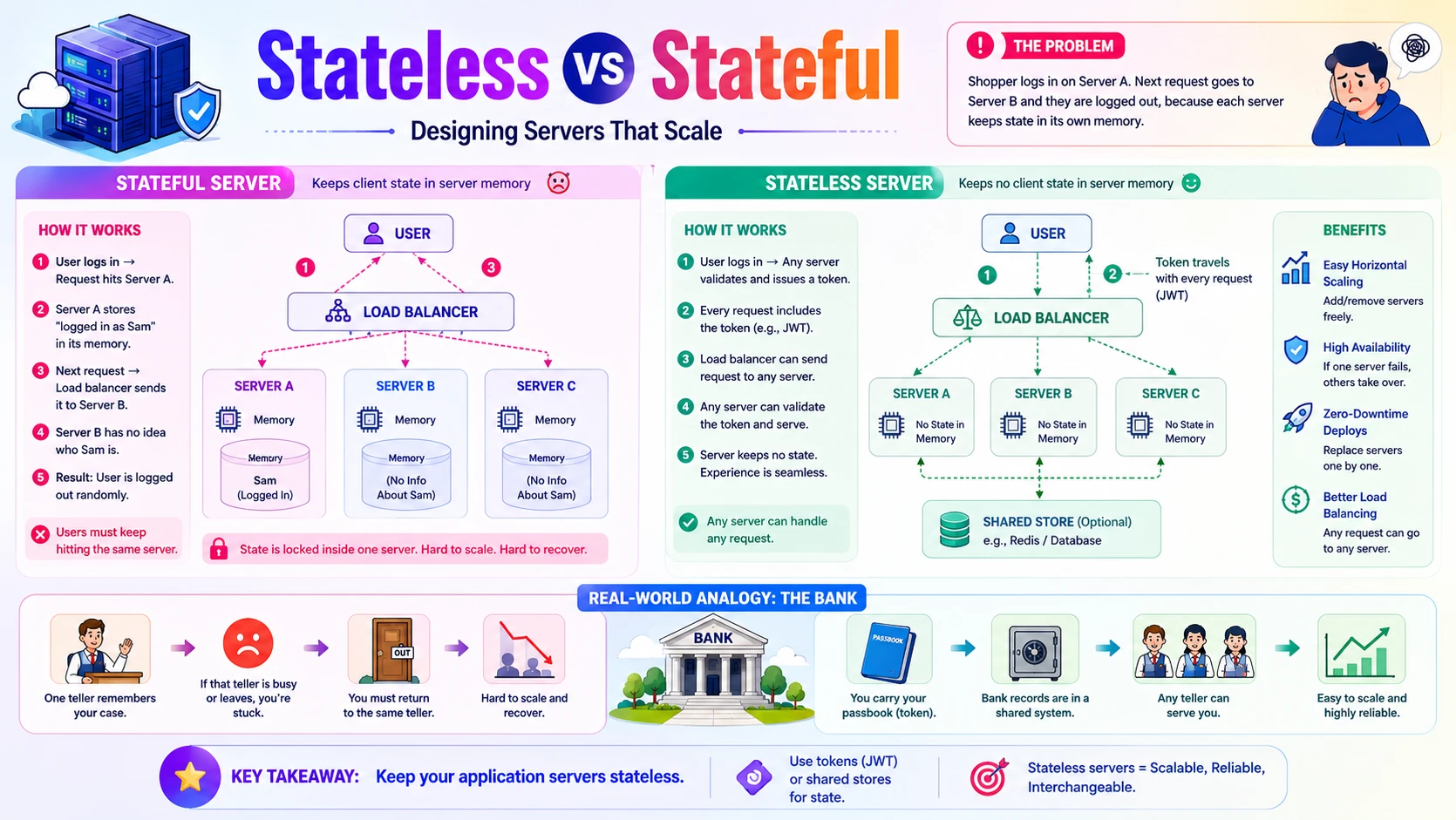
ShopEasy has grown, so it now runs three application servers behind a load balancer that spreads requests across them. A shopper logs in — that request happens to hit Server A, which stores "logged in as Sam" in its own memory. A moment later the shopper adds an item to the cart, but the load balancer sends that request to Server B — which has never heard of Sam and asks them to log in again. The shopper gets randomly logged out. Frustrating, and entirely self-inflicted.
The bug is that Server A kept state in its own memory. That is a stateful design. The fix is to make every server stateless — none of them remembers anything about the shopper between requests. Instead, the identity travels with each request (a token) or lives in a shared store both servers can read. Now it doesn't matter which server handles a request; they're interchangeable.
- Stateful server — keeps data about the client in its own memory between requests. The client must keep hitting the same server.
- Stateless server — keeps nothing between requests; each request carries or fetches everything it needs. Any server can handle any request.
4.2 💡 Why It Matters
Statelessness is the property that makes modern scaling possible. It is why a service can run on 3 servers today and 300 tomorrow: because any server can serve any request, you just add more behind the load balancer. The entire cloud autoscaling model — AWS Auto Scaling groups, Kubernetes pods scaling up and down — assumes your application tier is stateless. Companies like Netflix and Amazon run tens of thousands of interchangeable, stateless instances for exactly this reason.
- Horizontal scaling — add or remove identical servers freely, because none holds unique client state.
- Load balancing — the balancer can route any request to any server without worrying about "which server has this user's data."
- Fault tolerance — if a stateless server crashes, its requests just go to another one; no user data is lost with it.
- Zero-downtime deploys — replace servers one by one during a release; since they hold no state, nothing is lost.
Why system design cares: "Keep the application tier stateless so it scales horizontally, and push state to a shared store or a token" is one of the most important sentences in all of system design. It connects directly to the REST statelessness you saw in blog_21 — same principle, applied to servers.
4.3 🏠 Real-world Analogy
Imagine a bank. In the stateful version, you start a transaction with one specific teller who keeps your details in their head — if that teller goes on break, you're stuck; you can only be served by them. In the stateless version, you carry a passbook with all your account information, and the bank's records live in a shared system every teller can access. Now any teller can serve you instantly, and if one leaves, the next continues seamlessly.
| Bank World | Server World | Meaning |
|---|---|---|
| 🧑💼 One teller who remembers your case | 🖥️ Stateful server holding your session in memory | You must return to the same one |
| 📓 Carrying your own passbook | 🎟️ A token (JWT) carried on each request | State travels with the client |
| 🗄️ Shared bank records system | 🧰 Shared session store (Redis) / database | Any server can read the state |
| 🙋 Any teller can serve you | ⚖️ Any server can handle any request | Servers are interchangeable |
| 🔁 A teller leaves; another continues | ♻️ A server crashes; another takes over | Fault tolerance and easy scaling |
The lesson: don't lock the customer to one teller. Give them a passbook and keep records in a shared system, and every teller becomes interchangeable — exactly how stateless servers plus externalized state let you scale.
4.4 📖 Key Terms
| Term | Simple Definition | Quick Example |
|---|---|---|
| State | Data a server remembers about a client between requests | Who is logged in, cart contents |
| Stateless | The server keeps nothing between requests; each is self-contained | A REST API validating a token each call |
| Stateful | The server stores client data in its own memory across requests | A session held in one server's RAM |
| Session | The data representing one user's ongoing interaction | Login status, preferences, cart |
| Sticky Session | Load balancer pins a user to the same server | "Session affinity" by cookie |
| Externalized State | State moved off the server into a shared place | Sessions stored in Redis |
| Shared Session Store | A fast store all servers read/write for session data | Redis, Memcached |
| Token (JWT) | A signed credential carrying identity on each request | A bearer token (see blog_21) |
| Horizontal Scaling | Adding more identical servers to handle load | 3 → 30 app servers |
4.5 🔢 How It Works
Let us break this down into four pieces: what "state" actually is, how the stateless approach works, the two ways to cope with state that must exist, and why stateless scales so well.
A. What "State" Really Is
State is anything a server holds about a specific client that it would need again on a later request. Common culprits that quietly make a server stateful:
- Session data in memory — "user 128 is logged in," stored in a local variable.
- In-memory caches — per-server caches that other servers can't see.
- Uploaded files on local disk — a file saved to
/tmpthat only this server has. - In-progress data — a multi-step wizard's partial data kept between requests.
B. The Stateless Approach
A stateless server makes each request self-contained: everything needed to handle it either travels with the request or is fetched from a shared source. Identity comes from a token the client sends every time; session and cart data live in a shared store (like Redis) or the database. The server itself remembers nothing — so it can be replaced at any moment.
Because the token proves who the caller is on every request, Server A and Server B are equally able to handle it — the random-logout bug disappears.
C. Sticky Sessions vs Shared Store
When state must exist, there are two ways to cope — and one is much better than the other:
| Approach | How It Works | Problem |
|---|---|---|
| Sticky sessions | The load balancer pins each user to the server that has their state | That server becomes a single point of failure; uneven load; breaks when it dies or is replaced |
| Shared store | State lives in Redis / a database; every server reads it | The preferred approach — servers stay stateless and interchangeable |
Sticky sessions are a crutch: they keep a stateful design limping along, but they undermine the benefits of load balancing. The clean solution is to externalize state to a shared store so servers stay truly stateless.
D. Why Stateless Scales
Once no server holds unique client state, servers become identical, disposable units. The load balancer sprays requests across all of them; you add servers when traffic rises and remove them when it falls; a crashed server is simply replaced. This is horizontal scaling, and it is the direct payoff of statelessness — the "add more servers" promise from Sub-topic 1 finally cashed in.
4.6 🔀 Types & Variations
It helps to see which components are naturally stateless, which are inherently stateful, and where externalized state can live.
A. Stateless vs Stateful Components
Stateless Tier
Web and application servers, REST APIs. Hold no client state, scale horizontally, replace freely. The default for your compute tier.
Stateful Tier
Databases, caches, message queues. They exist precisely to hold state — and are scaled with specialised techniques, not by simple cloning.
Long-lived Connections
WebSocket / real-time servers hold per-connection state, so they need care (e.g. a shared pub/sub layer) to scale beyond one machine.
B. Where to Keep State
Client-side (Token)
Identity and small claims travel in a signed token (JWT) on each request. No server storage needed. Ideal for authentication.
Shared Cache
Sessions, carts, and hot data in a fast shared store like Redis that every server reads. The standard home for session state.
Database
Durable state — orders, accounts, saved carts — lives in the database, readable by any server. The source of truth.
The key reframe: "stateless" never means your system has no state — every real system has state. It means the application servers don't hold it. State is pushed to the client (token), a shared cache (Redis), or the database — places built to hold it.
4.7 🎨 Illustrated Diagram
The diagram below shows the stateless design: a load balancer sends requests to any of several identical app servers, none of which stores session data locally — they all read and write it to a shared session store and the database.
Reading the diagram: the load balancer can route a request to any of the three app servers, because none of them holds the session — they all share the same store. Add a fourth server and it works instantly; kill one and the others carry on. That is statelessness enabling horizontal scaling.
4.8 ✅ When to Use
The guiding principle: make the tier you need to scale stateless, and confine state to purpose-built stateful systems.
| Design it stateless when… | Accept statefulness when… |
|---|---|
| It's a web / application server or REST API you scale horizontally | It's a database, cache, or queue — its job is to hold state |
| You want autoscaling, easy failover, and zero-downtime deploys | You have real-time connections (WebSocket, game servers) with per-connection state |
| Requests can be served by any interchangeable server | The workload genuinely needs in-memory locality for performance |
| You can carry identity in a token and session in a shared store | You isolate and scale the stateful part with specialised tools |
Rule of thumb: keep your application tier stateless and treat every app server as disposable. Store identity in a token, session/hot data in a shared cache (Redis), and durable data in the database. Let the databases and caches be the stateful specialists — never your web tier.
4.9 🏗️ Real-world Example — Login Across Three Servers
Here is the ShopEasy random-logout bug and its fix, side by side — the same two requests, one stateful design and one stateless:
| Step | ❌ Stateful (broken) | ✅ Stateless (works) |
|---|---|---|
| ① Login | Hits Server A; "Sam logged in" saved in Server A's memory | Hits Server A; a signed token is issued, session saved in Redis |
| ② Next request | Load balancer routes to Server B | Load balancer routes to Server B |
| ③ Server B checks | Server B has no memory of Sam | Server B validates the token and reads the session from Redis |
| ④ Result | 🚫 Sam is asked to log in again | ✅ Sam stays logged in seamlessly |
| ⑤ Scale up | Adding Server D doesn't help — state is stuck on A | Add Server D; it serves requests immediately |
| ⑥ Server crashes | Everyone on the dead server is logged out | Requests move to other servers; nobody notices |
Notice: the only change was where the state lives — moved out of the server's memory into a token plus a shared Redis store. That one change turns a fragile, unscalable system into one that scales to hundreds of servers and survives crashes. This is the payoff the whole post has been building toward.
4.10 ⚖️ Trade-offs
Stateless design is the default for scalable systems, but it isn't free — the state has to go somewhere, and that somewhere has its own cost:
| ✅ Advantages of Stateless | ❌ Costs & Cautions |
|---|---|
| Effortless horizontal scaling — add/remove identical servers at will | State must live elsewhere — you now depend on a shared store or database |
| Simple load balancing — any request to any server, no affinity needed | Extra lookup per request — fetching session from Redis adds a small latency |
| Fault tolerance — a dead server loses no client state | The shared store is critical — it must itself be made highly available |
| Zero-downtime deploys — replace servers freely during releases | Token size / staleness — data in a token can grow large or go out of date |
| Predictable & testable — each request is self-contained | Some workloads resist it — real-time connections need extra design to fit |
4.11 🚫 Common Mistakes
| # | ❌ Common Mistake | ✅ The Reality |
|---|---|---|
| 1 | Storing sessions in server memory | It works with one server and breaks the moment you add a second. Store sessions in a shared store or a token from the start. |
| 2 | Saving uploads to local disk | A file on one server's disk is invisible to the others and vanishes when the server is replaced. Use object storage (Sub-topic 2). |
| 3 | Relying on sticky sessions to scale | Session affinity is a band-aid over a stateful design — it causes uneven load and breaks on server failure. Externalize state instead. |
| 4 | Assuming a per-server cache is shared | An in-memory cache on Server A is invisible to Server B, causing inconsistent behaviour. Use a shared cache like Redis. |
| 5 | Thinking "stateless" means no state anywhere | Every system has state. Stateless means the app servers don't hold it — it lives in tokens, caches, and databases. |
| 6 | Putting too much data in a token | Tokens are sent on every request and can go stale. Keep them small (identity + key claims); keep larger session data in a shared store. |
4.12 📝 Summary
- Stateful remembers, stateless forgets — a stateful server keeps client data in its memory; a stateless one keeps nothing between requests.
- Statelessness enables horizontal scaling — interchangeable servers mean you add, remove, and replace them freely.
- Externalize the state — push it to a token (identity), a shared cache like Redis (sessions), or the database (durable data).
- Avoid sticky sessions — they prop up a stateful design and undermine load balancing and failover.
- Keep the app tier stateless — let databases, caches, and queues be the stateful specialists.
4.13 🏋️ Design Challenge
🎮 Challenge: Make a stateful app scale
A team built a multiplayer quiz app on a single server. It keeps each player's login, score, and current question in memory. It works for 100 players but falls over under load, and adding a second server logs everyone out. Think through the following:
- Which pieces of in-memory data are making the server stateful?
- Where should each piece move so the server becomes stateless?
- The game uses live WebSocket connections for real-time updates. Why is that harder to make stateless, and what would help?
- Once stateless, how do you handle a sudden jump from 100 to 100,000 players?
👁️ Show Answer
What makes it stateful: login/session, each player's score, and the current-question pointer are all held in the single server's memory — so only that server can serve a given player, and a restart wipes everything.
Where each piece moves:
- 🎟️ Login/identity → a signed token (JWT) the client sends each request
- ⚡ Scores & current question → a shared store like Redis, readable by any server
- 🗃️ Final results & history → the database (durable source of truth)
Now any app server can handle any player's request, so you run several behind a load balancer.
WebSockets are harder: a live connection is inherently pinned to one server (it holds that open socket), which is per-connection state. To scale, put a shared pub/sub layer (e.g. Redis pub/sub) behind the WebSocket servers so a message on one server reaches players connected to another. The connection stays local, but the game state and messaging are shared.
100 → 100,000 players: because the app tier is now stateless, autoscale it behind the load balancer — add servers as players surge, remove them afterwards — and scale Redis and the database (the stateful specialists) with their own techniques covered later in the series.
4.14 ☁️ Cloud Service Mapping
Staying stateless relies on a few cloud services: a place to keep externalized session state, a load balancer, and autoscaling for the stateless tier:
| Need | AWS (Primary) | GCP | Azure |
|---|---|---|---|
| Shared session store — externalized state | ElastiCache (Redis) | Memorystore | Azure Cache for Redis |
| Load balancer — spread requests across servers | Elastic Load Balancing | Cloud Load Balancing | Azure Load Balancer |
| Autoscaling — grow/shrink the stateless tier | EC2 Auto Scaling | Managed Instance Groups | Virtual Machine Scale Sets |
Simplest AWS picture: put stateless app servers in an Auto Scaling group behind an Elastic Load Balancer, store sessions in ElastiCache (Redis), and carry identity in a token. Traffic rises → the group adds servers; a server dies → the load balancer routes around it. Stateless servers plus externalized state — the foundation of scalable backends.
📚 References
- System Design Interview (Vol. 1) — Alex Xu — Uses servers, storage, queues, and statelessness as the building blocks of every design.
- Designing Data-Intensive Applications — Martin Kleppmann — Deep coverage of storage engines, background processing, and stateful vs stateless systems.
- AWS Architecture Center — Reference patterns for compute (EC2/Lambda), storage (S3/EBS), and queues (SQS).
- The Twelve-Factor App — The canonical explanation of why backend processes should be stateless and disposable.
- Cloudflare Learning Center — Beginner-friendly explanations of servers, object storage, and CDNs.