LangGraph Advanced: Part 5 — MCP Integration with LangGraph
Author Photo
LangGraph Advanced Part 5 — MCP Integration with LangGraph

🧩 1. Introduction

Every tool built in the previous posts — the finance tools in Basics Part 5, the real estate tools in Advanced Part 4 — had something in common: someone had to write Python code for each one. When requirements change, you update the code. When you want the same tools in a different agent, you copy the code. This approach works, but it doesn't scale.

The Model Context Protocol (MCP) changes this. MCP is an open standard that defines a common interface for AI agents to connect to external tools, resources, and data sources — regardless of which AI framework they use. Instead of writing a custom Python wrapper for every service, you build one MCP server and any compliant agent can use it.

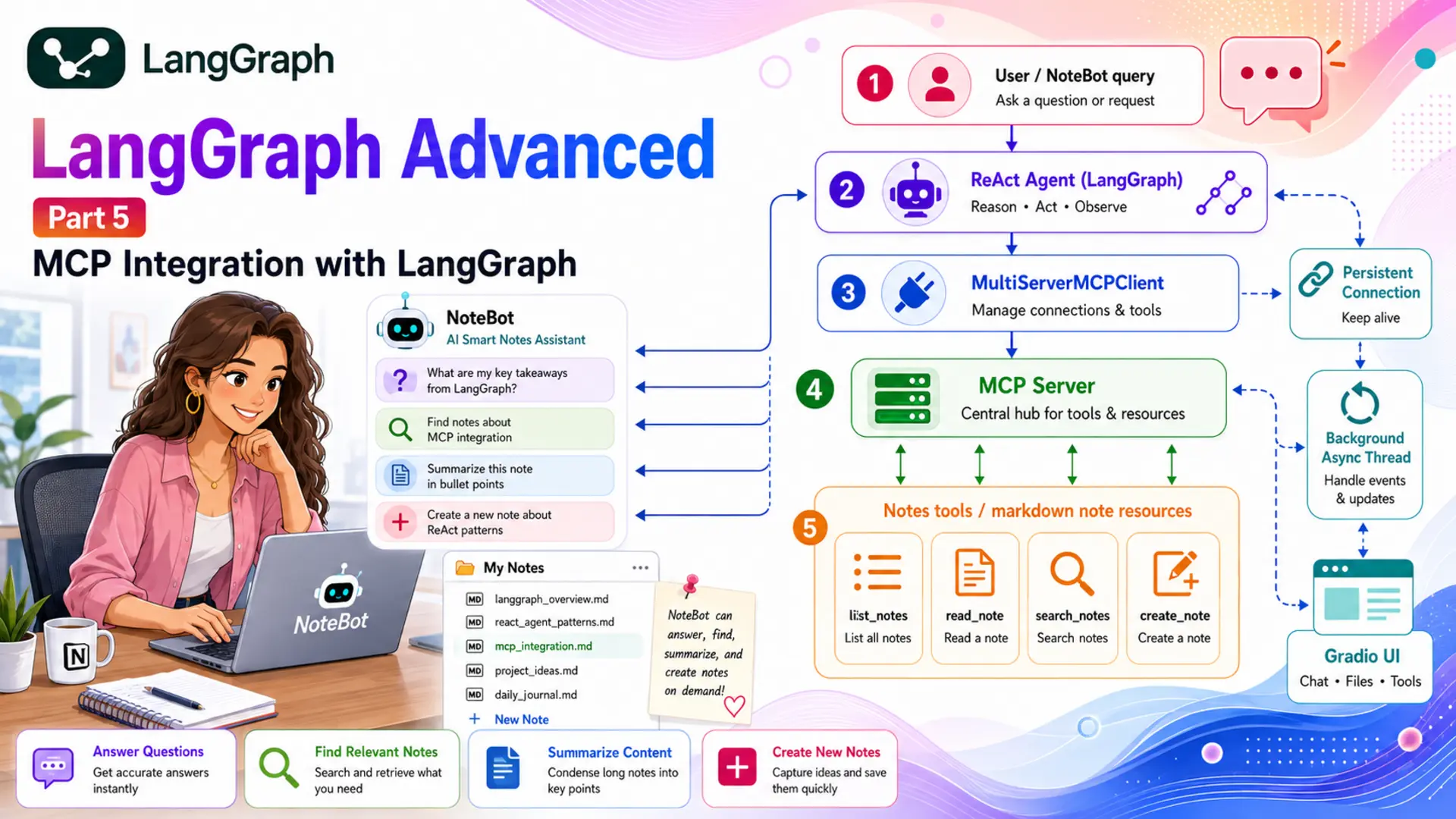
In this post, we build NoteBot — an AI Smart Notes Assistant. NoteBot connects to a Python MCP server that manages a folder of markdown notes and exposes four tools: list_notes, read_note, search_notes, and create_note. NoteBot uses those tools through a LangGraph ReAct agent to answer questions, find relevant notes, summarise content, and create new notes on demand.

🔌

MCP Server

A Python FastMCP server that exposes notes tools through a standardised protocol interface.

🔗

MultiServerMCPClient

Connects to one or more MCP servers and returns LangChain-compatible tool objects.

🤖

ReAct Agent

Built with create_react_agent — same loop as Part 4, tools now come from MCP.

🧵

Persistent Connection

Background asyncio thread keeps the MCP connection alive inside the Gradio web UI.


⚙️ 2. Installation & Setup

This project is part of the shared LangGraph series environment. All packages are installed once from a single requirements.txt at the root of the langgraph/ folder.

Python version:

python --version # Python 3.12.x

Create and activate a virtual environment:

# Create python -m venv langgraph # Activate — macOS / Linux source langgraph/bin/activate # Activate — Windows langgraph\Scripts\activate

Install dependencies — two new packages are added for MCP:

langchain==1.2.17 langgraph==1.1.10 langchain-google-genai==4.2.2 python-dotenv==1.2.2 gradio==6.14.0 chromadb==0.6.3 mcp==1.9.0 langchain-mcp-adapters==0.1.7
pip install -r requirements.txt
Two new packages: mcp is the official Python SDK for building MCP servers (provides FastMCP). langchain-mcp-adapters bridges those servers to LangChain/LangGraph by converting MCP tools into StructuredTool objects the agent can call.

Gemini API key — create a .env file in the langgraph/ folder:

GOOGLE_API_KEY=your_google_api_key_here GEMINI_MODEL_NAME=gemini-3-flash-preview GEMINI_TEMPERATURE=0.7 GEMINI_MAX_RETRIES=2

Get a free key at Google AI Studio. Never commit .env — it is already in .gitignore.

2.1

⚙️ Configuring the LLM

config.py reads the environment variables; llm.py wraps ChatGoogleGenerativeAI — identical to every other post in this series:

# config.py import os from dotenv import load_dotenv load_dotenv(dotenv_path=os.path.join(os.path.dirname(__file__), "..", ".env")) class Config: MODEL_NAME = os.getenv("GEMINI_MODEL_NAME", "gemini-3-flash-preview") TEMPERATURE = float(os.getenv("GEMINI_TEMPERATURE", 0.7)) MAX_RETRIES = int(os.getenv("GEMINI_MAX_RETRIES", 2))
# llm.py from langchain_google_genai import ChatGoogleGenerativeAI from config import Config class GeminiLLM: def __init__(self): self.llm = ChatGoogleGenerativeAI( model=Config.MODEL_NAME, temperature=Config.TEMPERATURE, max_retries=Config.MAX_RETRIES, ) def get_llm(self): return self.llm

🔌 3. What is MCP?

The Model Context Protocol (MCP) is an open standard published by Anthropic that defines how AI models connect to external tools and data sources. Think of it like a USB standard for AI: instead of every device needing a custom cable for every computer, you build to the standard once and everything just works together.

MCP has two sides: a server that exposes tools, resources, or prompts; and a client that connects to servers and calls their tools. The server and client communicate via a transport layer — the most common being stdio (subprocess pipes, for local servers) and SSE (HTTP server-sent events, for remote servers).

MCP vs custom tools: In previous posts, tools were Python classes or functions defined directly in the agent's codebase. With MCP, the tools live in a separate server process. The agent only knows the tool's name, description, and parameter schema — not the implementation. This means you can swap, update, or share the server without touching the agent.

Here's a side-by-side comparison of both approaches for the same tool:

AspectCustom BaseTool (Part 4)MCP Tool (Part 5)
Defined inAgent's Python codebaseSeparate MCP server process
SchemaPydantic BaseModel (args_schema)Auto-generated from type hints + docstring
Agent change needed?Yes — import new tool class, add to TOOLSNo — server exposes it; client discovers it
Reuse across agentsCopy the file / packageConnect any agent to the same MCP server
LanguageMust be PythonAny language (Python, Node.js, Go, …)

In this project, MultiServerMCPClient from langchain-mcp-adapters handles the connection. Instantiate it directly, then call await client.get_tools() to retrieve all tools from all connected servers as a flat list — those tools work exactly like any other LangChain tool.

from langchain_mcp_adapters.client import MultiServerMCPClient MCP_CONFIG = { "notes": { # server name (any string) "command": "python", # start command "args": ["-m", "mcp_server.notes_server"], "transport": "stdio", # communicate via subprocess pipes } } client = MultiServerMCPClient(MCP_CONFIG) tools = await client.get_tools() # list of StructuredTool objects print(tools) # [list_notes, read_note, search_notes, create_note]

The MCP_CONFIG dict maps server names to connection settings. With stdio transport, MultiServerMCPClient starts the server as a subprocess when you enter the context and terminates it when you exit. With sse transport, it connects to an already-running HTTP server instead.


📂 4. The Notes MCP Server

The MCP server lives in mcp_server/notes_server.py and uses FastMCP — a high-level Python helper that turns annotated functions into MCP tools with minimal boilerplate. The server manages a notes/ folder containing markdown files.

Project structure:

advanced-5-mcp-integration/ ├── config.py # Config — reads .env ├── llm.py # GeminiLLM wrapper ├── graph.py # NoteGraph — create_react_agent + MemorySaver ├── notebot_runner.py # Async console entry point ├── app.py # Gradio Blocks with background MCP thread ├── mcp_server/ │ ├── __init__.py # Package marker │ └── notes_server.py # FastMCP server — 4 notes tools ├── notes/ │ ├── langgraph_notes.md # Sample note — LangGraph concepts │ ├── python_tips.md # Sample note — Python async and OOP tips │ └── project_ideas.md # Sample note — AI project ideas ├── prompts/ │ └── system.txt # NoteBot persona + tool-use instructions └── figure/ # Auto-generated diagrams (git-ignored)

The full server is shown below — notice that there is no manual Pydantic schema, no BaseTool subclass, and no separate description file. FastMCP reads the function name, type hints, and docstring to generate the MCP tool schema automatically:

from pathlib import Path from mcp.server.fastmcp import FastMCP NOTES_DIR = Path(__file__).parent.parent / "notes" mcp = FastMCP("Notes MCP Server") @mcp.tool() def list_notes() -> str: """Return a newline-separated list of all note filenames.""" files = sorted(f.name for f in NOTES_DIR.glob("*.md") if f.is_file()) return "\n".join(files) if files else "No notes found." @mcp.tool() def read_note(filename: str) -> str: """Read and return the full content of a note. Args: filename: The name of the note file to read (e.g. 'python_tips.md'). """ path = NOTES_DIR / filename if not path.exists() or path.suffix != ".md": return f"Note '{filename}' not found." return path.read_text(encoding="utf-8") @mcp.tool() def search_notes(query: str) -> str: """Search all notes for lines containing the query text (case-insensitive). Args: query: The text to search for across all notes. """ results = [] for f in sorted(NOTES_DIR.glob("*.md")): matches = [ f" [{f.name}] {line.strip()}" for line in f.read_text(encoding="utf-8").splitlines() if query.lower() in line.lower() ] results.extend(matches) return "\n".join(results) if results else f"No matches found for '{query}'." @mcp.tool() def create_note(filename: str, content: str) -> str: """Create a new markdown note with the given content. Args: filename: Filename for the new note — '.md' is appended if missing. content: Full markdown content to write into the note. """ if not filename.endswith(".md"): filename += ".md" path = NOTES_DIR / filename path.write_text(content, encoding="utf-8") return f"Note '{filename}' created successfully ({len(content)} characters)." if __name__ == "__main__": mcp.run()
How @mcp.tool() generates the schema: The function name becomes the tool name (read_note). The first line of the docstring becomes the description. The Args: section in the docstring provides per-parameter descriptions. Python type hints (filename: str) determine the JSON schema types. The MCP client sends this schema to the LLM so it knows exactly how to call the tool.

The server is started as a subprocess by MultiServerMCPClient using the stdio transport — the agent communicates with it through standard input and output pipes. This means the server and agent run as separate processes but on the same machine, connected by the MCP protocol.


🔧 5. Building the Graph

Because the ReAct loop was already covered in detail in Advanced Part 4, this post uses create_react_agent — the prebuilt LangGraph helper that assembles the full agent-node → ToolNode → tools_condition pattern in one call. The main focus here is on where the tools come from: they are passed in as a parameter from the MCP client rather than imported from a local module.

NoteGraph takes tools and system_prompt as constructor arguments — both provided by the caller after the MCP connection is established:

import os from langgraph.checkpoint.memory import MemorySaver from langgraph.prebuilt import create_react_agent from llm import GeminiLLM FIGURE_DIR = os.path.join(os.path.dirname(__file__), "figure") class NoteGraph: def __init__(self, tools: list, system_prompt: str): self.tools = tools self.system_prompt = system_prompt self.compiled_graph = self._build() def _build(self): llm = GeminiLLM().get_llm() return create_react_agent( model=llm, tools=self.tools, prompt=self.system_prompt, checkpointer=MemorySaver(), ) def get_compiled_graph(self): return self.compiled_graph def save_figure(self): os.makedirs(FIGURE_DIR, exist_ok=True) mmd_path = os.path.join(FIGURE_DIR, "graph.mmd") with open(mmd_path, "w") as f: f.write(self.compiled_graph.get_graph().draw_mermaid()) png_path = os.path.join(FIGURE_DIR, "graph.png") with open(png_path, "wb") as f: f.write(self.compiled_graph.get_graph().draw_mermaid_png()) print(f" Graph saved → {mmd_path}") print(f" Graph saved → {png_path}")

Line by line:

  • tools: list — the StructuredTool objects returned by client.get_tools(). They behave identically to tools built with @tool or BaseTool.
  • prompt=self.system_prompt — a string that create_react_agent converts to a SystemMessage and prepends to every turn. NoteBot's persona and tool-use instructions live in prompts/system.txt.
  • checkpointer=MemorySaver() — enables conversation memory. Each thread_id gets its own isolated session history.
  • save_figure() — same pattern as all previous posts: saves the graph as graph.mmd and graph.png into figure/.
Why no state.py or nodes.py? create_react_agent builds the agent node, ToolNode, and tools_condition routing internally. There is no custom TypedDict state because the agent uses LangGraph's built-in messages state. When the main new concept is MCP (not the ReAct internals), the prebuilt shortcut keeps the code focused on what matters.

The resulting graph has the same structure as Advanced Part 4: START → agent → (tools → agent loop) → END. The difference is that the tools node executes MCP tools — functions running in a separate subprocess — rather than local Python methods.

5.1

📊 Graph Diagram

The compiled NoteBot graph — identical topology to Part 4's ReAct agent, but the tools node now dispatches MCP tool calls to the running notes_server subprocess instead of local Python methods.

flowchart TD S([__start__]) --> agent["🤖 agent\ncreate_react_agent"] agent -- "has tool_calls" --> tools["🔌 tools\nMCP ToolNode"] tools -- "returns ToolMessages" --> agent agent -- "no tool_calls" --> E([__end__]) style S fill:#e8f5e9,stroke:#43a047,color:#1b5e20 style E fill:#fce4ec,stroke:#e53935,color:#b71c1c style agent fill:#e3f2fd,stroke:#1e88e5,color:#0d47a1 style tools fill:#fff3e0,stroke:#fb8c00,color:#e65100

▶️ 6. Running the Demo

notebot_runner.py is an async module. The MCP client is created with MultiServerMCPClient(MCP_CONFIG) and tools are fetched with await client.get_tools() — no context manager needed in langchain-mcp-adapters ≥ 0.1.0. asyncio.run(main()) starts the event loop and keeps the client alive for the duration of the run.

import asyncio import os from langchain_core.messages import HumanMessage from langchain_mcp_adapters.client import MultiServerMCPClient from graph import NoteGraph MCP_CONFIG = { "notes": { "command": "python", "args": ["-m", "mcp_server.notes_server"], "transport": "stdio", } } _PROMPTS_DIR = os.path.join(os.path.dirname(__file__), "prompts") def _load_prompt(filename: str) -> str: with open(os.path.join(_PROMPTS_DIR, filename), "r") as f: return f.read().strip() def _extract_text(content) -> str: if isinstance(content, list): return "".join( b.get("text", "") for b in content if isinstance(b, dict) and b.get("type") == "text" ) return str(content) class NoteBotRunner: def __init__(self, app): self.app = app def _config(self, thread_id: str) -> dict: return {"configurable": {"thread_id": thread_id}} async def chat(self, message: str, thread_id: str) -> str: result = await self.app.ainvoke( {"messages": [HumanMessage(content=message)]}, config=self._config(thread_id), ) ai_messages = [ m for m in result["messages"] if m.type == "ai" and not getattr(m, "tool_calls", []) ] if not ai_messages: return "I'm sorry, I couldn't generate a response. Please try again." return _extract_text(ai_messages[-1].content) async def main(): print("=" * 60) print(" LangGraph Advanced — AI Smart Notes Assistant Demo") print("=" * 60) client = MultiServerMCPClient(MCP_CONFIG) tools = await client.get_tools() system_prompt = _load_prompt("system.txt") graph = NoteGraph(tools, system_prompt) runner = NoteBotRunner(graph.get_compiled_graph()) print("\n Saving graph architecture...") graph.save_figure() # run demos ... if __name__ == "__main__": asyncio.run(main())

The filter not getattr(m, "tool_calls", []) skips intermediate AIMessages that contain tool requests — only the last message with plain text content is returned as the answer.

cd advanced-5-mcp-integration && python notebot_runner.py

Expected console output:

============================================================ LangGraph Advanced — AI Smart Notes Assistant Demo ============================================================ Saving graph architecture... Graph saved → /path/to/figure/graph.mmd Graph saved → /path/to/figure/graph.png ──────────────────────────────────────────────────────────── Demo 1: List available notes ──────────────────────────────────────────────────────────── 🙋 User: What notes do I have in my collection? 🤖 NoteBot: You have 3 notes in your collection: • langgraph_notes.md • python_tips.md • project_ideas.md Would you like me to read or summarise any of them? ──────────────────────────────────────────────────────────── Demo 2: Read and summarise a note ──────────────────────────────────────────────────────────── 🙋 User: Summarise my LangGraph notes for me. 🤖 NoteBot: Here's a summary of your LangGraph notes: **Core primitives:** StateGraph, State (TypedDict), Nodes (callables returning partial state updates), Edges (static or conditional), and Checkpointers (MemorySaver for RAM, SqliteSaver for disk persistence). **ReAct pattern:** START → agent ←→ tools → END. The agent node uses bind_tools(); ToolNode executes calls; tools_condition routes based on whether the last message contains tool_calls. **Advanced patterns covered:** Supervisor multi-agent, RAG with conditional routing, Human-in-the-Loop with interrupt(), Subgraphs, and MCP integration using MultiServerMCPClient and create_react_agent. ──────────────────────────────────────────────────────────── Demo 3: Search across notes ──────────────────────────────────────────────────────────── 🙋 User: Which of my notes mention Python? 🤖 NoteBot: I found Python-related content in 2 notes: • **python_tips.md** — multiple sections on async programming, type hints, and OOP conventions. • **langgraph_notes.md** — Python import examples for LangGraph and LangChain MCP adapters. • **project_ideas.md** — mentions Python briefly in the MCP server ideas. ──────────────────────────────────────────────────────────── Demo 4: Create a new note ──────────────────────────────────────────────────────────── 🙋 User: Create a note called 'mcp_summary.md' that explains what the Model Context Protocol is and why it matters for AI agents. 🤖 NoteBot: Done! I've created 'mcp_summary.md' with a structured overview of the Model Context Protocol. The note covers what MCP is, how it differs from custom tool wrappers, the client-server architecture, supported transports (stdio and SSE), and why protocol-level standardisation matters for building reusable, language-agnostic AI tools. ============================================================

🌐 7. Gradio Web UI

The Gradio app has one challenge the console runner doesn't: MultiServerMCPClient must stay alive across all requests, but Gradio's request handler is called from a synchronous thread. Calling asyncio.run() inside a Gradio handler fails if an event loop is already running — and creating a new client per request would kill and restart the MCP server subprocess on every message.

The solution is a persistent background event loop. At startup, a daemon thread is started that owns a dedicated asyncio event loop. That thread instantiates MultiServerMCPClient(MCP_CONFIG), fetches tools, builds the graph, then suspends at await asyncio.Future() — keeping the client alive indefinitely. Gradio request handlers submit coroutines into that loop using asyncio.run_coroutine_threadsafe().

import asyncio import os import threading import uuid import gradio as gr from langchain_core.messages import HumanMessage from langchain_mcp_adapters.client import MultiServerMCPClient from graph import NoteGraph MCP_CONFIG = { "notes": { "command": "python", "args": ["-m", "mcp_server.notes_server"], "transport": "stdio", } } class NoteBotApp: def __init__(self): self._app = None self._loop = asyncio.new_event_loop() self._ready = threading.Event() t = threading.Thread(target=self._run_loop, daemon=True) t.start() self._ready.wait() # block until MCP tools are loaded and graph is built def _run_loop(self): asyncio.set_event_loop(self._loop) self._loop.run_until_complete(self._setup_and_hold()) async def _setup_and_hold(self): self._client = MultiServerMCPClient(MCP_CONFIG) tools = await self._client.get_tools() system_prompt = _load_prompt("system.txt") self._app = NoteGraph(tools, system_prompt).get_compiled_graph() self._ready.set() await asyncio.Future() # keep the event loop (and MCP client) alive indefinitely async def _chat(self, message: str, thread_id: str) -> str: config = {"configurable": {"thread_id": thread_id}} result = await self._app.ainvoke( {"messages": [HumanMessage(content=message)]}, config=config ) ai_msgs = [ m for m in result["messages"] if m.type == "ai" and not getattr(m, "tool_calls", []) ] if not ai_msgs: return "I'm sorry, I couldn't generate a response. Please try again." return _extract_text(ai_msgs[-1].content) def respond(self, message: str, _history: list, thread_id: str): if not message.strip(): yield "" return future = asyncio.run_coroutine_threadsafe( self._chat(message, thread_id), self._loop ) yield future.result(timeout=120) def launch(self): with gr.Blocks(title="📝 NoteBot — AI Smart Notes Assistant") as demo: thread_state = gr.State(value=str(uuid.uuid4())) chat = gr.ChatInterface( fn=self.respond, title="📝 NoteBot — AI Smart Notes Assistant", description=( "Ask NoteBot to list, read, search, or create your markdown notes. " "NoteBot connects to a live MCP server that manages your notes folder." ), additional_inputs=[thread_state], ) gr.ClearButton( [chat.chatbot, chat.textbox], value="🔄 New Session", variant="primary", ).click( fn=lambda: str(uuid.uuid4()), outputs=[thread_state], ) demo.launch(css=".gradio-container { max-width: 860px !important; margin: auto; }") if __name__ == "__main__": NoteBotApp().launch()
How the background thread pattern works:
  1. asyncio.new_event_loop() creates a loop not yet attached to any thread.
  2. A daemon thread calls loop.run_until_complete(_setup_and_hold()) — this thread now owns the loop.
  3. _setup_and_hold() builds the graph, sets the threading.Event, then suspends at await asyncio.Future() — the MCP connection stays open.
  4. The main thread unblocks at self._ready.wait() and Gradio starts.
  5. asyncio.run_coroutine_threadsafe(coro, loop) safely submits each chat coroutine to the background loop and blocks the Gradio thread until the result is ready.
cd advanced-5-mcp-integration && python app.py

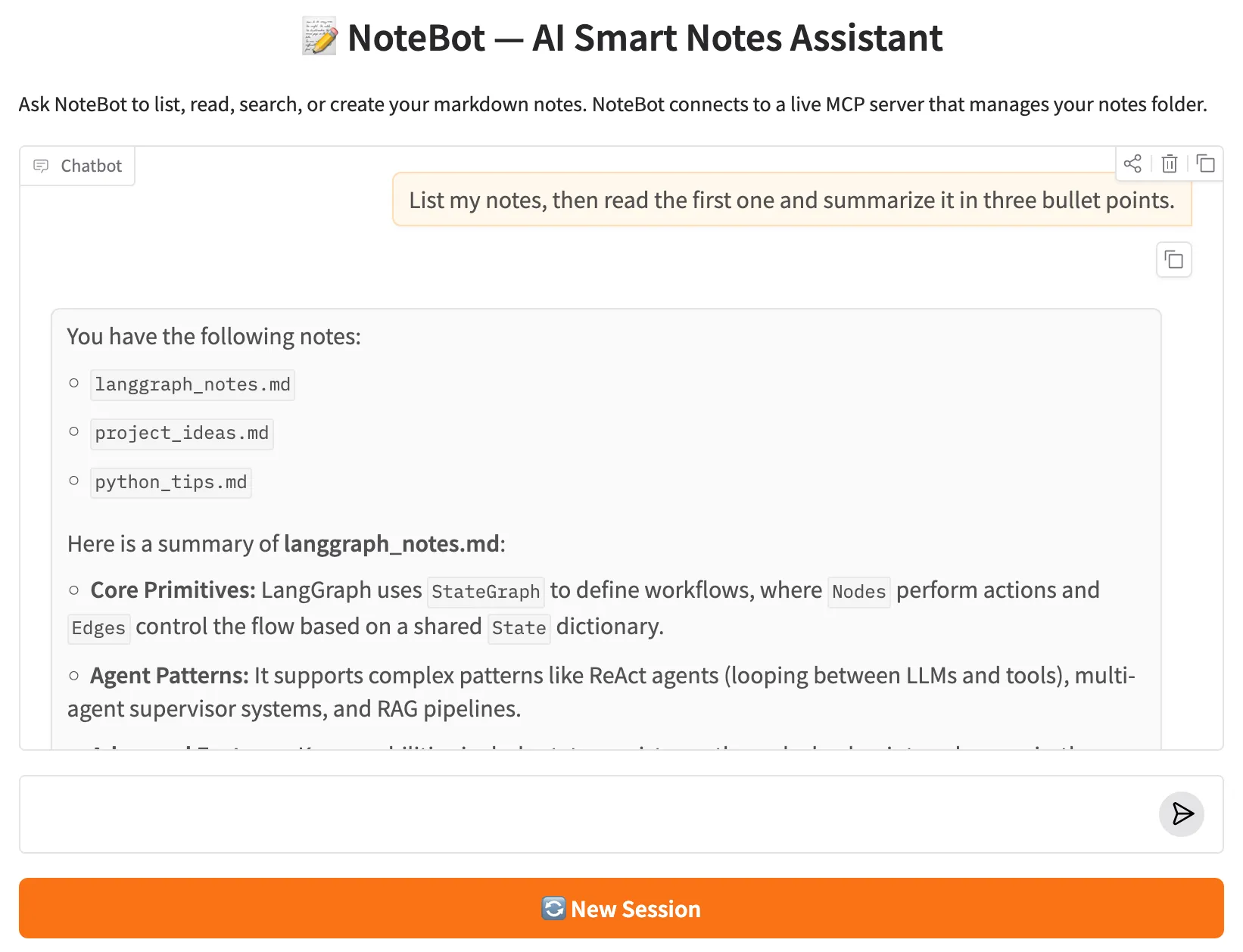
The web UI starts at http://127.0.0.1:7860. Within a session, NoteBot remembers previous context — ask "What notes do I have?", then follow up with "Read the project ideas one" and it will remember which note you were discussing. The "New Session" button resets the conversation thread without restarting the MCP server.
NoteBot Gradio web UI

NoteBot web UI — asking about notes triggers the appropriate MCP tool and returns grounded answers.

Extending NoteBot with more servers: Adding a second MCP server (e.g. a calendar server) is a single dict entry in MCP_CONFIG. client.get_tools() returns tools from all connected servers in one flat list. The graph, agent node, and Gradio app require zero changes.
7.1

💡 What to Try

Each query exercises one of the four MCP tools. Try them in sequence within the same session — NoteBot remembers context across follow-up messages:

list_notes "What notes do I have?"
Triggers list_notes. Returns all .md filenames in the notes folder so you can see what's available at a glance.
read_note "Read my meeting-notes.md file."
Triggers read_note. NoteBot fetches the full content of the specified file and displays it in the chat.
search_notes "Search my notes for anything related to LangGraph."
Triggers search_notes. Scans all notes for the keyword and returns matching filenames and excerpts.
create_note "Create a note called mcp-summary.md with a brief summary of what MCP is."
Triggers create_note. NoteBot writes a new markdown file to the notes folder. You can then read it back to verify.
Multi-step "List my notes, then read the first one and summarise it in three bullet points."
Triggers list_notes then read_note in sequence. Watch the agent reason across two MCP tool calls before producing its final answer.

✅ 8. Conclusion

In this post you built NoteBot — an AI Smart Notes Assistant that connects a LangGraph ReAct agent to a live MCP server over the Model Context Protocol. Instead of defining tools inside the agent's codebase, NoteBot discovers them at runtime from a running subprocess, calls them through the standardised MCP protocol, and returns grounded answers drawn directly from real file contents.

This is the architecture shift MCP enables: the agent doesn't need to know how a tool works — only its name, description, and parameter schema. You can update, replace, or add servers without touching the agent code. That separation is what makes MCP a meaningful step beyond hand-crafted BaseTool subclasses.

Five key takeaways from this post:

  • MCP separates tool implementation from tool consumption. The server owns the logic; the agent only sees the schema. Update one without touching the other.
  • FastMCP generates schemas automatically. Function name → tool name. First docstring line → description. Type hints → JSON schema. No Pydantic classes or manual registration needed.
  • MultiServerMCPClient is the bridge. Instantiate it with a server config dict, call await client.get_tools(), and get a flat list of LangChain-compatible tool objects — ready to pass directly to create_react_agent.
  • Background asyncio thread solves the sync/async boundary. A daemon thread owns the event loop and keeps the MCP subprocess alive. Gradio handlers submit coroutines with run_coroutine_threadsafe() — no new subprocess per request.
  • create_react_agent is the right shortcut here. When the graph topology is standard (agent ⟷ tools loop), the prebuilt helper keeps the code focused on what's actually new — the MCP integration — rather than rewiring a graph you've already built.
🎉 LangGraph Advanced series complete! This is Part 5 of 5. Here's what the full series covered:
  • Part 1 — Bounded Memory Window: managing conversation history with RemoveMessage and a summary node.
  • Part 2 — Multi-Agent Supervisor: routing queries to specialist agents with structured-output LLM decisions.
  • Part 3 — RAG with Conditional Routing: retrieve → grade → rewrite → generate loop with a fallback path.
  • Part 4 — ReAct Agent with Tool Calling: manual ReAct loop using production-grade BaseTool subclasses.
  • Part 5 — MCP Integration (this post): connecting a LangGraph agent to external tools via the Model Context Protocol.

🛠️ Tech Stacks Used

Python Python 3.12
LangGraph LangGraph
LangChain LangChain
Google Gemini Google Gemini
MCP MCP

Gradio Gradio
Download

Source Code

Full project — NoteBot source code, MCP server, sample notes, and system prompt.

View on GitHub

📚 References